4. Description of parts
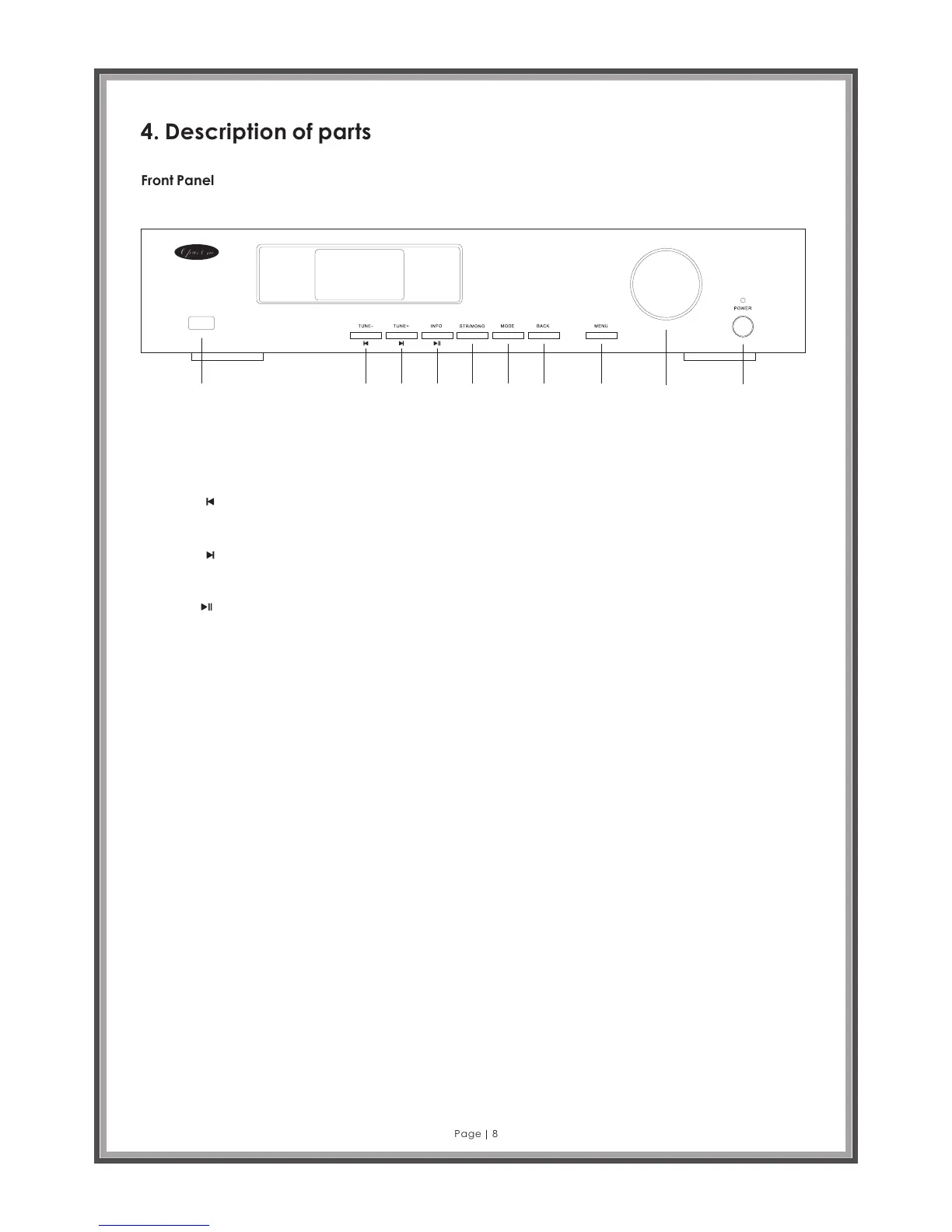
Front Panel
Page 8
1 2 3 4 5 6 7 8 9 10
A 2696 Digi ta l (D AB +) I nt er ne t FM Tuner
1. USB Port - Connect mass storage media like flash drives or Hard Drives. Not suitable for keyboards, mouse, and
some MP3 players not supported.
2. TUNE - / : When operating mode is FM Radio press to auto scan for previous station.
When operating mode is Music Player, press to skip to previous track.
3. TUNE + / : When operating mode is FM Radio press to auto scan for next station.
When operating mode is Music Player press to skip to next track.
4. INFO / : When operating mode is FM Radio or DAB Radio press to see RDS / DLS information on the current
station.
When operating mode is Music Player press to play, press again to pause.
5. STR / MONO: When operating in FM Radio mode use this button to switch between mono and stereo reception.
NOTE: Some stations may be MONO only FM broadcasts.
6. MODE: Change operating mode. Press to select modes either DAB+ Radio, FM Radio, Internet Radio or Music
Player.
7. BACK: Press to go to Previous Menu screen. (This function is available from the Remote Control, but the BACK
button is not included)
8. MENU: Press to go to Menu screen.
9. Jogwheel: This acts as a volume control, station selector or Menu function selector. Turn left or right to scroll
through menu items. Press to confirm the selection.
10. POWER: Press to switch the unit on or off.



 To Next Page