Remote Control Handset
Page 9
1
2
3
4
5
6
7
8
9
10
11
12
13
14
15
16
17
18
19
20
21
22
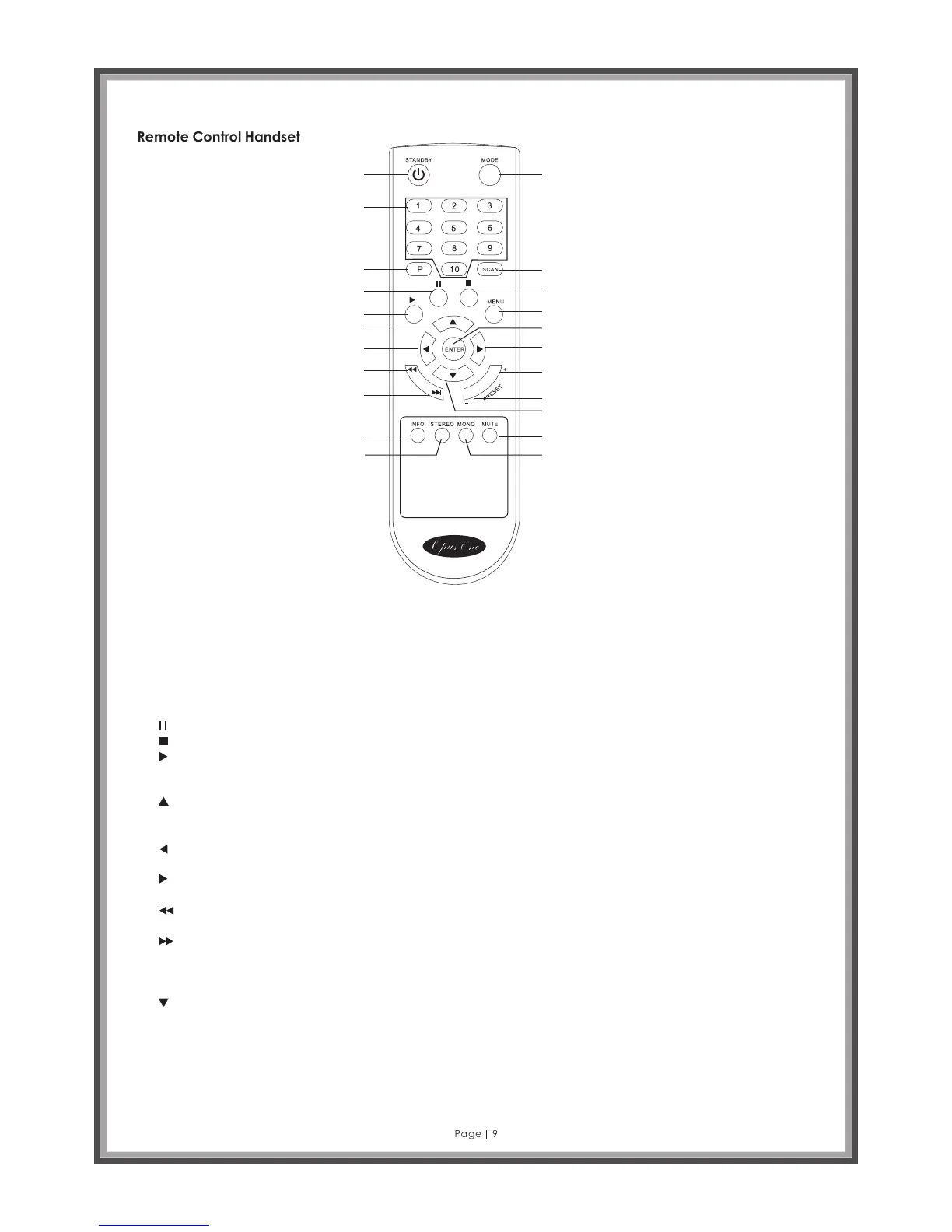
1. STANDBY: Press to turn unit on or off.
2. MODE: Press to select one mode within DAB, FM, Internet radio, Media player, USB.
3. Numbers (1-10): In FM or DAB modes, press and hold the number buttons to save station or frequency to a preset. Or press a
button to select a stored station.
4. P: Press to browse preset station list. Use up/down arrow keys to highlight a station in the list, and press ENTER to select your
preferred station.
5. SCAN: Press to auto search for stations in FM or DAB+ modes. In DAB mode, the scan function will capture all available
stations and keep them in memory to be selected at will, or chosen as favourites in the presets list.
6. : PAUSE – Press to pause playback of track in Media Player mode. Also acts as a menu control.
7. : STOP –End all playback
8. : PLAY - Press to start playback of track in Media Player mode. Also acts as a menu control.
9. MENU: Press to go to menu list. Allows a user to change a range of parameters and control each mode of operation for the
A2696.
10. : When play mode is FM, press up to change frequency by 0.05 MHz steps. When in MENU screen, press to go up the list of
settings to highlight and change. This cursor can also be used for character input.
11. ENTER – OK or confirm button.
12. : Left move – When in MENU screen, press to go back to PREVIOUS menu screen or cancel an action. This cursor can also
be used for character input.
13. : Right move - When in MENU screen, press to go forward to NEXT menu selection screen. This cursor can also be used for
character input.
14. : When play mode is media player, press to skip to PREVIOUS track. When operation mode is tuner, press to auto scan for
previous stations.
15. : When play mode is media player, press to skip to NEXT track. When play mode is tuner, press to auto scan for next
stations.
16. PRESET+: press to go to next preset station.
17. PRESET-: Press to go to previous preset station.
18. : When play mode is FM, press down to change frequency by 0.05 MHz steps. When in MENU screen, press to go down the
list of settings to change. This cursor can also be used for character input.
19. INFO: Information about current stations or tracks
20. STEREO: When in FM mode, press to change from mono to stereo reception (works only where station is broadcasting in
stereo. Some low-power FM station broadcast in mono only!)
21. MUTE – Press to turn audio volume off and on again.
22. MONO: When in FM mode, cancels STEREO command.



 To Next Page