Call Out Description
2 Slide rail latching bracket release tab (labeled PUSH)
b. Use your right hand to support the CMA and use your left thumb to push in (toward the
left) on the slide rail latching bracket release tab labeled PUSH (callout 2), and pull the
latching bracket out of the left slide rail and put it aside [3 and 4].
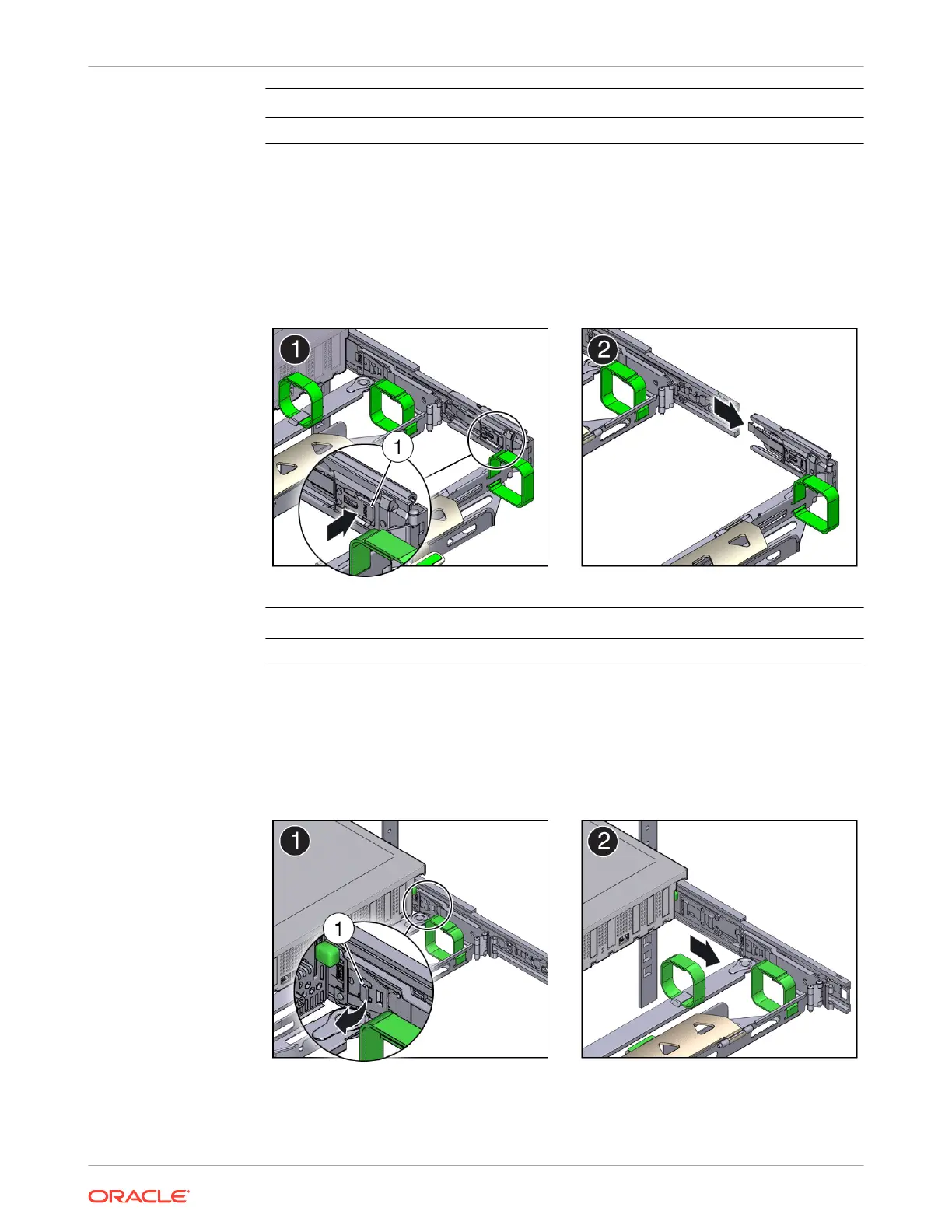
4. To disconnect connector C:
a. Place your left arm under the CMA to support it.
b. Use your right thumb to push in (toward the right) on the connector C release tab
labeled PUSH (callout 1), and pull connector C out of the right slide rail [1 and 2].
Call Out Description
1 Connector C release tab (labeled PUSH)
5. To disconnect connector B:
a. Place your right arm under the CMA to support it and grasp the back end of connector
B with your right hand.
b. Use your left thumb to pull the connector B release lever to the left, away from the right
slide rail (callout 1), and use your right hand to pull the connector out of the slide rail [1
and 2].
Chapter 4
Replacing the Cable Management Arm
4-20















 To Next Page