30
ELECTRICAL PARTS
1 Engine Temperature Display Data Item ・Engine Temperature・by meter and value.
2 Engine Speed Display Data Item ・Engine Speed・by meter and value.
3 Intake Air Temperature Display Data Item ・Intake Air Temperature・by meter and value.
4 Selected Data Item Display selected Data Item by value.
5 [Toolbar] View Setting button Show Select Data Item dialog to select 8 Data Items.
6 [Toolbar] Print button Print a screen image.
7 [Toolbar] Unit Switch button Switch unit mode.
8 When this screen is displayed When the ECU is not connected, the ECU connection will be
started. If failed to connect to the ECU, the message 7 will
be shown(See ・-・Message List).
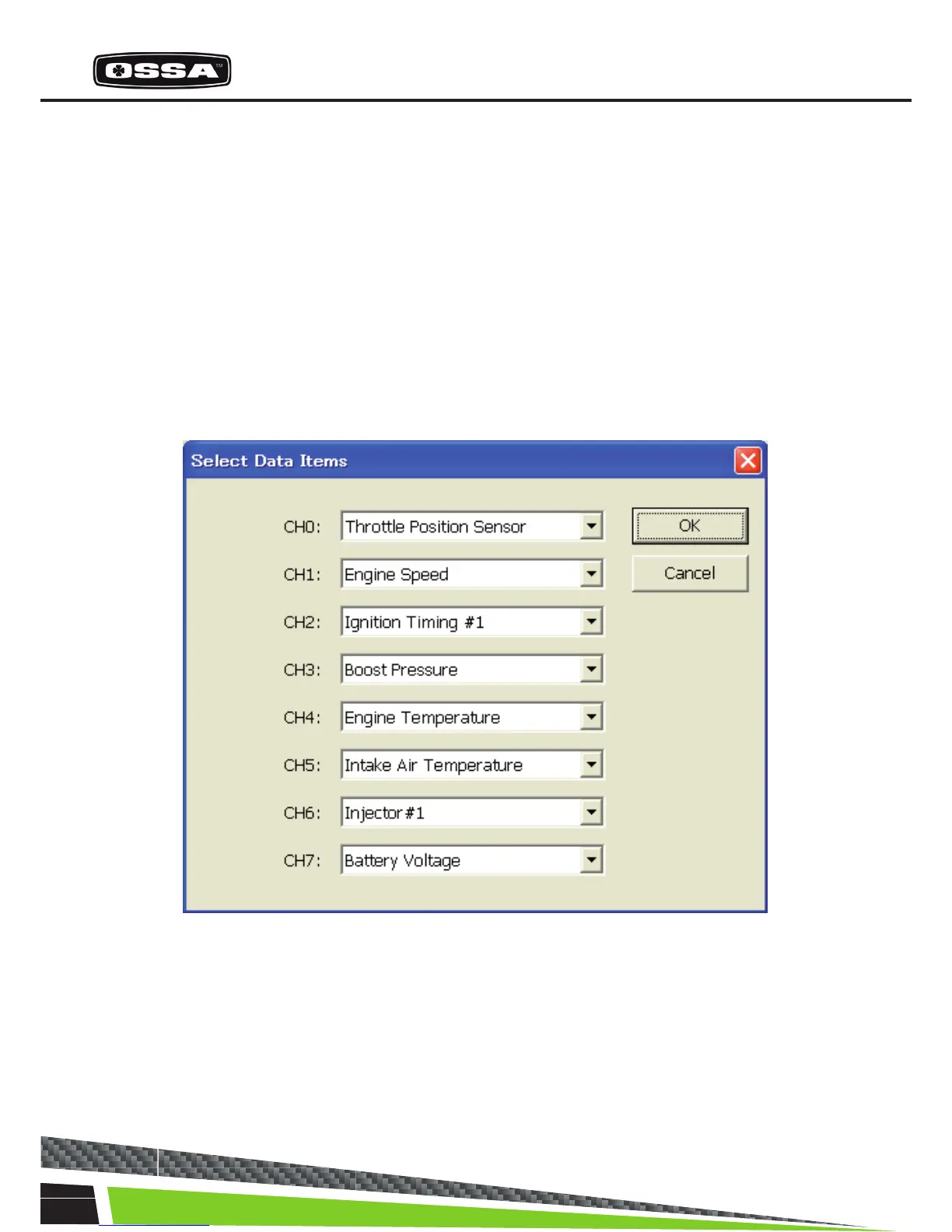
SELECT DATA ITEMS
This dialog is to select 8 Data Items.
Figure 4 Select Data Items Dialog
1 CH0 - CH7 combo box Select a Data Item from list. The list is created when this dialog is
created.
2 [OK] button Save selection of Data Items and close this dialog.
3 [Cancel] button Cancel selection of Data Items and close this dialog.



 To Next Page