29
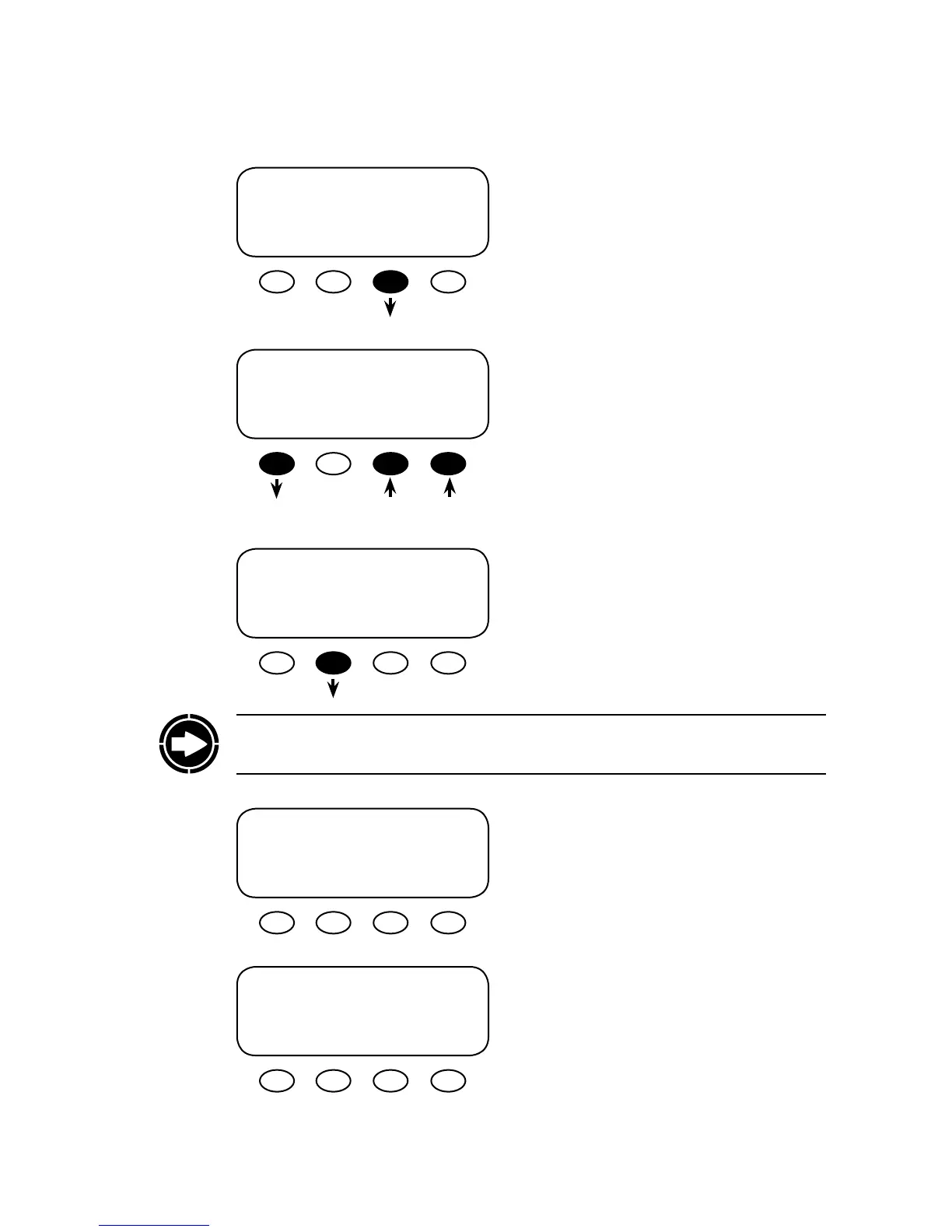
Press the <PC> so key to enable or disable the
MATE’s RS232 communications port.
In the PC communications screen, choose ON or
OFF by pressing the respective so key. Press the
<BACK> so key to return to the choose category
screen.
Press the <REPOLL> so key aer a device is
added to, moved, or removed from the HUB.
e MATE has found the HUB and will automati-
cally go to the Port Assignment screen.
Aer displaying the devices connected to each
Port, the MATE returns to the choose category
screen on its own.
SETUP/MATE/PAGE2--------------
PC communications: OFF
BACK OFF ON
SETUP/MATE/PAGE2--------------
choose category:
BACK REPOLL PC DEBUG
SETUP/MATE/PAGE2--------------
choose category:
BACK REPOLL PC DEBUG
Searching for Devices
HUB Found
Port Assignment
1> FX 2> FX 3> CC 4> CC
5> 6> 7> 8>
9> 10> 2M>
NOTE: Disconnecting the MATE’s CAT5 cable and then reconnecting it also performs the
re-poll task, but the cable can be inconvenient to remove from a mounted MATE.


 To Next Page