Form PA102.20-N1
53
Installation & Assembly Manual │ PACESECTION 3 - HANDLING, STORAGE, AND INSTALLATION
Issue Date: 07/03/2018
3
Installing a Multi-Cell SBM Double
Headered (DH) Filter
Use the following instructions to install a Multi-Cell
SBM double header (DH) filter (nominal 12 in.) into a
16 g galvanized holding frame with four latches (P/N
026-35788-612), as shown in Figure 72 on page 48.
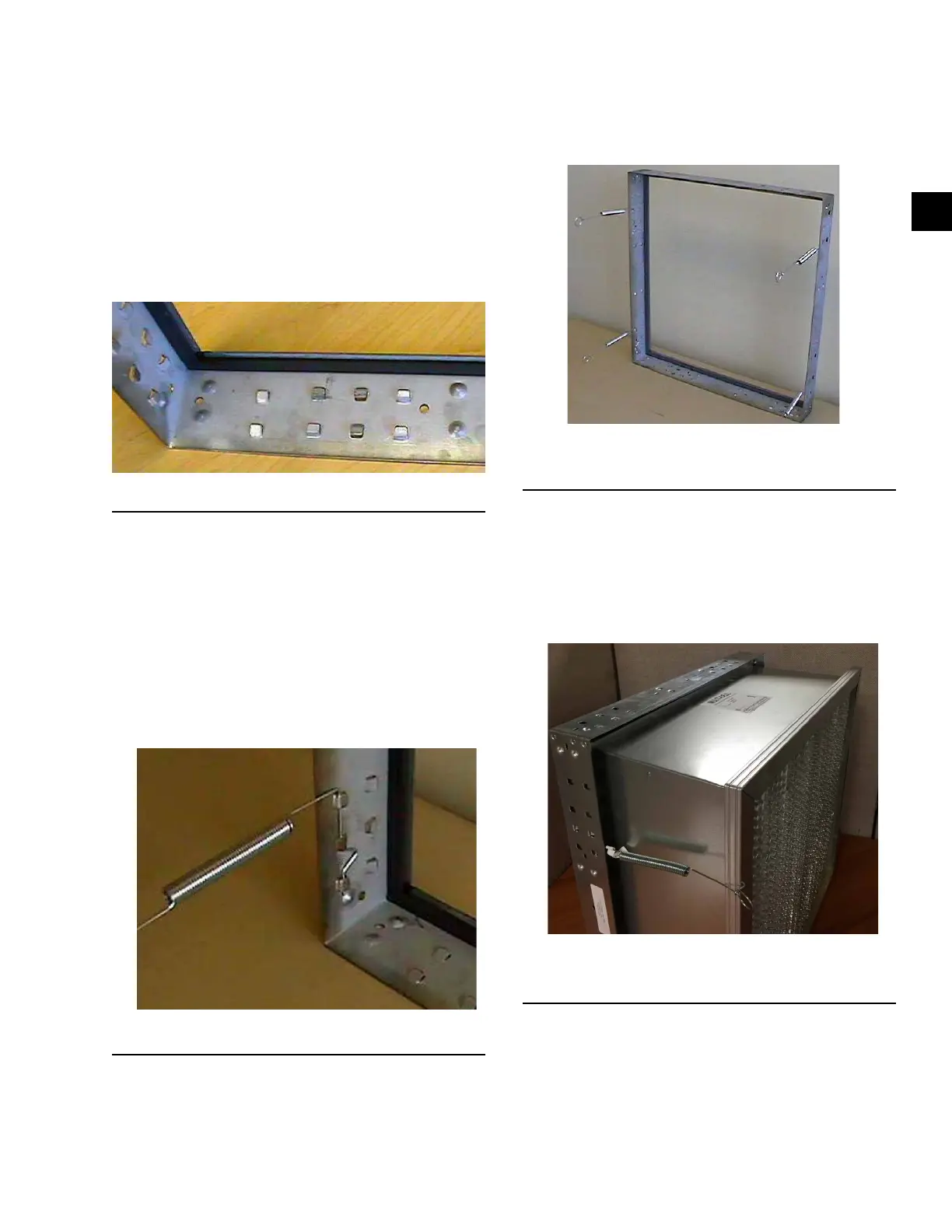
1. Install the two latches on each side of the frame.
not on the top or bottom. Refer to the sets of
knockouts in Figure 80 on page 53 that should
be used for the latches.
LD10150
Figure 80 - Correct use of Knockouts
2. Insert the straight end of the latch between the
two knockouts furthest from the corner.
3. Using a moderate amount of pressure, force the
latch over the third knockout.
4. The latch installation should be complete. The
latch should now be trapped within the three
knockouts.
5. Repeat the steps with the remaining latches. Note
the orientation of the latch to the knockouts as
shown in Figure 81 on page 53.
LD10154
Figure 81 - Correct Latchout/Knockout Configuration
6. After the latches are installed, the frame should be
congured as shown in Figure 82 on page 53,
which shows there are two latches per side, none
on the top or bottom.
LD10183
Figure 82 - Frame with Four Latches Installed on the
Sides
7. Insert the Multi-Cell SBM DH lter into the frame.
While holding the lter in the frame, grasp the loop
on the end of the latch, and pull it until it stretch-
es over the header, and rests into the pre-drilled
hole in the header as shown in Figure 83 on page
53.
8. Repeat this step with the remaining latches.
LD10184
Figure 83 - Spring Latch Pulled and Fastened in Filter
Hole
9. The lter should now be securely installed into the
frame.


 To Next Page