Configuration
3.6 Setting of User Connection
3.6.1 List of Setting Items
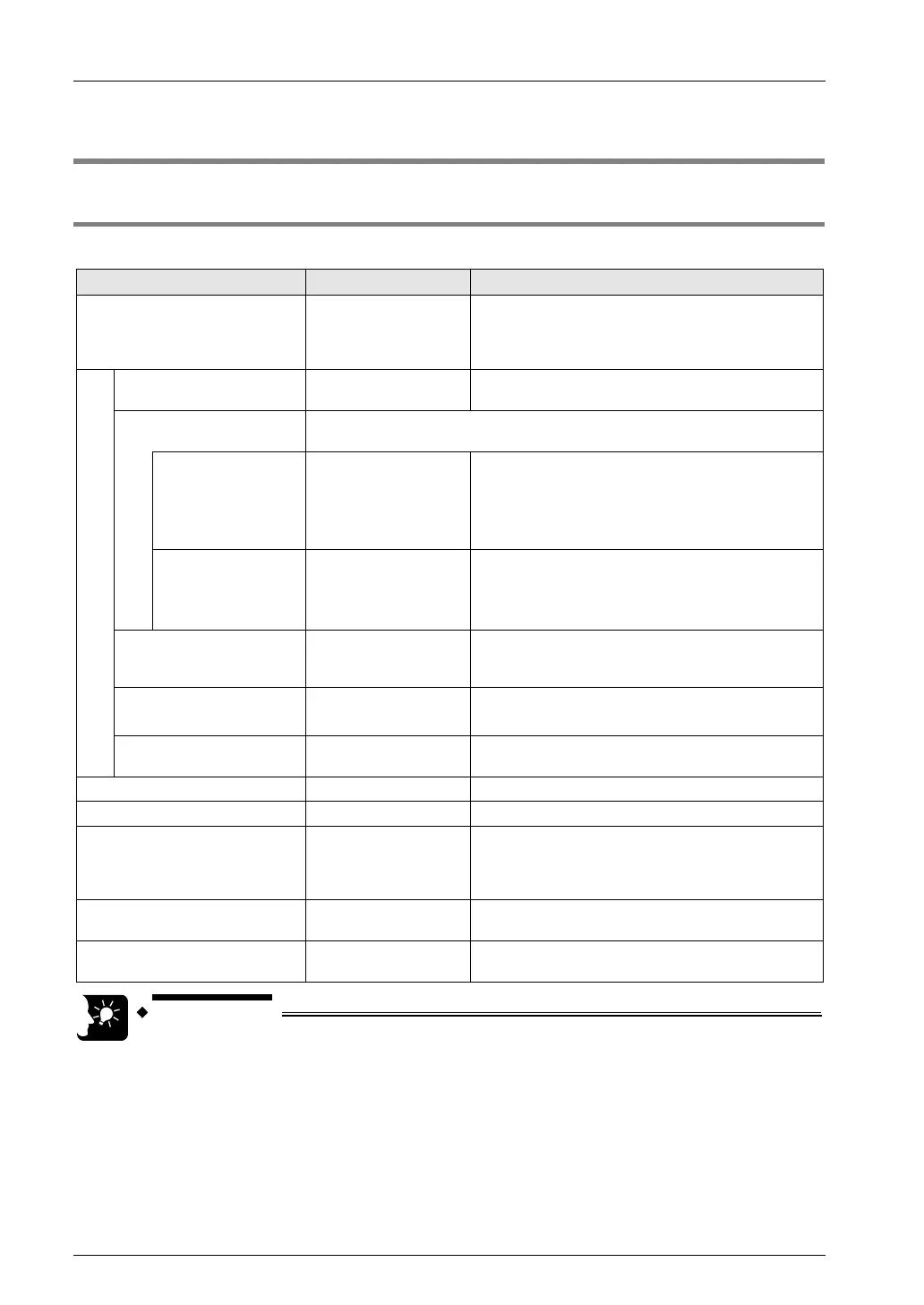
List of setting items
Setting item Default Setting method
Operation Mode Setting MEWTOCOL-COM
Select an operating mode (MEWTOCOL-COM /
MEWTOCOL-COM7 / MODBUS-TCP /
MEWTOCOL-DAT / general-purpose
communication).
Setting of application use
Specifying use of
connection
Not use Specify whether each connection is to be used.
MEWTOCOL
communication type
Conditions to be selected vary by the selected operation mode.
MEWTOCOL-DAT
MEWTOCOL-COM
is selected
Not connect to FP2
ET-LAN
Not connect to FP2 ET-LAN / Connect to FP2 ET-
LAN
When communication is to be performed with the
FP2 ET-LAN unit, select " Connect to FP2 ET-
LAN".
When selecting
general-purpose
communication
Attach a dedicated
header
Attach / Do not attach a dedicated header
When communication is to be performed with the
FP2 ET-LAN unit, select "Do not attach a dedicated
header".
Open method
(server/client)
Client connection
Select connection function settings (server
connection (unspecified partner) / server
connection (specified partner) / client connection).
Open method
(auto/manual)
Auto OPEN
Select the connection open method (auto/manual).
Select "Auto OPEN".
Communication method TCP/IP
Select the communication protocol (TCP IP / UDP
IP).
Source node port No. 0 Specify the source node (sender) port number.
Partner node port No. 0 Specify the partner node (receiver) port number.
Unused connection closing time 0
Input the no-connection communication monitoring
time. Connection is automatically cut off when no-
connection communication exceeds the specified
time.
Partner node - Setting method
Specification using IP
address (IPv4)
Select the setting for partner node (IP address /
host name).
Partner node IP address and
name
0.0.0.0
Specify the setting for partner node (IP address /
host name).
• Select a desired operation mode.
• When client settings are used, select "Use in the connection settings" only
for the connection to be used. When "Use in the connection settings" is
selected, and if connection is failed, it is regarded as a communication error.
3-10



 To Next Page