32
VQT3K06
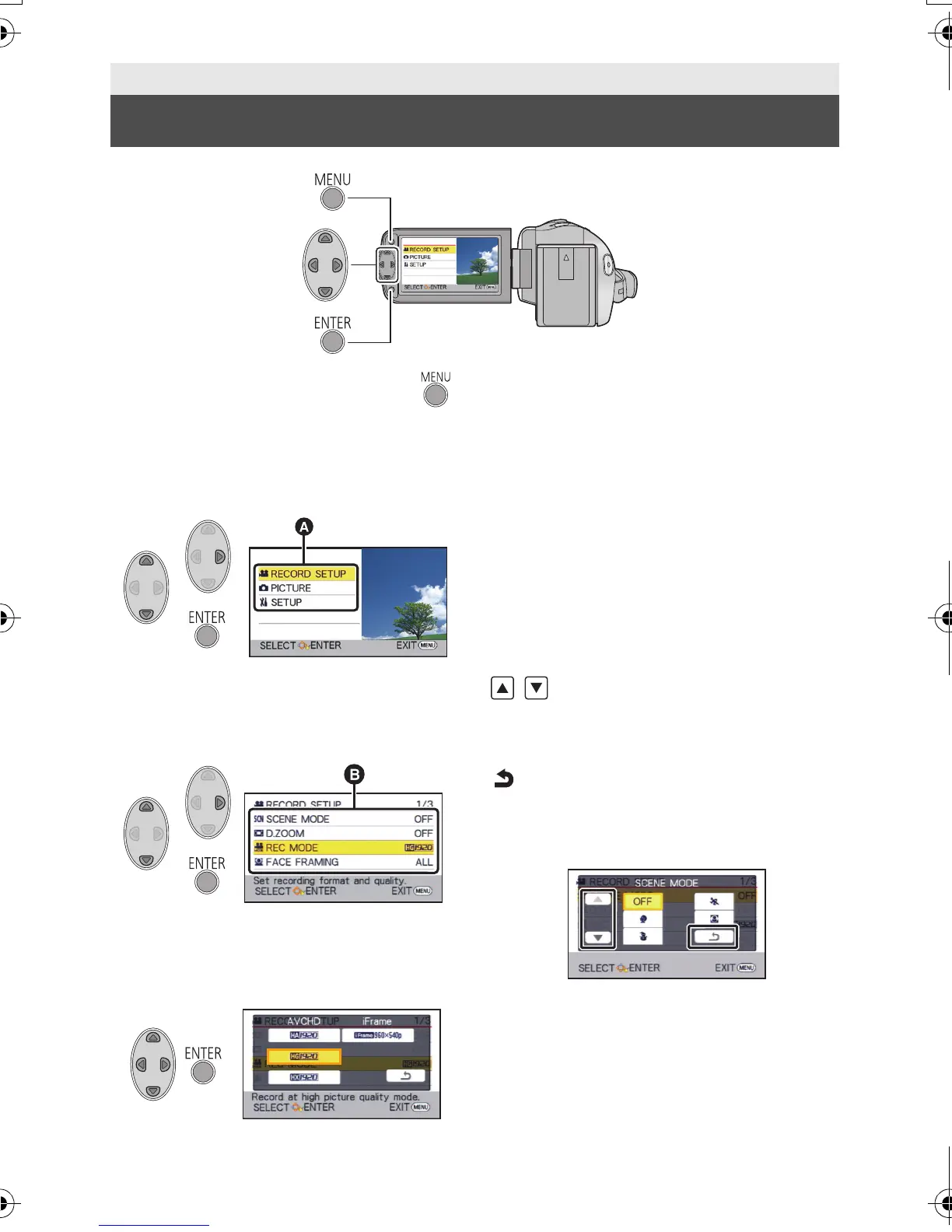
1 Press the MENU button.
2 Select the top menu A using
3/4 and press 1 or press the
ENTER button.
3 Select the submenu B using
3/4 and press 1 or press the
ENTER button.
4 Select the desired item using
3/4/2/1, and press the
ENTER button to set.
To get back to the previous screen
Press 2 of the cursor button.
To exit the menu screen
Press the MENU button.
∫ About the information display
Descriptions of the selected submenus and
items displayed in steps 3 and 4, and
messages to confirm settings are displayed.
∫ About the operation icons
/:
Select and then press the ENTER button
to switch the menu and thumbnail
display page.
:
Select and then press the ENTER button
to return to the previous screen in cases
such as menu setting, etc.
Basic
Using the menu screen
HDC-SD40&TM40EB-VQT3K06_mst.book 32 ページ 2011年2月8日 火曜日 午後6時8分















 To Next Page