42
VQT3K06
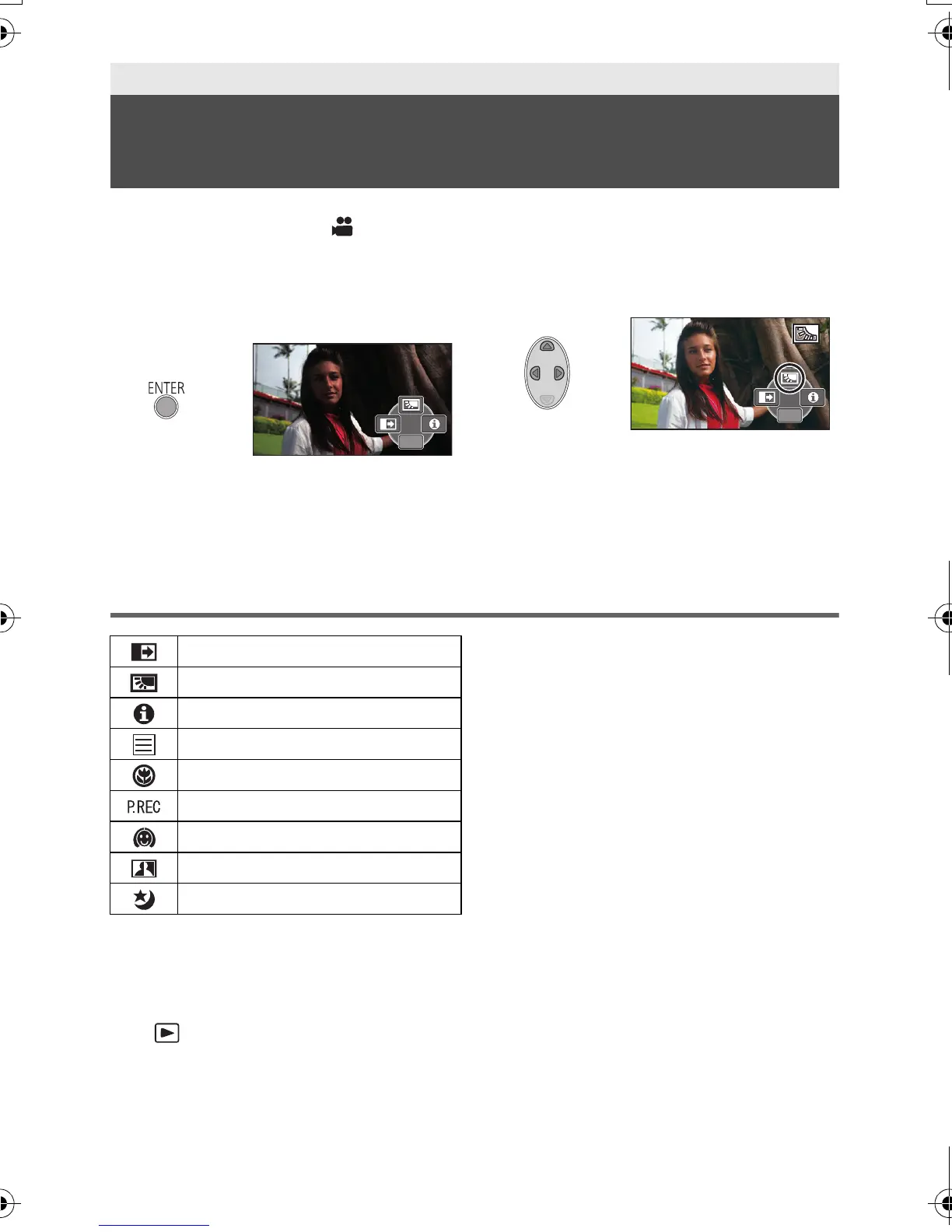
Select the operation icons to add different effects to the images to be recorded.
¬ Change the mode to .
1 Press the ENTER button to
display the operation icons on
the screen.
≥ The indication changes each time you
press 4 of the cursor button.
≥ Press the ENTER button to display/not-
display the operation icon.
2 (e.g. Backlight compensation)
Select an operation icon.
≥ Select the operation icon again to cancel
the function.
≥ Refer to the respective pages for
cancelling the following functions.
jHelp mode (l 43)
jGuideline (l 43)
Operation icons
*1 Not displayed during recording.
*2 It is not displayed in the intelligent auto
mode.
≥ If you turn off the unit or change the mode
to , PRE-REC, backlight
compensation, colour night view and tele
macro functions are cancelled.
≥ If you turn off the unit, the fade function is
cancelled.
≥ It is possible to set from the menu.
(Except for the PRE-REC and Help mode)
Advanced (Recording)
Recording functions of operation
icons
Fade
Backlight compensation
Help mode
*1
Guideline
Te le m ac ro
*1
PRE-REC
*1
Soft skin mode
*1,2
Intelligent contrast control
*2
Colour night view
*1,2
HDC-SD40&TM40EB-VQT3K06_mst.book 42 ページ 2011年2月8日 火曜日 午後6時8分















 To Next Page