VQT1T27
22
Preparation
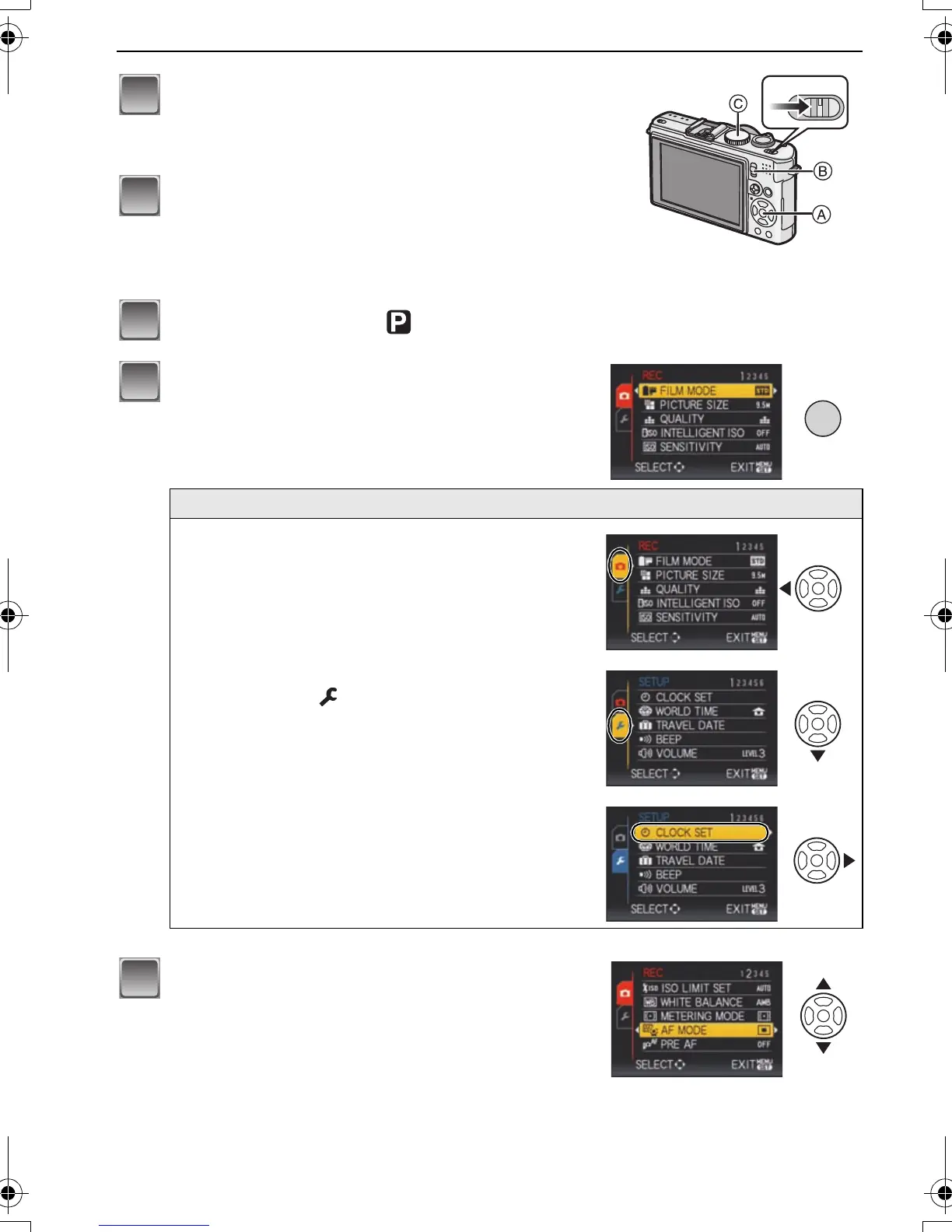
Turn the camera on.
A [MENU/SET] button
B [REC]/[PLAYBACK] selector switch
C Mode dial
Slide the [REC]/[PLAYBACK] selector
switch to [!].
• When selecting the [PLAYBACK] mode menu
settings, set the [REC]/[PLAYBACK] selector switch to
[(], and proceed to step
4.
Set the mode dial to [ ].
Press [MENU/SET] to display the menu.
• You can switch menu screens from any menu item by
rotating the zoom lever.
Switching to the [SETUP] menu
1 Press 2.
2 Press 4 to select the [SETUP]
menu icon [ ].
3 Press 1.
•
Select a menu item next and set it.
Press 3/4 to select [AF MODE].
• Select the item at the very bottom, and press 4 to
move to the second screen.
P.PC_DMC-LX3_eng.book 22 ページ 2008年7月8日 火曜日 午後10時13分


 To Next Page
 Loading...