VQT1T27
72
Advanced (Recording pictures)
• The number of days that have passed since the departure date can be printed out using the
“PHOTOfunSTUDIO-viewer-” bundled software on the CD-ROM (supplied).
• Select [CLOCK SET] to set the current date and time in advance. (P19)
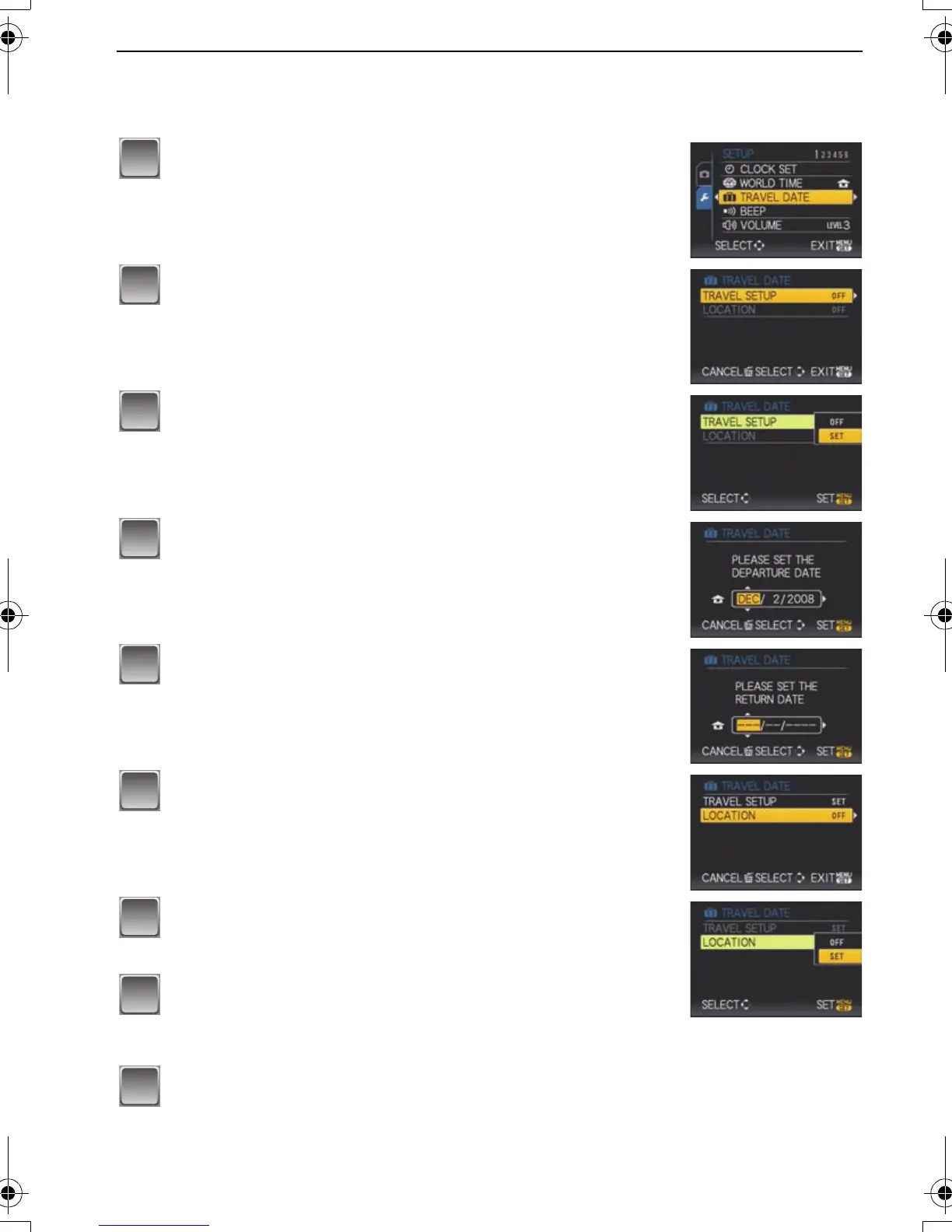
Select [TRAVEL DATE] from the [SETUP] menu,
and then press 1.
Press 3 to select [TRAVEL SETUP] and then
press 1.
Press 4 to select [SET] and then press [MENU/
SET].
Press 3/4/2/1 to set the departure date (year/
month/day), and then press [MENU/SET].
Press 3/4/2/1 to set the return date (year/
month/day), and then press [MENU/SET].
• If you do not want to set the return date, press [MENU/SET]
while the date bar is displayed.
Press 4 to select [LOCATION] and then press 1.
Press 4 to select [SET] and then press [MENU/
SET].
Enter the location.
• For details on how to enter characters, read the [TITLE EDIT]
section on P98.
Press [MENU/SET] twice to close the menu.
P.PC_DMC-LX3_eng.book 72 ページ 2008年7月8日 火曜日 午後10時13分


 To Next Page
 Loading...