7 Operation Procedures
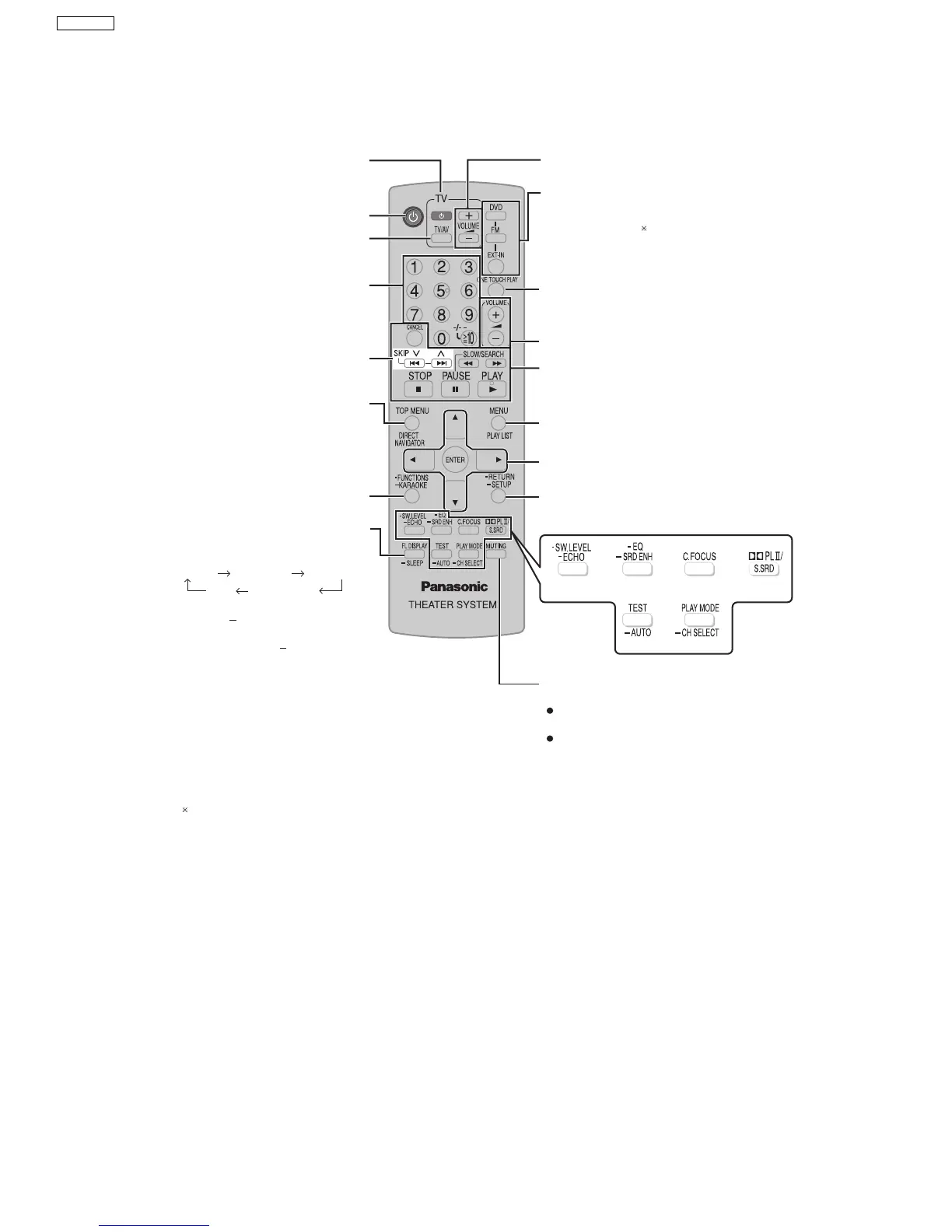
7.1. Remote Control Key Buttons Operations
Adjust the television volume
Select the source
DVD: DVD/CD
FM
EXT-IN: USB , AV
, AUX,
D-IN, MUSIC P.
Start up and play a disc automatically,
Control both the home theater system and the
television
Adjust the volume of the main unit
Basic operations for play
Show a disc menu or play list
Select or confirm menu items on the
television screen , Frame-by-frame
Return to previous screen
Show the Setup menu
Telev ision op erations
Switch the main unit on or off
Change the television’s video input mode
Select disc’s title numbers and etc.,
Enter numbers
Select preset radio stations
Show a disc top menu
or program list
Show the display on the main unit,
This function enables you to turn off the unit
automatically after the set time
SLEEP 30 SLEEP 60 SLEEP 90
OFF SLEEP 120
To confi rm the remaining time
To mute the sound
To cancel
Press [MUTING] again or adjust the
volume.
Muting is cancelled when you switch the
unit to standby.
To cancel the timer
Press and hold [ SLEEP] to select "OFF".
Press and hold [ SLEEP] again.
"AV" works only when the scart cable is connected.
Show on-screen menu
Karaoke
14
SA-PT850EE



 To Next Page