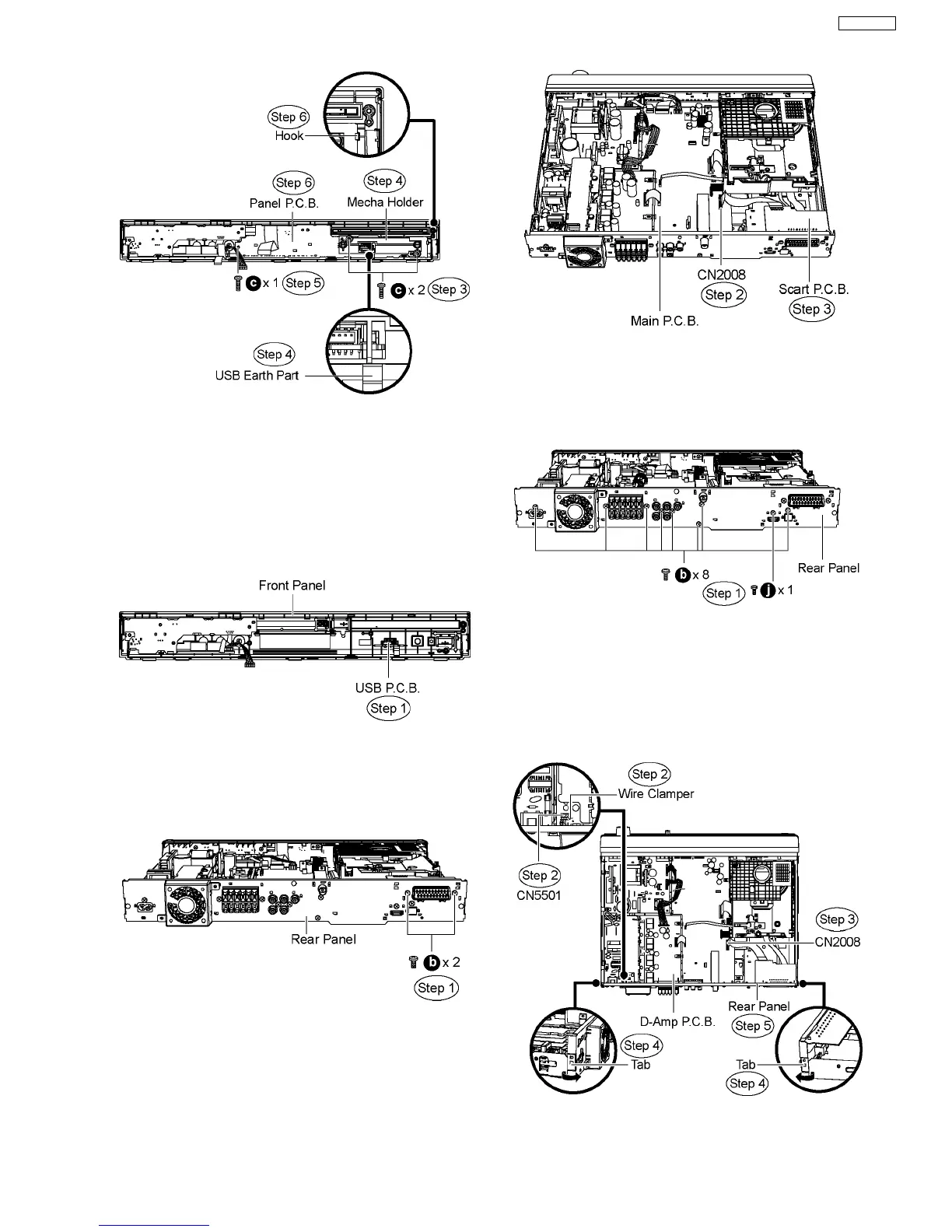
10.9. Disassembly of USB P.C.B.
·
Follow (Step 1) to (Step 3) of Item 10.3.
·
Follow (Step 1) to (Step 4) of Item 10.4.
·
Follow (Step 1) to (Step 6) of Item 10.5.
·
Follow (Step 1) to (Step 6) of Item 10.8.
Step 1 Remove USB P.C.B. from the front panel.
10.10. Disassembly of Scart P.C.B.
·
Follow (Step 1) to (Step 3) of Item 10.3.
Step 1 Remove 2 screws from the rear panel.
Step 2 Detach FFC cable from the connector (CN2008) on
Main P.C.B.
Step 3 Remove Scart P.C.B.
10.11. Disassembly of Rear Panel
·
Follow (Step 1) to (Step 3) of Item 10.3.
Step 1 Remove 9 screws from the rear panel.
Step 2 Remove the wire clamper to detach the fan unit
connector (CN5501) on D-Amp P.C.B.
Step 3 Detach FFC cable from the connector (CN2008) on
Main P.C.B.
Step 4 Release the tab on each side of the rear panel in the
direction of arrow.
Step 5 Remove the rear panel.
43
SA-PT850EE



 To Next Page