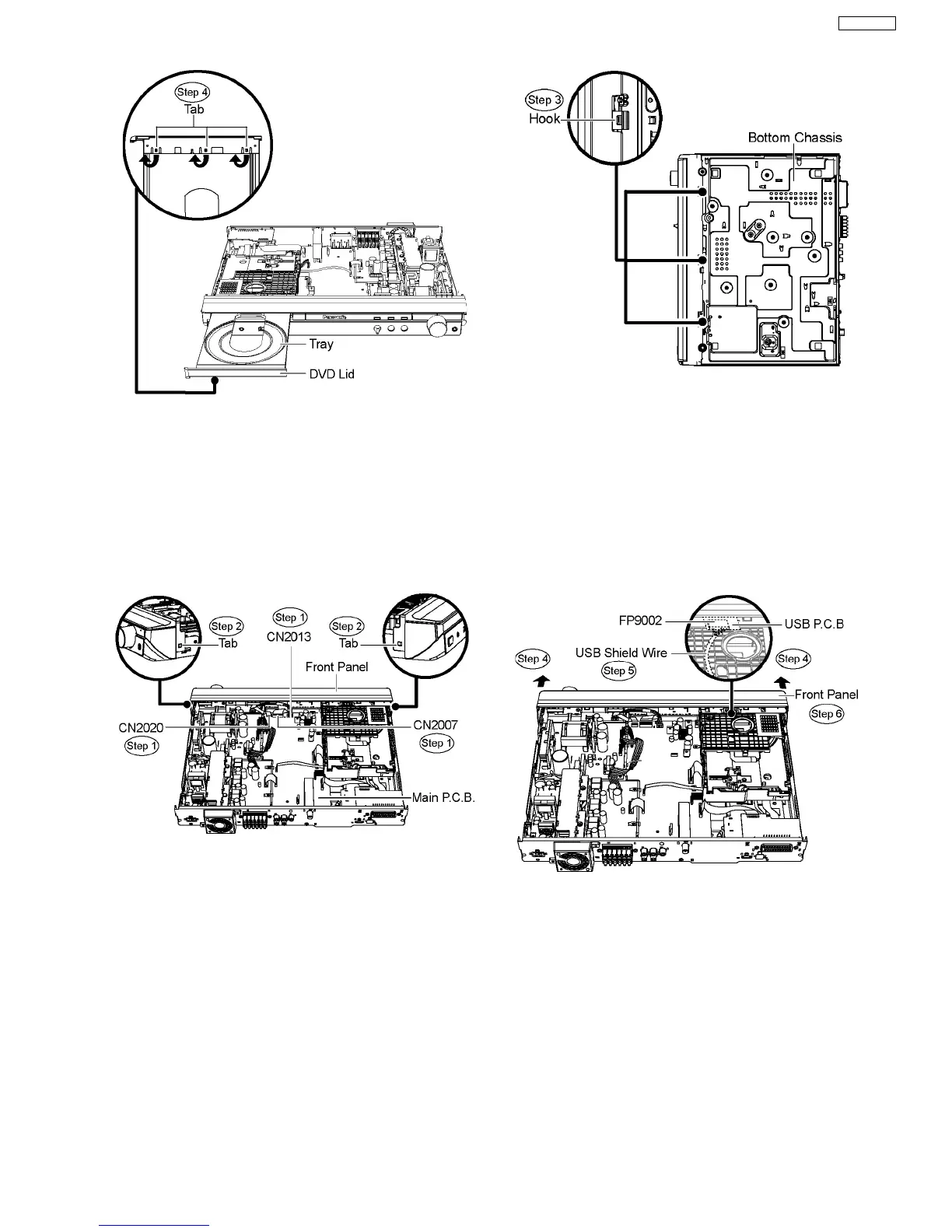
Note : You can return the tray by turning the gear jig clockwise.
10.5. Disassembly of Front Panel
·
Follow (Step 1) to (Step 3) of Item 10.3.
·
Follow (Step 1) to (Step 4) of Item 10.4.
Step 1 Detach FFC cables from the connectors. (CN2007,
CN2013 & CN2020) on Main P.C.B.
Step 2 Release the tab on each side of the front panel.
Step 3 Upset the unit and release 3 hooks at the bottom
chassis.
Special Note : Avoid placing the set in a position that might
cause damage to the jacks when removing the front panel.
Step 4 Detach the front panel slightly forward in the direction of
arrows.
Caution: Do not attempt to exert strong force when
detaching the front panel.
Step 5 Detach the USB shield wire from the connector
(FP9002) from USB P.C.B.
Caution: Remember to attach USB shield wire during
assembling.
Step 6 Remove the front panel.
10.6. Disassembly of Volume P.C.B.
·
Follow (Step 1) to (Step 3) of Item 10.3.
·
Follow (Step 1) to (Step 4) of Item 10.4.
·
Follow (Step 1) to (Step 6) of Item 10.5.
Step 1 Remove the volume knob from the front panel.
41
SA-PT850EE







 To Next Page