7.6. Audio & Video Connections
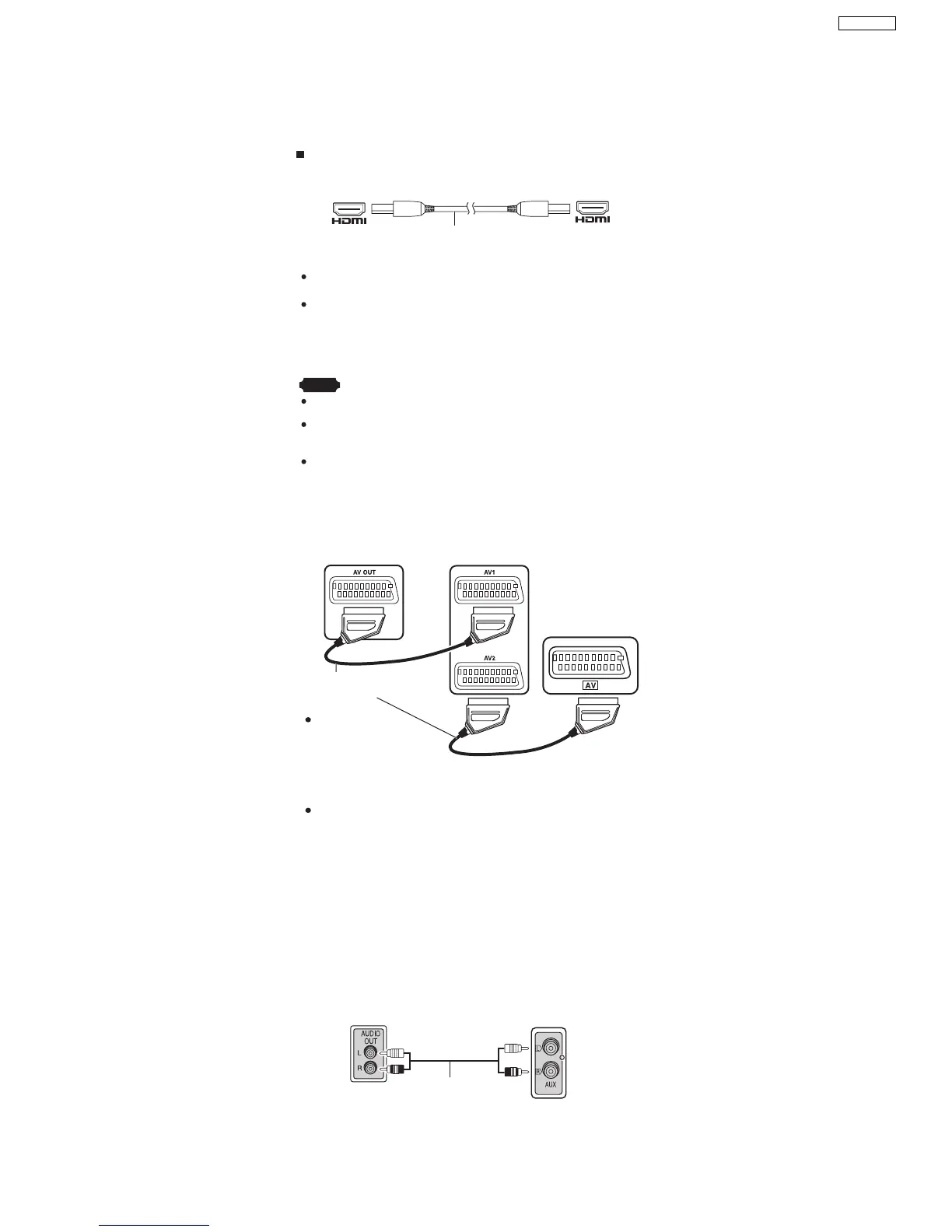
7.6.1. Television with an HDMI Terminal
Television with an HDMI terminal
AV IN
AV OUT
HDMI cable (not included)
HDMI-compatible
television
(not included)
Use the HDMI connection to enjoy higher quality audio and video
with a single cable.
Set "Video Output Mode" ( "Picture Menu" of the O/I book).
VIERA Link (HDAVI Control)
If your Panasonic television is a VIERA Link compatible television,
you can operate your television synchronising with home theater
operations or vice versa.
Note
Make the extra audio connection (Refer to the O/I book) when you use HDAVI
Control function.
It is recommended that you use Panasonic’s HDMI cable.
[Recommended part number: RP-CDHG15 (1.5 m), RP-CDHG30 (3.0 m),
RP-CDHG50 (5.0 m), etc.]
Non-HDMI-compliant cables cannot be utilised.
Set "Video Mode" to "On" and "Audio Output" to "On"
(Refer to
Refer to
"HDMI" tab of the O/I book)..
7.6.2. Optional Connection for Set Top Box, Cable TV, or Video Cassette Recorder
Set top box
(not included)
Television
(not included)
Rear panel of
this main unit
SCART cable (not included)
SCART cable
(not included)
To listen to the
sound from the
television, select the
appropriate audio out
(example: Monitor) on
the television.
Sound from the television
Press [EXT-IN] (Refer to the O/I book) to select the "AV" audio input on the
remote control.
7.6.3. Optional Audio Connection for Video Cassette Recorder or Television
Video cassette
recorder/ TV
(not included)
(not included)
Rear panel of
this main unit
Audio cable
Press [EXT-IN] (Refer to the O/I book) to select "AUX" as the source
to operate the audio input.
This audio connection will enable you to play audio from
your video cassette recorder or television through your
home theater system.
19
SA-PT850EE



 To Next Page