EasyManua.ls Logo

Panduit MP300 - Display

Panduit MP300
66 pages
Print Icon
To Next Page IconTo Next Page
To Previous Page IconTo Previous Page
Loading...
6
Top
Using the printer with
Easy-Mark Plus
Troubleshooting
Part Names and
Functions
Start Here
Cleaning
Initializing the
Settings
Label Functions
Key Menu Index
Frame and Table Lists
Symbol List
Specications
Technical Support
Part Names and Functions
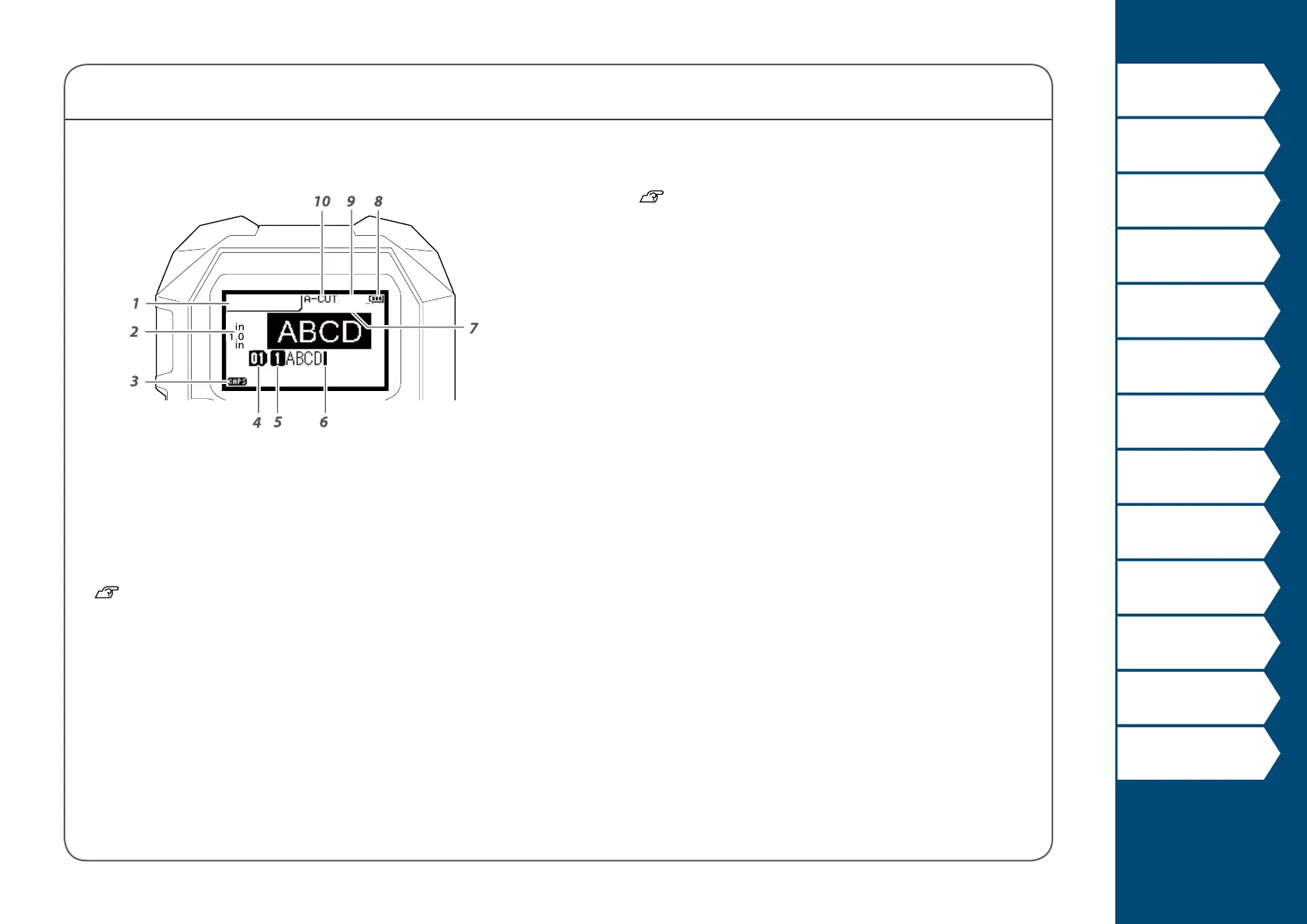
Display
The display shows the current settings and characters you
have entered.
You can change the language shown on the setting screen
and menu.
"Language"
1. Label Mode
2. Current label length and width
The unit can be switched between inch and cm.
"inch/cm"
3. Caps Lock ON
4. Page Number
5. Line Number
6. Cursor
7. Label Part Number
8. Battery Life
9. Font Size
10. Cutter Setting
T100X000VPM
TAPE
64PT
2.6

Table of Contents

Other manuals for Panduit MP300

Related product manuals