Copyright © 2014 PAYTER
BV. All rights reserved. No
part of this document may be
reproduced in any form by
print, photo print, microfilm,
electronic copy or any other
means without written
permission by Payter BV.
Potential Free Pulse Contact (Autoscan mode)
6.3.1 Description
Connecting a P6X Terminal to existing, coin mechanism only, applications can be challenging. To
be able to integrate a P6X Terminal in these existing applications, a potential free pulse contact
was added to the terminal features. Allowing the terminal to replace the coin mechanism or be
used in parallel.
A potential free pulse contact can signal a host machine that a payment was performed
successfully, the concept is similar to a pulse output on a coin mechanism interface.
In addition, a P6X terminal has an inhibit input that can be used to enable/disable payments on
the terminal, for example when the Host machine is out of order.
6.3.2 Connecting the terminal
Implementing this mode of operation requires attention to electrical details to which this
interface is bound. The pulse output is highly configurable in polarity, pulse width, pulses per
transaction etc. For a detailed description of the potential free pulse contact features, please
inquire with your local supplier about “Pulse I/O” documentation. This documentation describes
the electrical properties and the settings that are important for integration with your device.
6.3.3 Pay flow
When the terminal is powered up, it will automatically start scanning for cards. Every time a card
is presented, a transaction is performed for the indicated amount, and a pulse is given for each
successful transaction. It is the responsibility of the host machine to capture all the pulses that
are send by the terminal. When the host machine is not able to capture pulses or provide the
service for which is to be paid, the terminal should be disabled. By either powering down the
terminal or through enabling the terminal inhibit input. When the host machine functionality is
restored the terminal can be enabled again to resume operation.
6.3.4 Applicable Settings
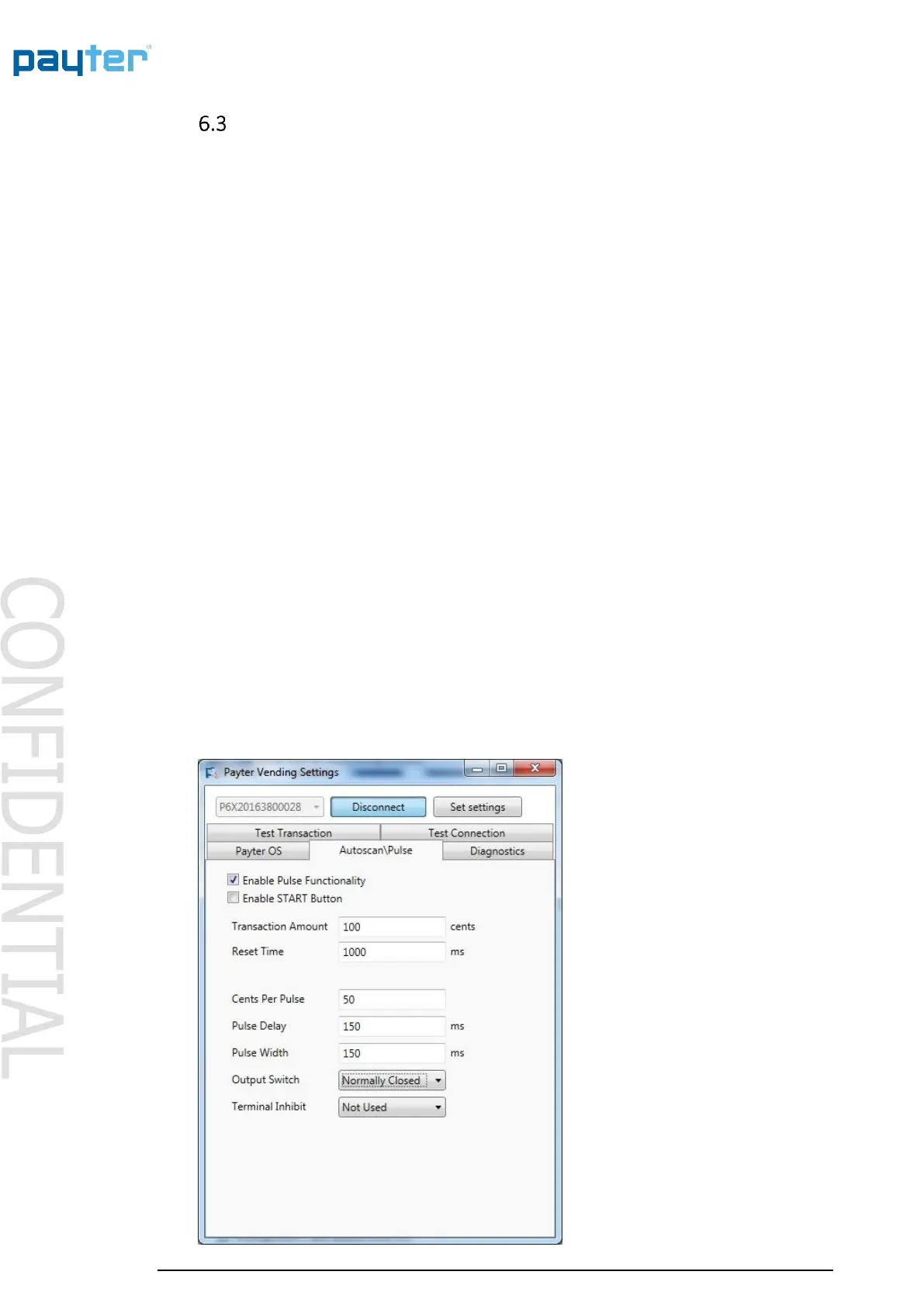
The following settings control the behavior of the Autoscan Pulse Contact mode.
Fig. 10 – Autoscan Pulse settings



 To Next Page