Copyright © 2014 PAYTER
BV. All rights reserved. No
part of this document may be
reproduced in any form by
print, photo print, microfilm,
electronic copy or any other
means without written
permission by Payter BV.
7.2.2 Applicable Settings
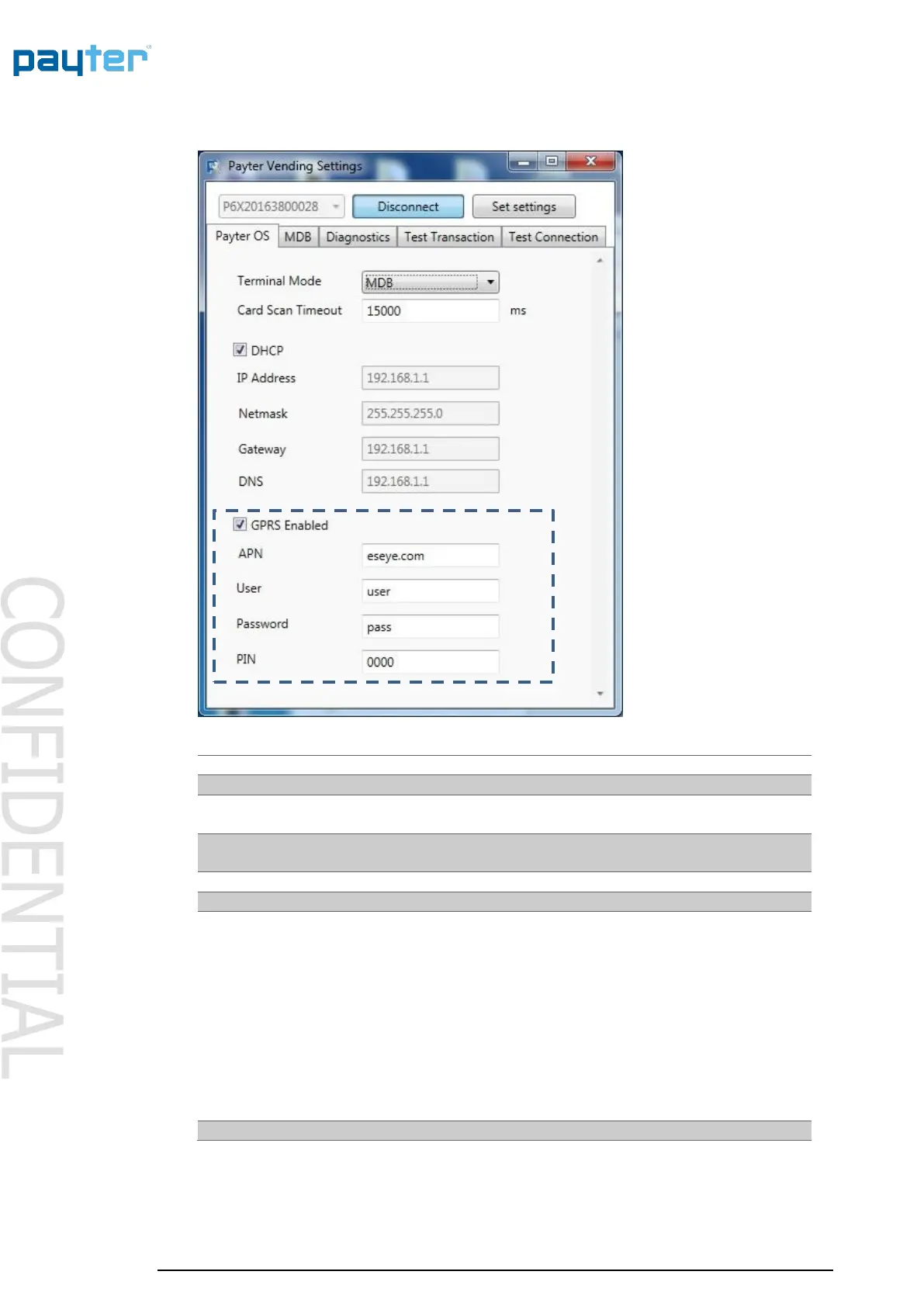
Fig 17 – Mobile Internet Settings
Enables/Disables Mobile Internet, only if the option is already
installed.
The Access Point Name is provided by the Mobile internet
provider.
Provided by Mobile internet provider
Provided by Mobile internet provider
Use this setting only when the SIM is configured with a PIN
Code. If no PIN is configured on the SIM this setting has no
effect.
It can be useful to configure no PIN or PIN 0000 on the SIM
cards to avoid having to configured this code individually on
each terminal.
Note that the terminal will attempt this code at each boot. If
not configured correctly this may block the SIM card requiring
it to be unlocked using the secondary PIN (PUK) code.
Table 16 - Mobile Internet settings



 To Next Page