Home
Payter
Payment Terminal
P68
Page 7 (P6 X Terminal Overview)
Payter P68 - P6 X Terminal Overview
50 pages
Manual
Save Page as PDF
To Next Page
To Next Page
To Previous Page
To Previous Page
Loading...
P6X Series User
Manual
Page 7
/
50
Copyright © 2014 PAY
TER
BV. All rights reserved.
No
part of this documen
t may be
reproduced in any for
m by
print, photo print, microfi
lm,
electronic copy or any ot
her
means without w
ritten
permission by Payter BV.
3.
P6
X T
erminal Overview
P
68 3in
1 te
rm
inal
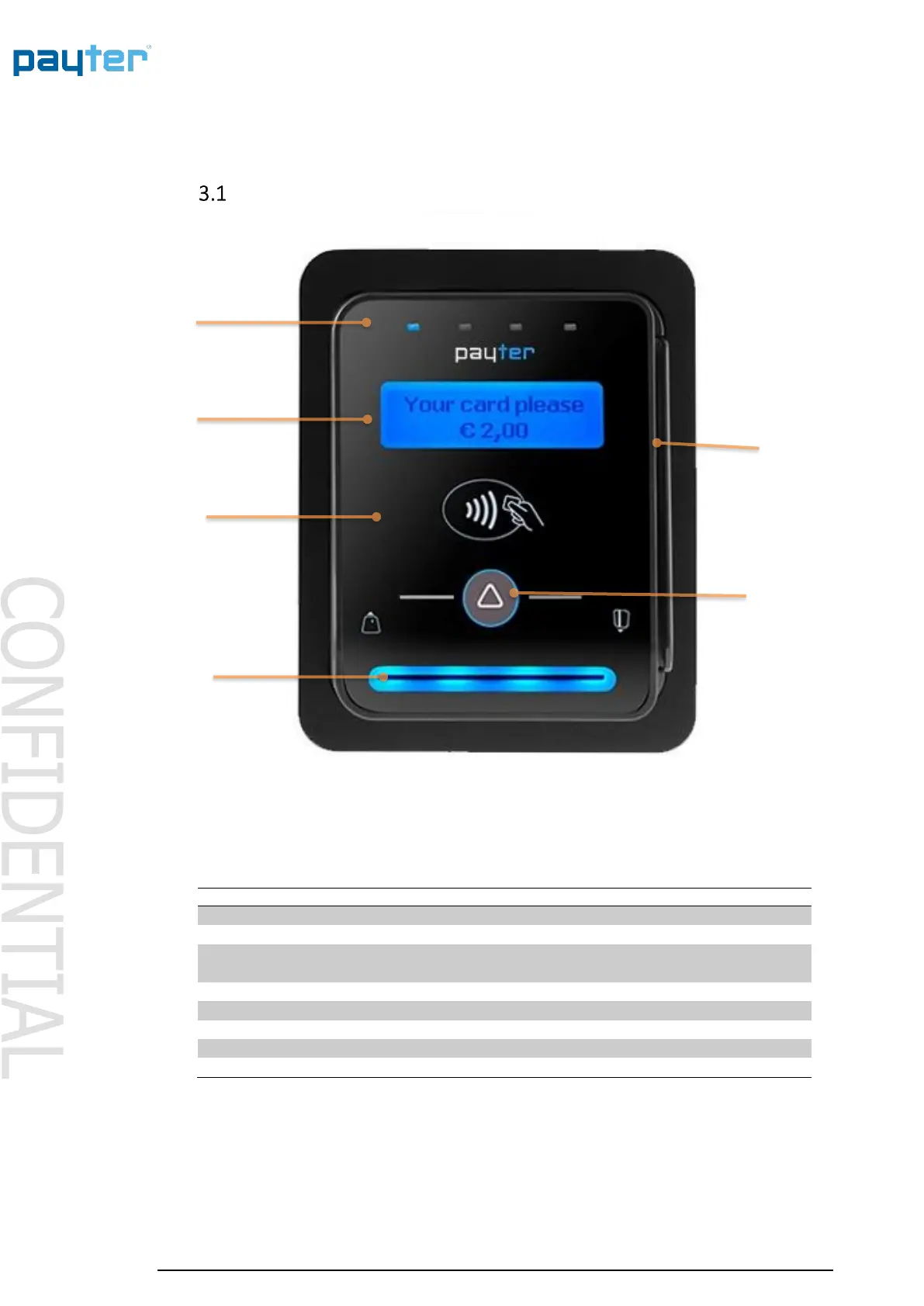
Fig. 1 - Front view
Nr.
Item
Description
1
Led Indicators
Transaction status indicatio
n
2
Status Display
Blue Backlight
Shows transaction in
formation and
basic
device diagnostics.
3
Contactless Symbol
Location for ta
pping Contactless Cards
4
Contact Card
Slot
Push/Pull type
5
Magnetic Stripe Card
Swipe Slot
3 Track Reader
6
Triangle Button
Multifunction bu
tton
Buzzer
Indicates a successful/
failed transaction
Table 1
–
Front Item de
scription
1
5
2
3
6
4
6
8
Table of Contents
Main Page
Revision History
2
Table of Contents
4
Introduction
6
Document Scope
6
P6X Terminal Overview
7
P68 3In1 Terminal
7
P66 Contactless Only Terminal
8
P66 Split Build on Top Terminal
9
Rear View
10
Basic Connectivity Features
11
Host Machine Interface
12
Internet Connection
12
Terminal Configuration
13
Payment Flow
14
Description
14
Accepted Card Types
14
Transaction & Display Messaging
15
Modes of Operation
17
MDB Mode
17
Description
17
Connecting the Terminal
17
Pay Flow
18
Applicable Settings
18
Executive Mode
19
Protocol a (Executive)
19
Vendbox
19
Applicable Settings
19
Potential Free Pulse Contact (Autoscan Mode)
20
Description
20
Connecting the Terminal
20
Pay Flow
20
Applicable Settings
20
RTP Mode
22
Description
22
Applicable Settings
22
CCI Mode
23
Description
23
Connecting the Terminal
23
Pay Flow
23
Applicable Settings
23
PVP Mode
24
Description
24
Connecting the Terminal
24
Applicable Settings
24
Setting up Internet
25
LAN Connection
25
Applicable Settings
25
Gprs/Egde/3G/Hspa Modem
27
Connection Setup
27
BV. All Rights Reserved. no
27
Applicable Settings
28
Terminal Configuration
29
Installing Vending Settings Tool
29
Connecting to the Terminal
29
Dimensions & Mounting
30
Device Opening
30
Mounting Options
31
Dimensions P68 the Arc
33
Dimensions P66 the Plane
34
Dimensions the Angle Casing
35
Installation P66 Split
36
Dimensions P66S Split Unit
37
Technical Specifications
38
Troubleshooting
39
Result Codes
39
LAN Troubleshooting
41
Mobile Internet Troubleshooting
43
Warnings
44
AC Adapter
44
Terminal
44
Contact
44
Installation Guide
45
FCC Compliance Statement (P68 Only)
47
CE Declaration of Conformity
48
Licenses
50
Lwip
50
Spiffs
50
Related product manuals
Payter P66
50 pages
Payter P6 Series
50 pages
Payter APO01 PAY V1-X Series
43 pages



 To Next Page