Copyright © 2014 PAYTER
BV. All rights reserved. No
part of this document may be
reproduced in any form by
print, photo print, microfilm,
electronic copy or any other
means without written
permission by Payter BV.
7. Setting Up Internet
An internet connection for a P6X terminal is necessary to perform features such as online
verification of payments, remote management functionality or telemetry.
During boot the terminal will check the connection to all configured payment host. If during
this check the payment host cannot be reached an error will be displayed indicating which host
was not reachable. This must be resolved before regular operations are attempted with the
terminal.
The following options are available to connect to the internet.
LAN connection
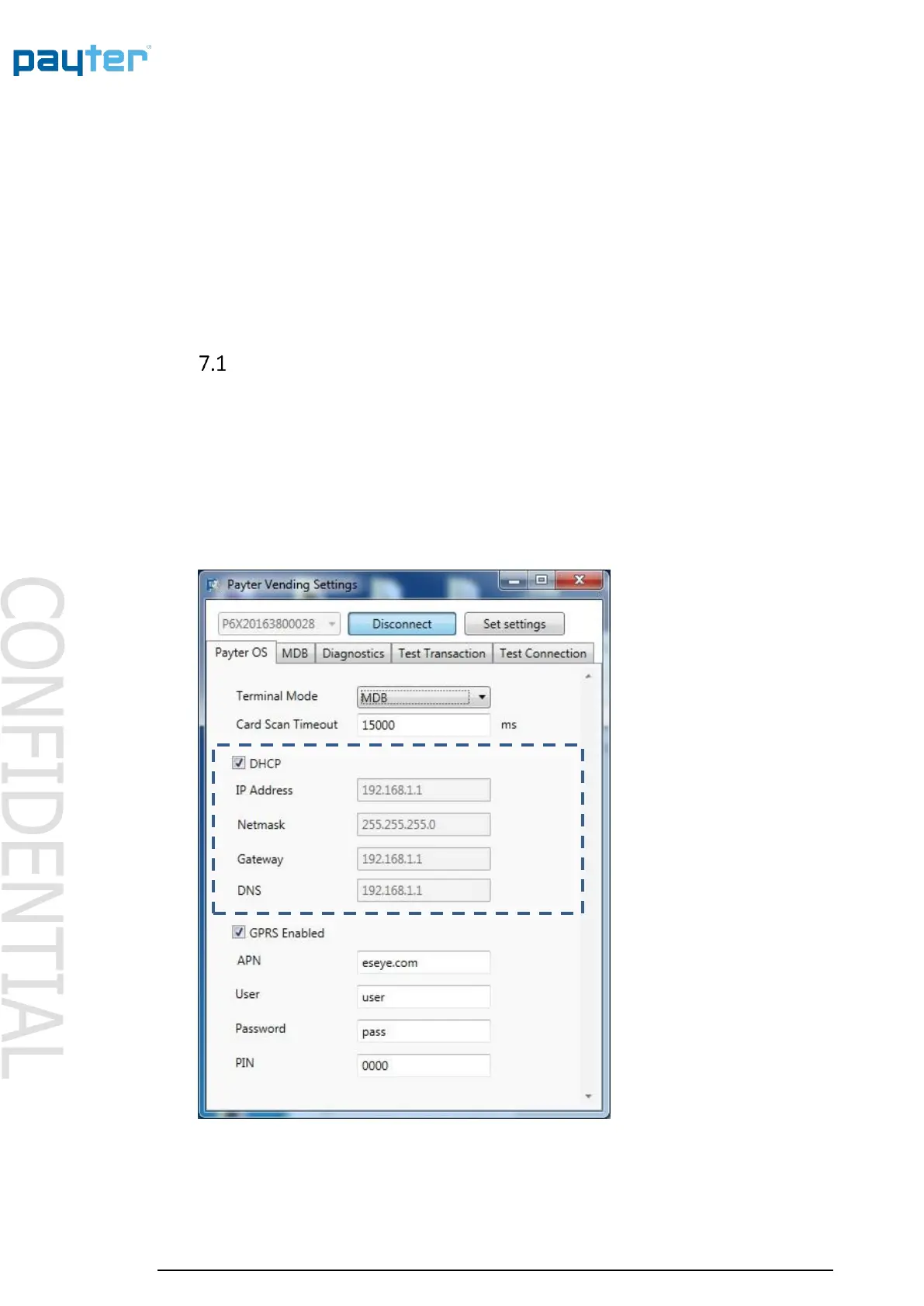
a P6X terminal can be connected to a LAN network using the onboard Ethernet port, with either
a dynamic or static IP address. The available LAN infrastructure is used by the terminal to
connect to the internet. The Firewall settings should allow the terminal to connect to the PSP and
other destination host addresses needed for correct functioning. This type of internet connection
is preferred and when the infrastructure is optimally configured, the best transaction
performance can be achieved.
7.1.1 Applicable Settings
Fig. 14 – Ethernet Settings



 To Next Page