2
28
Mini-101M
7&3,3&RQÀJXUDWLRQ
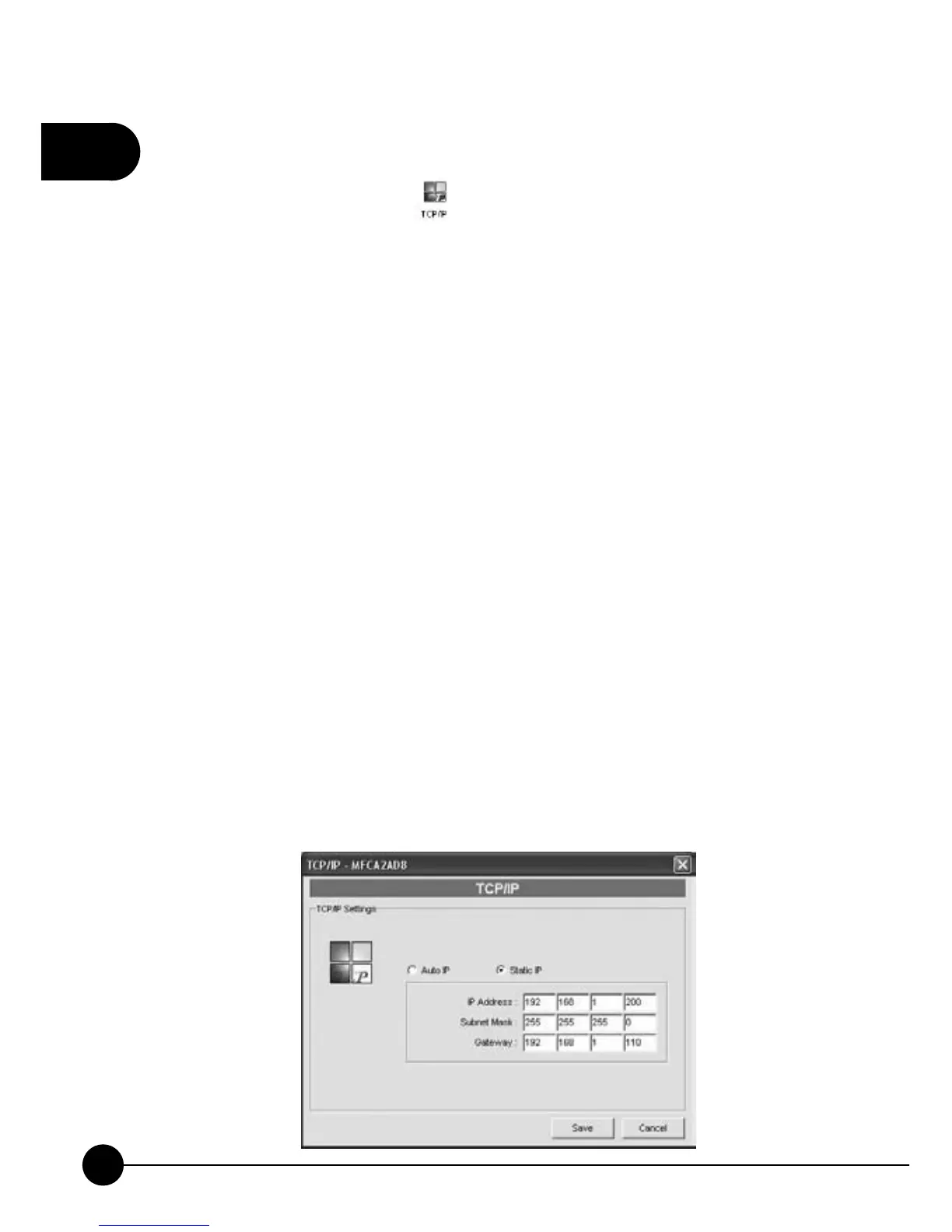
If you want to configure protocol, please follow the following
description to set up TCP/IP Settings for the print server. You can configure
the MFP Server to automatically get IP from DHCP server or manually
specify a static IP. You may chooseņStatic IPŇorņAuto IP.ŇIt is
recommended that you should assign a static IP for Mini-101M. Click
ņSaveŇto apply the settings.
IP Address Assignment:
If you need the MFP Server to automatically get an IP from DHCP server,
selectņAuto IPŇ. You also can selectņStatic IPŇto manually assignņ
IP AddressŇ,ņSubnet MaskŇandņGatewayŇfor the MFP Server. By
default,ņStatic IPŇis enabled and the default settings are as follows:
IP Address: 192.168.1.200
Subnet Mask: 255.255.255.0
Auto IP – The IP Address information of the MFP Server obtained from
DHCP Server will be displayed in the address field.
Static IP – Manually assign the IP address information on the same
network with your computer to the MFP Server.



 To Next Page