15
1
Getting Started
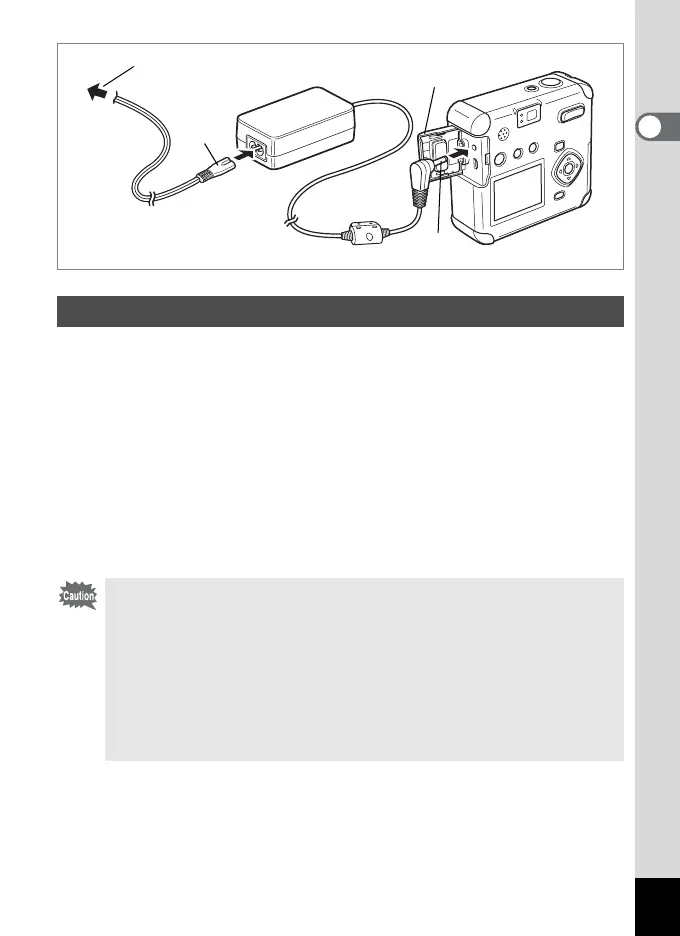
When using the LCD monitor for a long time or when connecting to your
PC, we recommend using the AC adapter D-AC5 (sold separately).
1 Make sure the camera is turned off before opening the
terminal cover.
2 Connect the DC terminal on the AC adapter to the DC
input terminal on the camera.
3 Connect the AC plug cord to the AC adapter.
4 Plug the AC plug cord into the power outlet.
Using the AC Adapter
• Make sure the camera is turned off before connecting or disconnecting
the AC adapter.
• Make sure connections are secure between the camera, AC adapter,
AC plug cord terminal, and the power outlet. Disconnections while the
camera is recording or reading data will corrupt your data.
• When using the AC adapter, be sure to read the AC adapter D-AC5
operating manual.
• Connecting the AC adapter will not charge the rechargeable batteries
in your camera.
f
e
c
d



 To Next Page