68
4
Taking Pictures
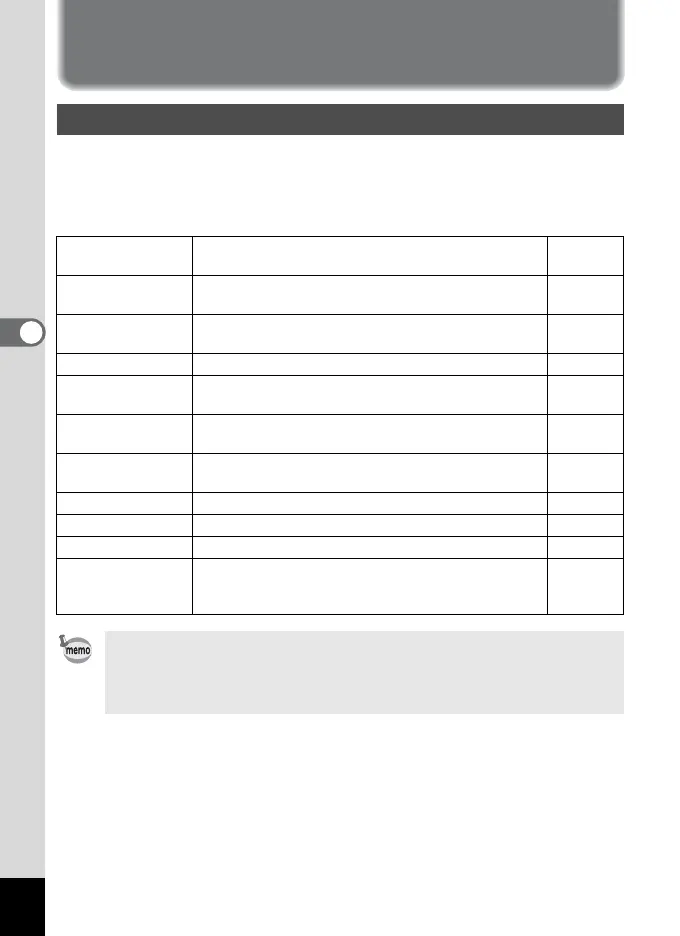
Saving the Settings
You can choose whether to save the set values when the camera is
turned off. If you select On, the camera saves the settings in effect just
before the camera is turned off. If you select Off, the settings return to
default settings when the camera is turned off.
Saving the Menu Items (Memory)
Item Description
Default
Setting
Flash
Saves the Flash mode setting selected with the
button.
O
White Balance
Saves the White Balance settings on the Rec. Mode
menu.
P
EV compensation Saves the EV compensation settings. P
Digital Zoom
Saves the Digital Zoom settings on the Rec. Mode
menu.
O
AE Metering
Saves the AE Metering settings on the Rec. Mode
menu.
P
Sensitivity
Saves the Sensitivity settings on the Rec. Mode
menu.
P
Focus Mode Saves the Focus Mode settings. P
Zoom Position Saves the Zoom Position settings. P
MF Position The focus position set by Manual Focus is saved. P
File No.
Saves the file numbers. File numbers will continue to
have sequential numbers even after changing the SD
Memory Card / MultiMediaCard.
O
• Menu items not included in Memory will also be saved with the settings
selected on the menus for each function.
• Zoom positions set within the digital zoom range will not be saved even
when Zoom Position is set to On in Memory.



 To Next Page