95
6
Editing/Settings
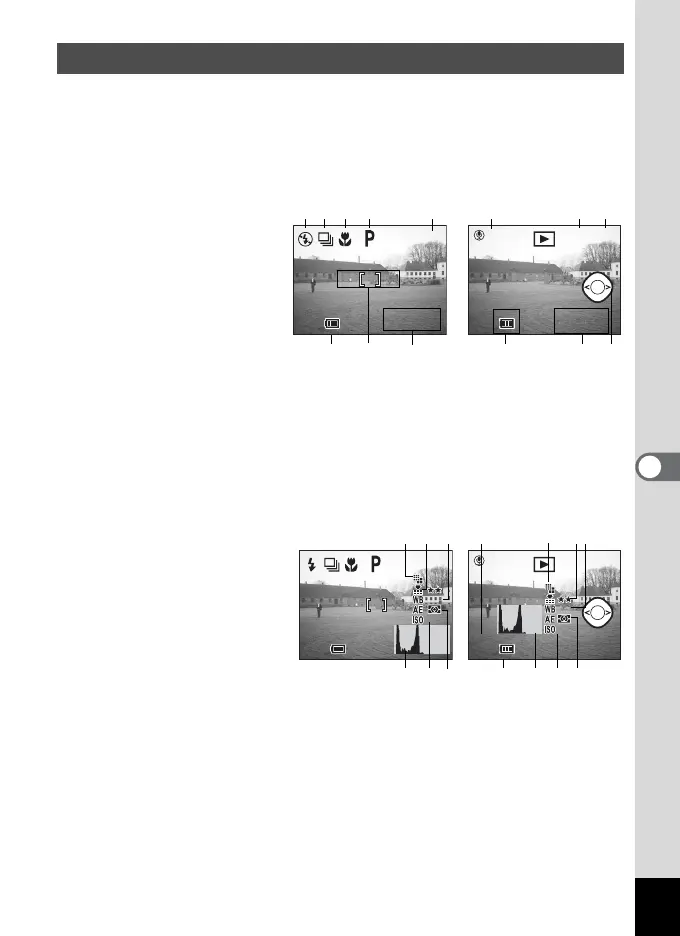
This determines the content displayed on the LCD monitor. You can
select Normal, Histogram, No. Info, or Off. Capture mode and Playback
mode display different information on the screen.
Normal
Capture information is
displayed.
1Flash
2 Drive Mode
3 Focus Mode
4 Capture Mode
5 Autofocus frame
6 Capacity remaining
7 Battery symbol
8 Date and time
9 Voice memo
10 Folder name/File name
11 Protect icon
12 Four-way controller operation guide
Histogram
Brightness distribution is
displayed. The horizontal
axis shows the brightness
(dark to bright, left to right),
and the vertical axis shows
the number of pixels.
1 Recorded pixels
2 Quality level
3 White balance
4 AE Metering
5 Sensitivity
6 Histogram
7 Aperture value
8 Shutter speed
• During Autofocus, the Autofocus frame is displayed.
Setting the Display Mode
100
11:20
10/10/2003
10/10/2003
11:20
Playback ModeCapture Mode
11:20
10/10/2003
10/10/2003
11:20
100-0001Start
123 4 6 10
8757 8
9 11
12
11:20
10/10/2003
10/10/2003
11:20
1/ 100
F3.9
1/ 100
F3.9
100-0001
640
AWB
200
640
AWB
200
Start
Capture Mode Playback Mode
100
640
AWB
AUTO
640
AWB
AUTO
123
65
123
654
8
7
4



 To Next Page