33
3
Common Operations
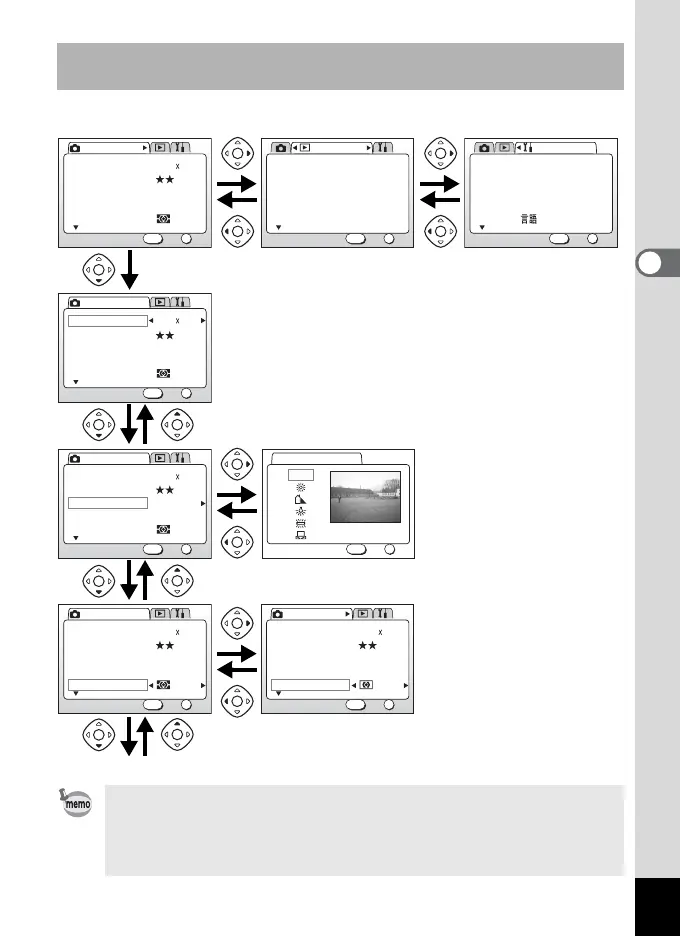
Example of menu operation (Pressing the MENU button in
Capture mode)
• If you press the shutter release button halfway and move the camera
to Capture mode, any changes to the setting will not be saved.
• When you display the menu from Capture mode, the [A Rec.Mode]
menu will be displayed, and when you display the menu from Playback
mode, the [Q Playback] menu will be displayed.
AWB
Multiple
2048 1536Recorded Pixels
Quality Level
White Balance
Focusing Area
AE Metering
Rec. Mode
OK
OK
1/3
Exit
MENU
AWB
Multiple
2048 1536Recorded Pixels
Quality Level
White Balance
Focusing Area
AE Metering
Rec. Mode
OK
1/3
MENU
OKExit
AWB
Multiple
2048 1536Recorded Pixels
Quality Level
White Balance
Focusing Area
AE Metering
Rec. Mode
OK
OK
1/3
Exit
MENU
AWB
Multiple
2048 1536Recorded Pixels
Quality Level
White Balance
Focusing Area
AE Metering
Rec. Mode
OK
OK
1/3
Exit
MENU
English
On
Format
Sound
Data Adjust
World Time
Language/
Set-up
OK
OK
1/3
Exit
MENU
01/01/2003
MENU button
Next menu screen
1
2
3
3
4
3
OK
OK
Exit
MENU
White Balance
AWB
AWB
Multiple
2048 1536Recorded Pixels
Quality Level
White Balance
Focusing Area
AE Metering
Rec. Mode
OK
OK
1/3
Exit
MENU
[A Rec.Mode] Menu
[B Set-up] Menu
Selection Screen
Off
Playback Message
Digital Filter
Resize
Trimming
Alarm
Playback
OK
OK
1/2
Exit
MENU
[Q Playback] Menu



 To Next Page