17
1
Getting Started
1 Slide the battery/card cover in the direction of the arrow
, and flip open.
2 Press the SD Memory Card / MultiMediaCard in the
direction of the arrow e, then pull out the ejected card.
3 Wipe away any sand or debris on the water-resistant
packing and the areas between the camera and the
packing.
4 Close the battery/card cover.
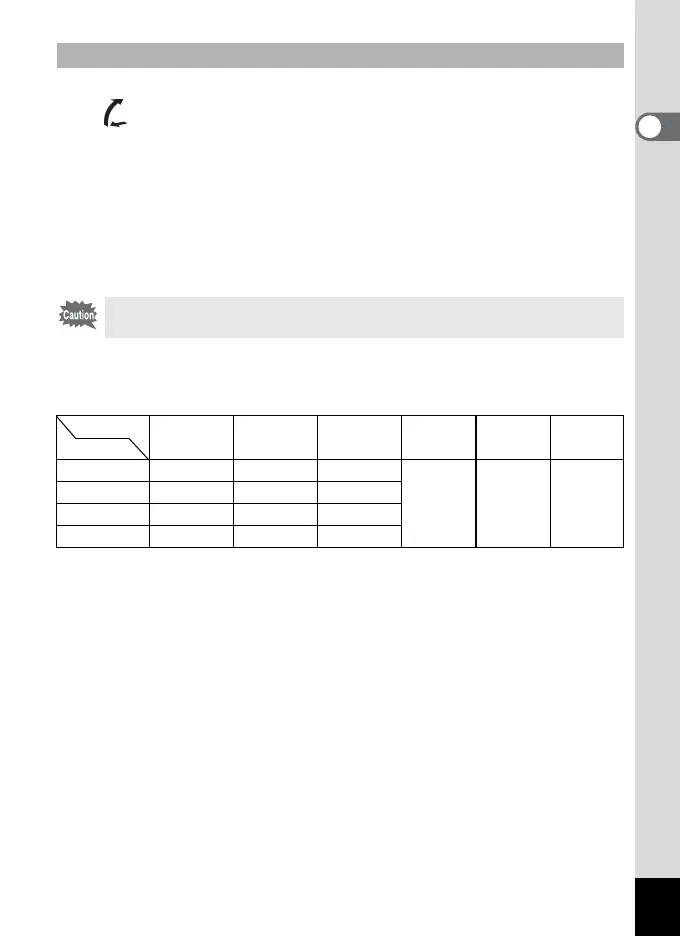
Approximate Number of Shots, Recorded Pixels, and Quality
Levels
• These figures show the number of shots when using a 16MB SD Memory Card.
• These figures are based on PENTAX standard shooting conditions, and may
vary depending on the subject, shooting conditions, capture mode, and SD
Memory Card used.
Removing
• If the battery/card cover is opened while saving an image, the save is
interrupted (the image is not saved).
Quality level
Best/
C
Better/
D
Good/
E
Movie picture
(320×240)
Movie picture
(160×120)
Voice
recording
Recorded Pixels
2048×1536 7 12 18
40 sec. 150 sec. 30 min.
1600×1200 11 20 27
1024×7680 25 45 56
640×480 53 82 100



 To Next Page