33
1
Getting Started
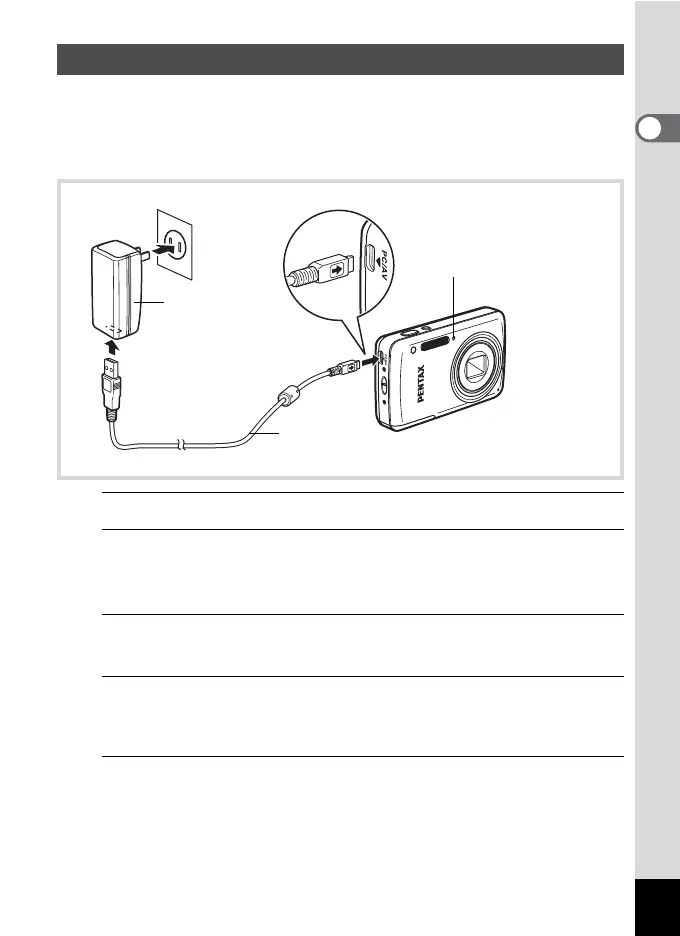
Charge the battery from a power outlet using the provided power adapter
(D-PA116) and USB cable (I-USB116) before using it for the first time,
after a long period of non-use, or when the [Battery depleted] message
appears.
1
Make sure that the battery is installed in the camera.
2
Face the } mark on the USB cable towards the 4 mark
on the camera, and connect the cable to the PC/AV
terminal.
3
Connect the other end of the USB cable to the power
adapter.
4
Plug the power adapter into the power outlet.
The self-timer lamp turns on while the battery is charging and turns off
when charging is finished.
5
Unplug the power adapter from the power outlet, and
disconnect the USB cable from your camera.
Charging the Battery
Power adapter
Self-timer lamp
While charging: Turns on
Charging finished: Turns off
USB cable
To power
outlet
4
3
2











 To Next Page