VisuNet RM Shell 6
Factory Reset
2023-05
121
10.1 Introduction
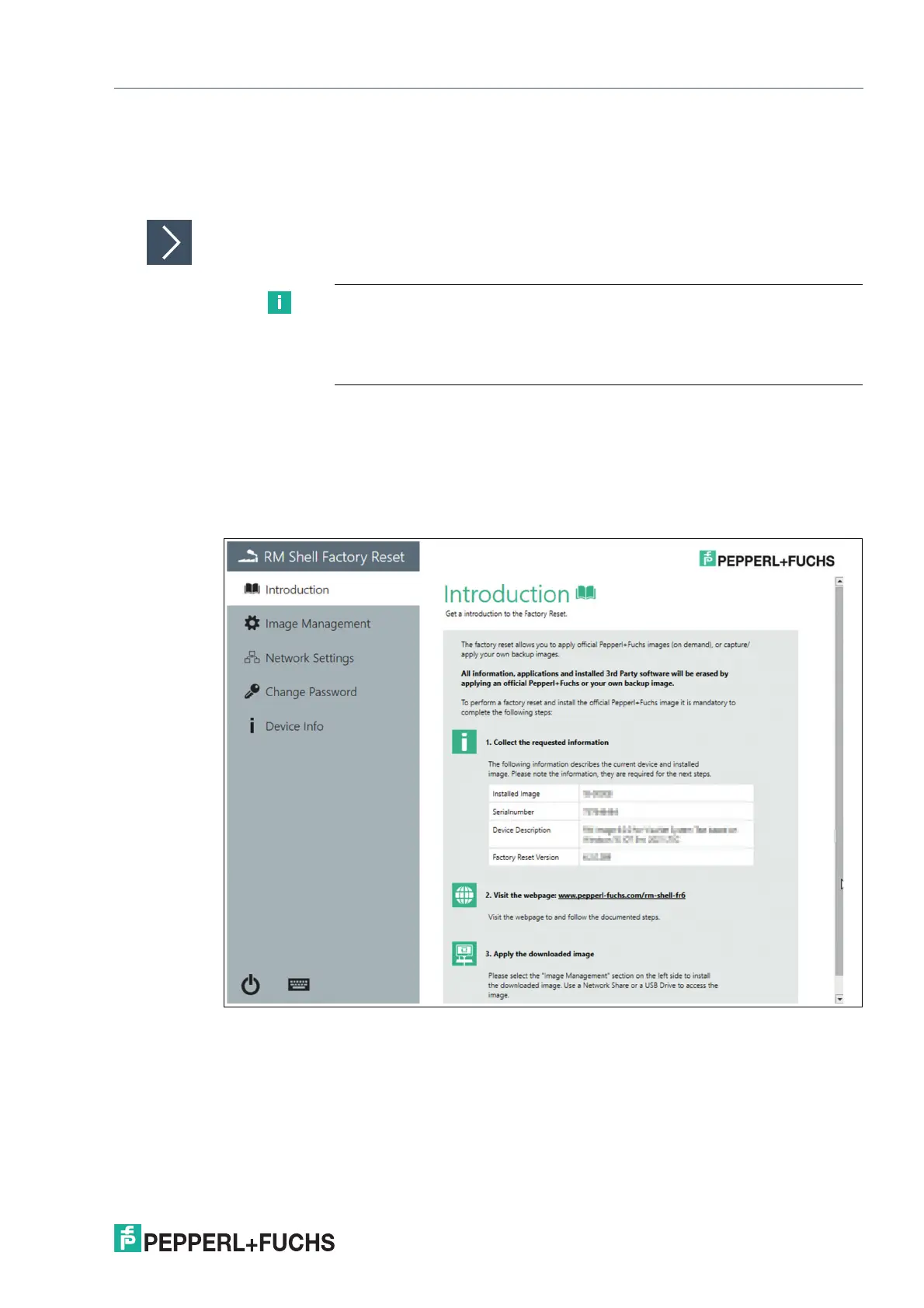
The section gives an overview of the Factory Reset. With the Factory Reset you can capture or
apply (backup) images.
Overview
1. Collect the requested information. The table shown in the introduction section lists the
information required for the next steps. Please note the information.
2. Visit the Pepperl+Fuchs Website (www.pepperl-fuchs.com/rm-shell-fr6) Follow the steps on
the website.
3. Apply the downloaded image. The downloaded image can be applied via the "Image
Management" section. The image can be accessed via a network share or a USB Drive.
Figure 10.4
Note
All information, apps and installed 3rd party sortware will be erased by
applying an official Pepperl+Fuchs or your own backup image. As described in
the introductory section, you have to perform the following steps to complete
the factory reset.


 To Next Page