Explorer Mini Repairs - Table and backrest unit
4.5 Table and backrest unit
4.5.1 Removing the table and backrest unit
Use a protective mat to prevent damage to the table and backrest unit
and the surface.
The following tools are necessary for this task:
• Torque wrench.
• Allen socket, 4 mm.
• Screwdriver or pliers.
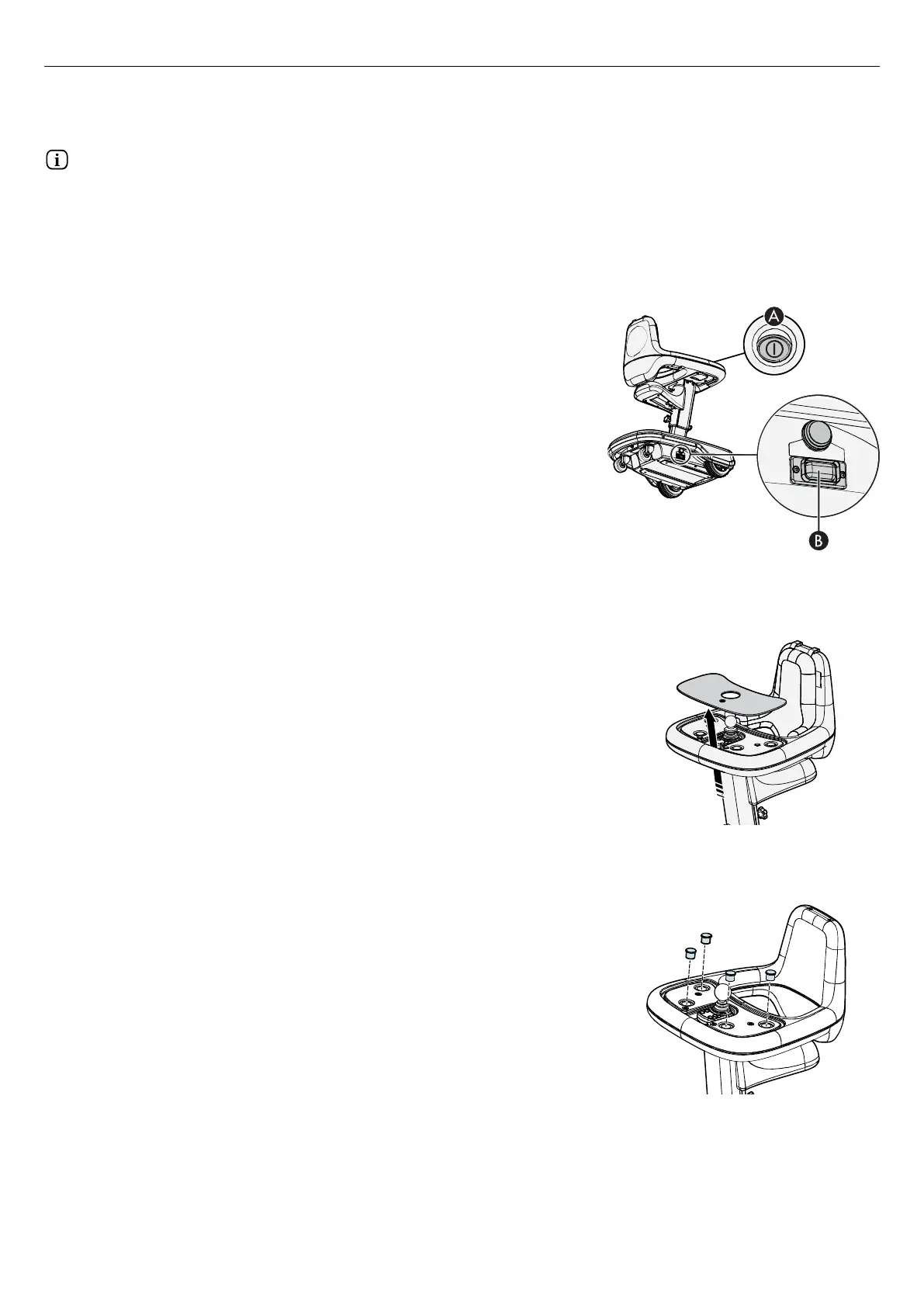
Figure 19. Positions for the on/off button (A) and the
main circuit breaker (B).
1. Put the Explorer Mini on a flat surface.
2. Press the on/off button (A) to turn off the power.
3. Turn off the main circuit breaker (B).
Figure 20. Remove the tray top.
4. Put your fingers in the hole that is positioned at the bottom of the
table. Push the tray top upward and lift off the tray top.
5. Make sure that the LEDs on the control panel are off.
Figure 21. Remove the four plastic plugs from the
screws.
6. Remove the four plastic plugs from the screws. Use a screwdriver or
pliers to loosen the plastic plugs.
20


 To Next Page