Explorer Mini Troubleshooting - Control panel diagnostics
6.2 Control panel diagnostics
Each time you turn on the Explorer Mini a self-diagnostic check of the
electronics is done. If a fault has occurred it is indicated by flashing
LEDs on the battery indicator and the maximum speed indicator.
You need to remove the tray top to access the control panel and the
LEDs on the battery indicator and the maximum speed indicator. For
information on how to remove the tray top, see
4.2.1
Removing the tray top
.
Troubleshooting and repairs must always be performed by qualified
personnel with good knowledge of the wheelchair‘s electronics.
NOTICE
Error signals
Error messages are not displayed on the indicators while the wheelchair is
being driven. They appear when it is next started.
6.2.1 LEDs on the battery indicator
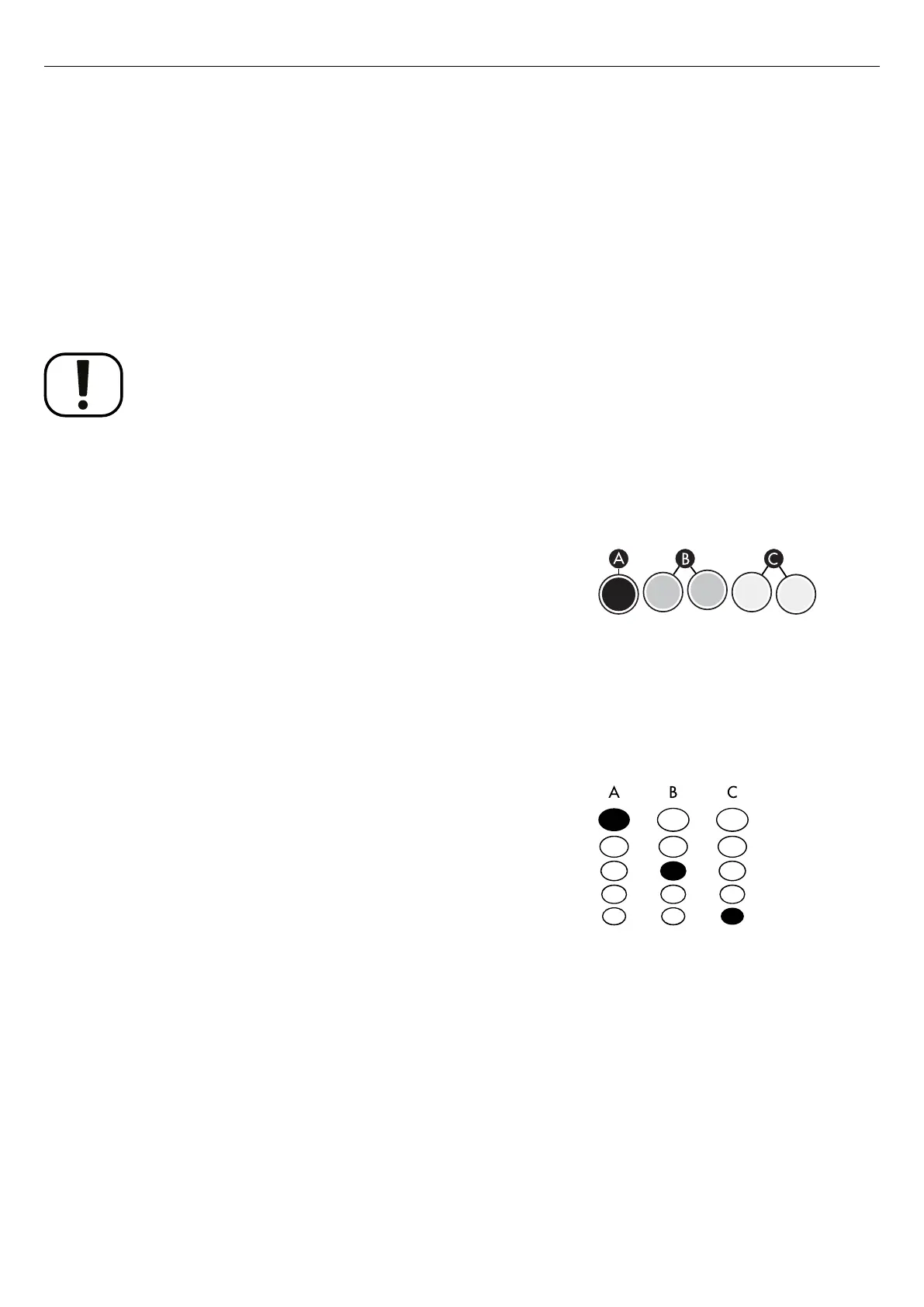
Figure 140. Battery indicator. A shows the red LED lit. B
shows the yellow LEDs lit. C shows the green LEDs lit.
The LEDs on the battery indicator show the battery status and if a
problem with the electronics has occurred:
• When the batteries are fully charged, the red LED (A), yellow LEDs
(B), and green LEDs (C) are lit.
• When the battery level is critically low, the red LED (A) flashes and a
beep sounds. This means that you have to charge the batteries
immediately to prevent that the Explorer Mini stops working.
• If all LEDs (A, B, and C) flash, there is a problem with the
electronics.
6.2.2 LEDs on the maximum speed indicator
Figure 141. Maximum speed indicator. A shows the
maximum setting. B shows the medium setting. C shows
the minimum setting.
The LEDs on the speed indicator show the current maximum speed
setting and if a problem with the electronics has occurred:
• When the fifth LED (A) is lit, the maximum setting is active.
• When the third LED (B) is lit, the medium setting is active.
• When the first LED (C) is lit, the minimum setting is active.
• If the LEDs flash, there is a problem with the electronics.
6.2.3 Rapidly flashing, one to ten LEDs
If the LEDs on the battery indicator and the maximum speed indicator
rapidly flash a fault has occurred in the electronics of the Explorer Mini
and you may not drive the wheelchair. Follow the instructions below:
1. Turn off the wheelchair.
2. Turn on the wheelchair. If the fault continues, count the flashes and
find a possible cause and remedy. See
6.2.4
Example of error messages and remedies
.
3. Do not use the Explorer Mini until the problem is solved or you
have received other information from your service provider.
75



 To Next Page