Explorer Mini
Repairs - Drive unit
4.12 Drive unit
4.12.1 Removing the drive units
The following tools are necessary for this task:
• Torque wrench.
• Allen socket, 3 mm.
• Allen socket, 4 mm.
1. Remove the top cover. For instructions, see
4.6.1.1
Removing the top cover
.
2. Remove the bottom cover. For instructions, see
4.6.2.1
Removing the bottom cover
.
3. Remove the drive wheels. For instructions, see
4.7.1
Removing the drive wheels
.
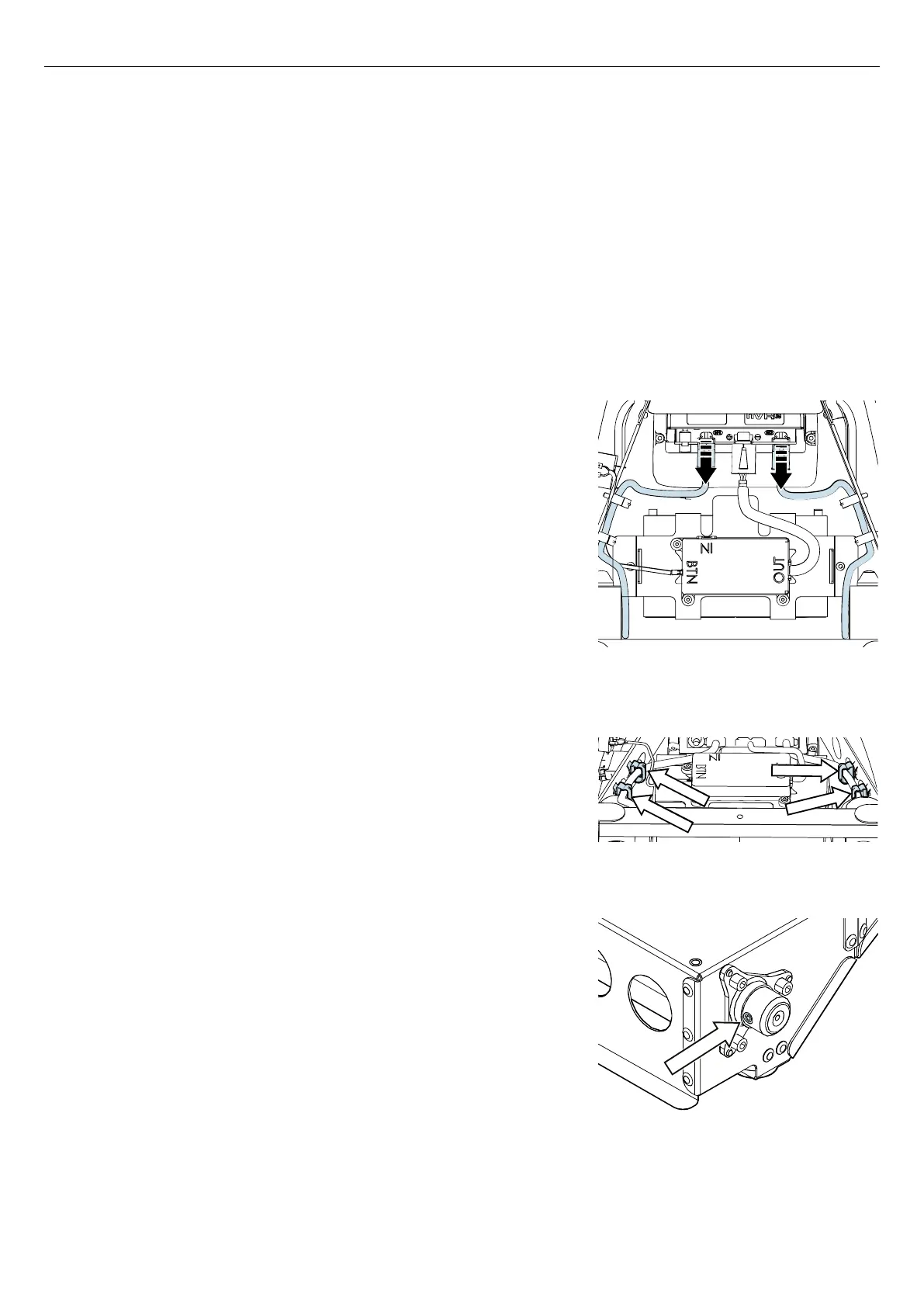
Figure 119. Disconnect the drive units from the nVR2
power module.
4. Press the latches on the connector of each drive unit and disconnect
the cable to each drive unit from the nVR2 power module.
Figure 120. Remove the cables from the cable holders.
5. Remove the cable for each drive unit from the cable holders.
Figure 121. Loosen the screw on the wheel hub.
6. Loosen the screw on the wheel hub for each drive unit. Do not
remove the screw.
63


 To Next Page