DA 7440 User Manual v.1.1 Aug 2015
10 (48)
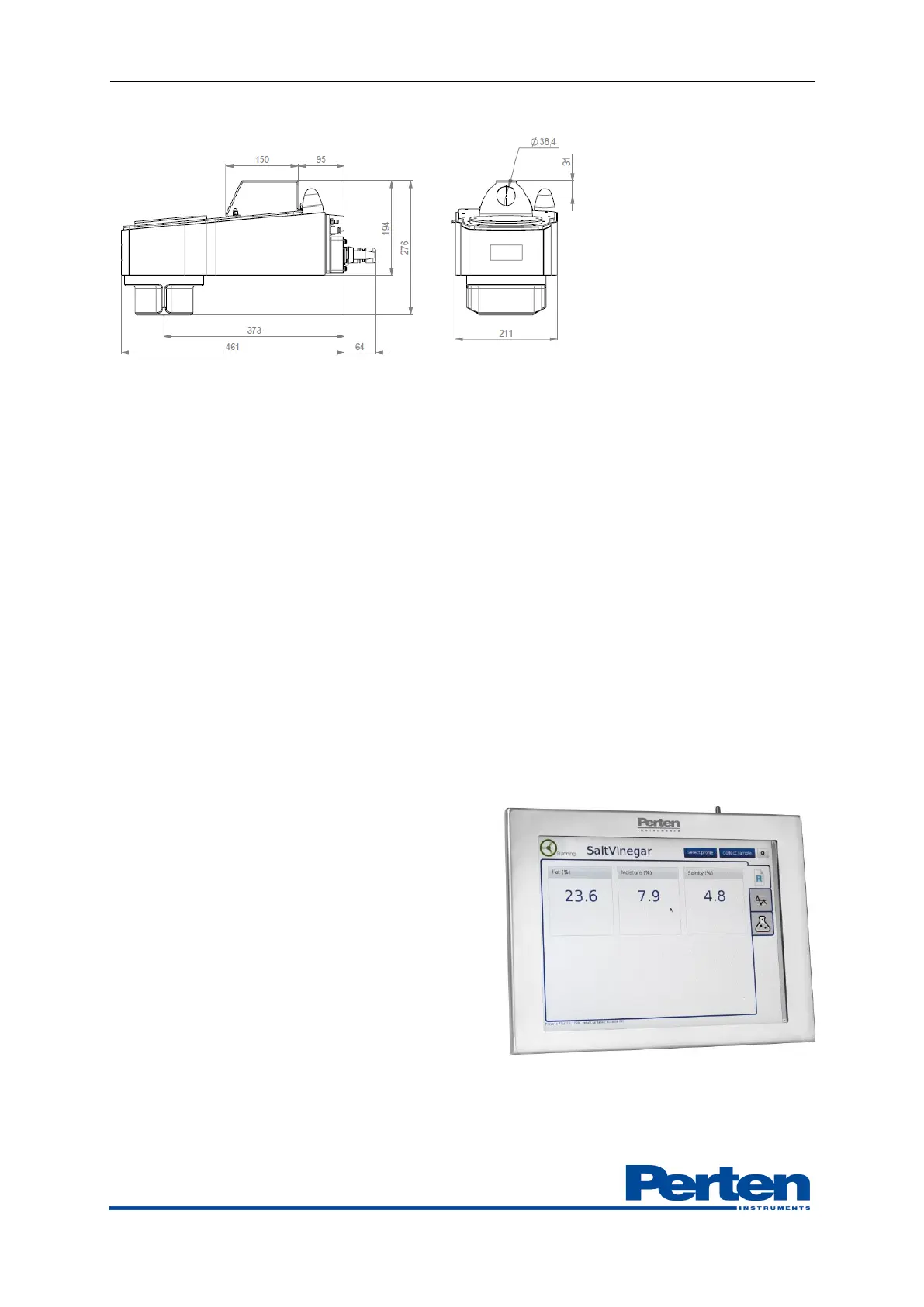
Instrument dimensions:
4.4 Junction box and instrument PC
To ease the DA 7440 instrument installation, a junction box for electronics could be included in
the scope of supply. The junction box should be placed in close vicinity of the sensor. It includes:
- 24 V DC power supply with UPS
- 4 port router with wireless access point
- PC
- Optional gateways for Analogue output and Fieldbus interfaces
The PC runs the operating software ProcessPlus on a Windows 7 platform. This computer is
placed in the junction box or optionally in a server room. As an alternative of using the Perten
supplied dedicated PC, the Process Plus software can be installed on a partition in a server.
Anti-virus protection is the responsibility of the instrument user. The PC does not include any
anti-virus software.
4.5 At line display
Enhancing the functionality of the instrument,
one optional At-line display is included in the
scope of supply. The screen provides at-a-glance
information of actual measurements in graphical
or numerical form. The instrument status is
shown with signaling and status messages,
highlighting the current instrument status.
The touch screen can also be used for taking the
grab samples. The At-line display is typically
placed in close connection (a few meters) to the
DA 7440 sensor measurement position.
Communication to the display is made through
Ethernet cable or wireless.


 To Next Page