DA 7440 User Manual v.1.1 Aug 2015
23 (48)
6.3 Sample collection settings
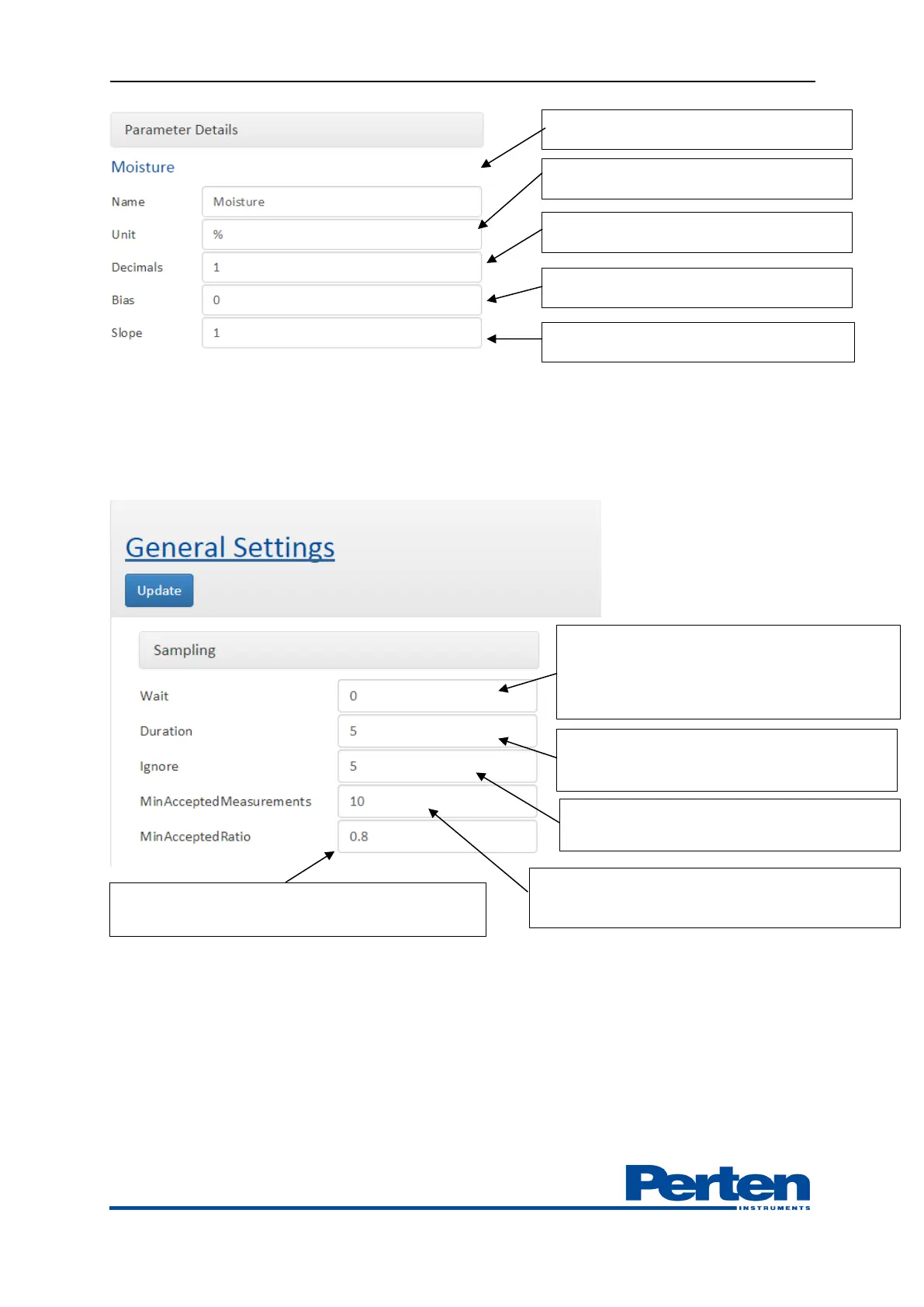
Sample collection settings include setting of the time during measurements and related optical
spectra are collected during grab samples collection.
6.4 Bias adjustment
In order to correct for systematic differences between laboratory results and DA 7440 NIR
measurements a Bias can be set. The Bias Adjustment function facilitates quick and easy
adjustments, should this become necessary.
The uncertainty of a calculated bias is significantly lowered as the number of samples included in
the bias calculation increases. It is also important that there are variations among the samples
used for the bias calculations, and that they are taken over a period of time. Generally >20
samples should be used to ensure a statistically valid bias.
Wait delay from sampling activation to
collection. >0 for pressing button –
collecting sample. < 0 for collecting sample
first.
Sample duration during which
measurements and spectra are averaged.
Minimum time in between sample
collections.
Minimum amount of measurements to approve
the sampling.
Minimum ratio of product present %, e.g on
conveyor belt to approve the sampling
Measurement result display decimals
Measurement adjustment bias
Measurement adjustment slope


 To Next Page