16
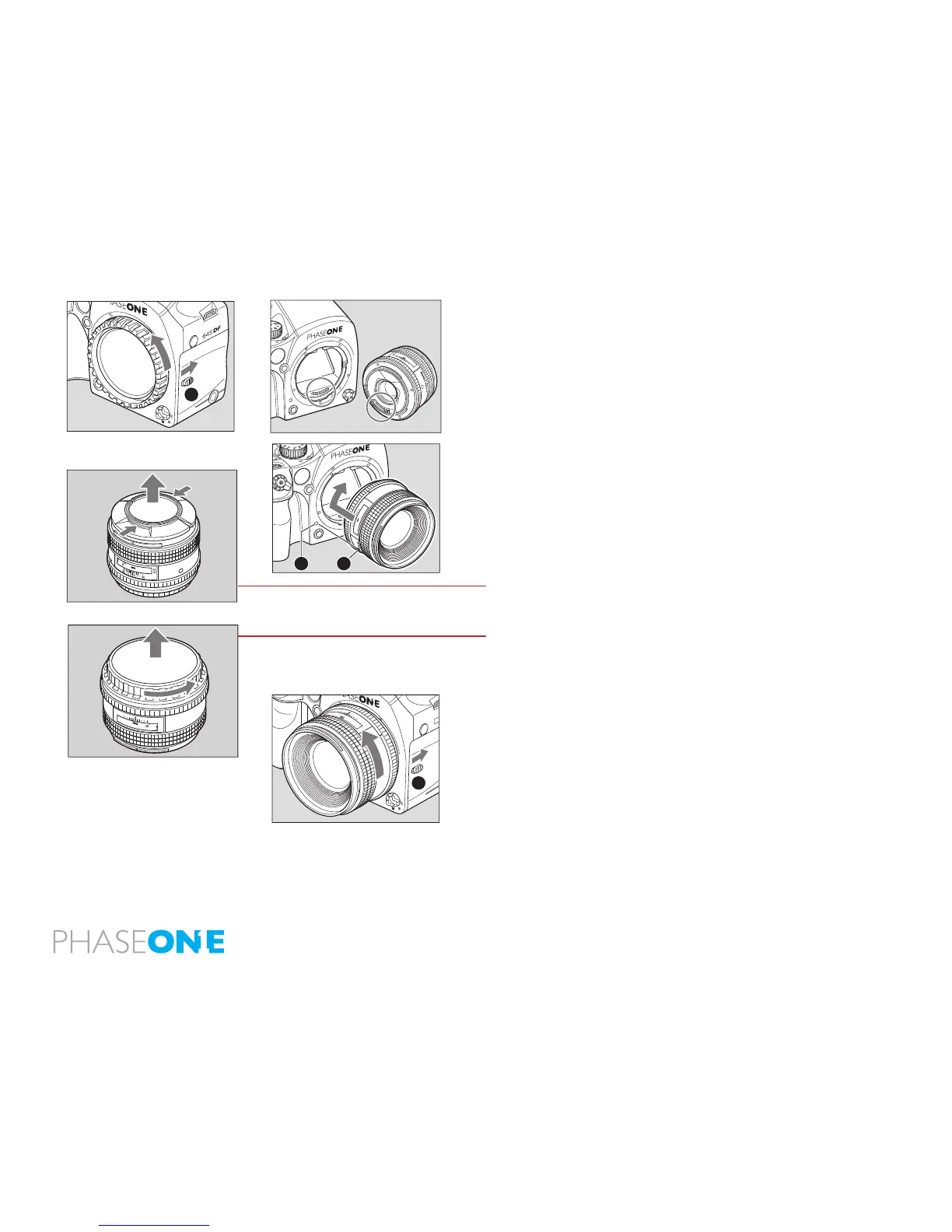
2.7 Attach and Remove Lens
1. Remove the front body cap in the same way that you would remove a lens;
push the lens release button [A] backward and then turn the front body cap
or the lens itself counter clockwise and lift out.
2. Align the white alignment dot of the lens [B] (on the shiny ange) with the
camera’s white dot [C]. Mount the lens and rotate it clockwise until it clicks
into place.
To remove the front lens cap, squeeze the shiny sections together
and lift out.
To remove rear lens cap turn it counterclockwise.
Remove the lens
While sliding the lens release button[A] back, rotate the lens counter
clockwise until it stops, and lift it o.
After removing the lens from the camera body, protect both ends by
attaching the caps.
Oil, dust, ngerprints or water on the electronic contacts could result in
malfunction or corrosion. Wipe such impurities o with a clean piece of cloth.
Do not tap the distance ring or other rotating parts when attaching the lens.
When installing a lens, do not press the lens release button.
MF
80mm
1:2 8
AF
22
22
11
11
4
4
ft
m
A



 To Next Page