PHILIPS 4000 and 3000 05 SERVICE MODE
18/18
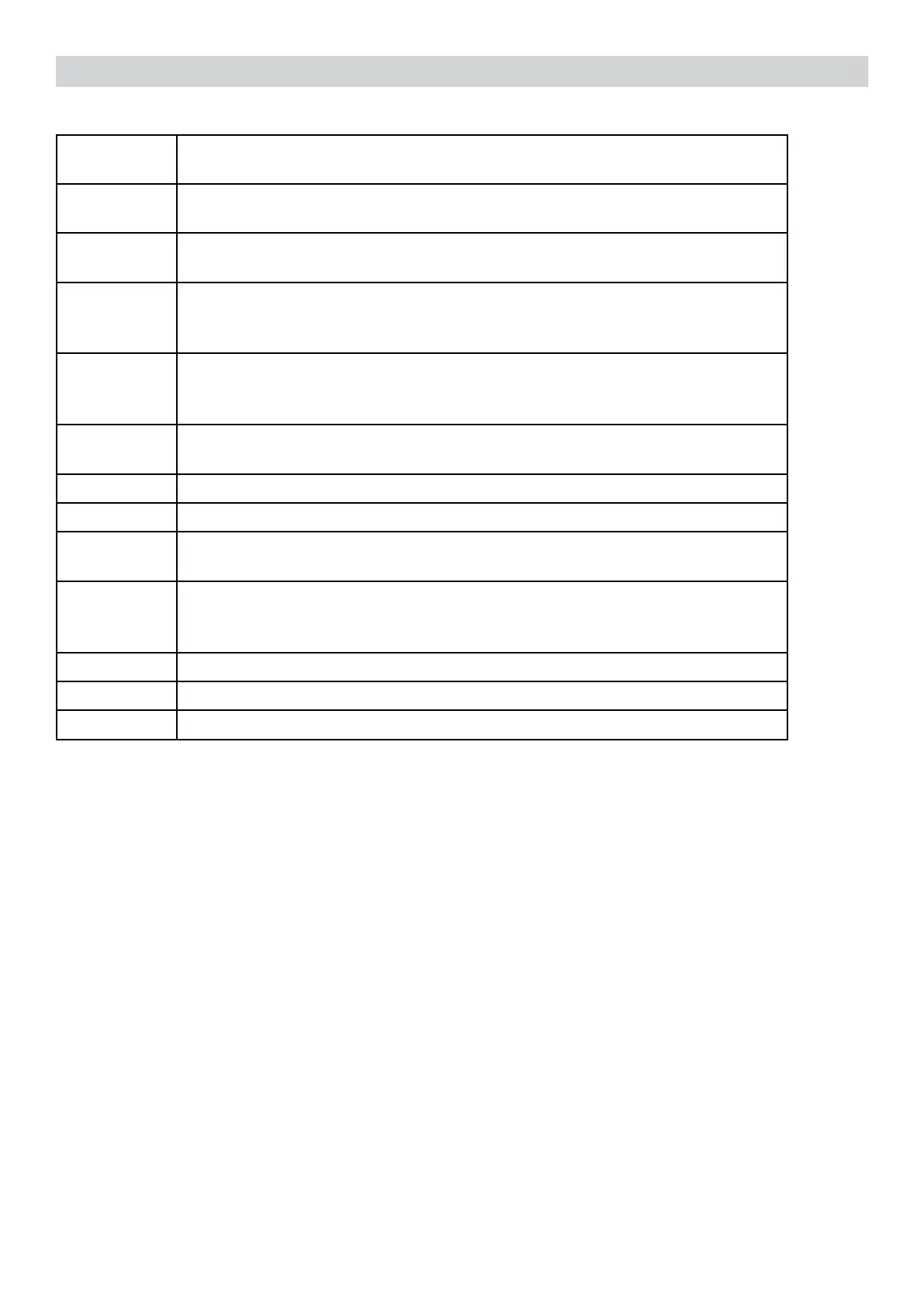
ERROR
CODES
DESCRIPTION
01
The coffee grinder is blocked (grinder blades jammed or sensor not
reading properly)
02
The grinder is disconnected (Only coffee grinder without electronic sen-
sor)
03
The brewing unit is blocked in work position (microswitch not released
inuppositionafter3",torqueerrortryingtomovedown,descenttime
out exceeded)
04
The brewing unit is blocked in home position (microswitch not released
indownpositionafter3",torqueerrortryingtomoveup,ascenttime
out exceeded)
05
Watercircuit/owmeterproblems(watercircuitblockedornoow
meter signal)
10
Boiler temperature sensor short circuited
11
Boiler temperature sensor open circuit
14
The boiler temperature has exceeded the maximum allowed value
(165°c)
15
The boiler temperature has not increased by x°C in y sec (boiler power
supplydisconnected,incorrectboilerttedmustbea1300Wboiler,par-
tialpowersupplytoboiler,cutoutthermostattripped)
19
Mains voltage trouble
22
interface missing or unknown
23
The Espresso/Coffee lever was damaged or disconnected
5.3. Error codes
5.4. SaecoServiceCenter-QuickStartGuide
SaecoServiceCenter–QuickStartGuide
Press the icon to view the document
To open the attached document is necessary to save the service manual on your PC.
Saeco Service Center (SSC) is a tool with which you can re-program the machine and check the
diagnostic of the same.
You can download the software from the following link: http://logsave.logtronics.com/SSC2/publish.htm
In support of this tool it is essential to order the Saeco Programming Device:
Cod. 20000490 “KIT PROGRAMMER SERKIT SSC2”.
This kit includes the programmer and cables helpful.
All details related to the registration and operation are explained in the enclosed Quick start guide
(QSG).





 To Next Page