Messages on your DVD Recorder display
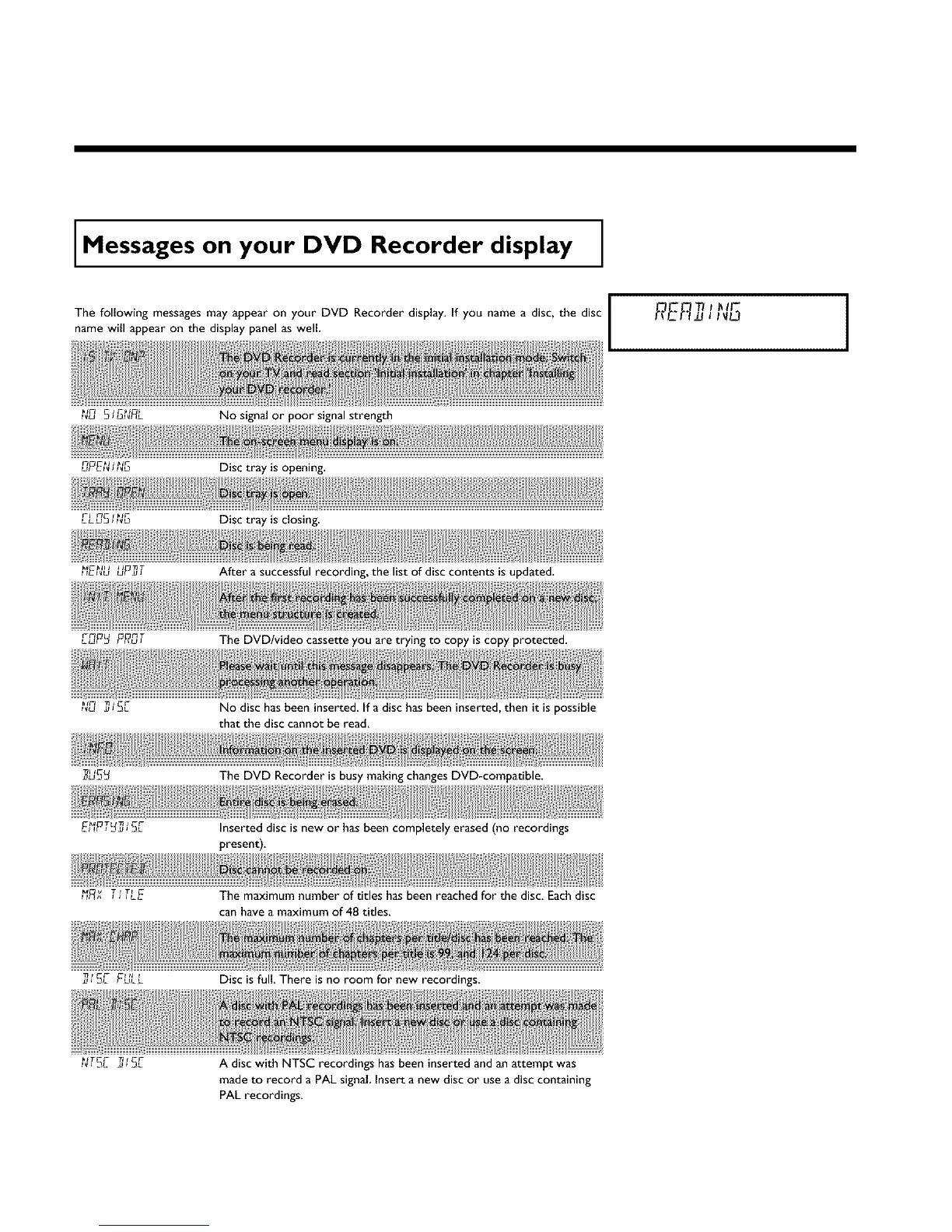
The following messages may appear on your DVD Recorder display. If you name a disc, the disc
name will appear on the display panel as well
F_ L _T
t_U Z J 3L
_ v j J JLEt F_ T _ TF
J _L FULL
No signal or poor signal strength
Disc tray is opening.
Disc tray is closing.
After a successful recording, the list of disc contents is updated.
The DVD/video cassette you are trying to copy is copy protected.
No disc has been inserted, if a disc has been inserted, then it is possible
that the disc cannot be read.
The DVD Recorder is busy making changes DVD-compatible.
Inserted disc is new or has been completely erased (no recordings
present).
The maximum number of titles has been reached for the disc. Each disc
can have a maximum of 48 titles.
Disc is full, There is no room for new recordings.
I I
_TGr- _1 r C_-
A disc with NTSC recordings has been inserted and an attempt was
made to record a PAL signal Insert a new disc or use a disc containing
PAL recordings.















 To Next Page