17EN 17EN
Recording Playback EditingIntroduction
Connections
Basic Setup Function Setup VCR Functions
Others
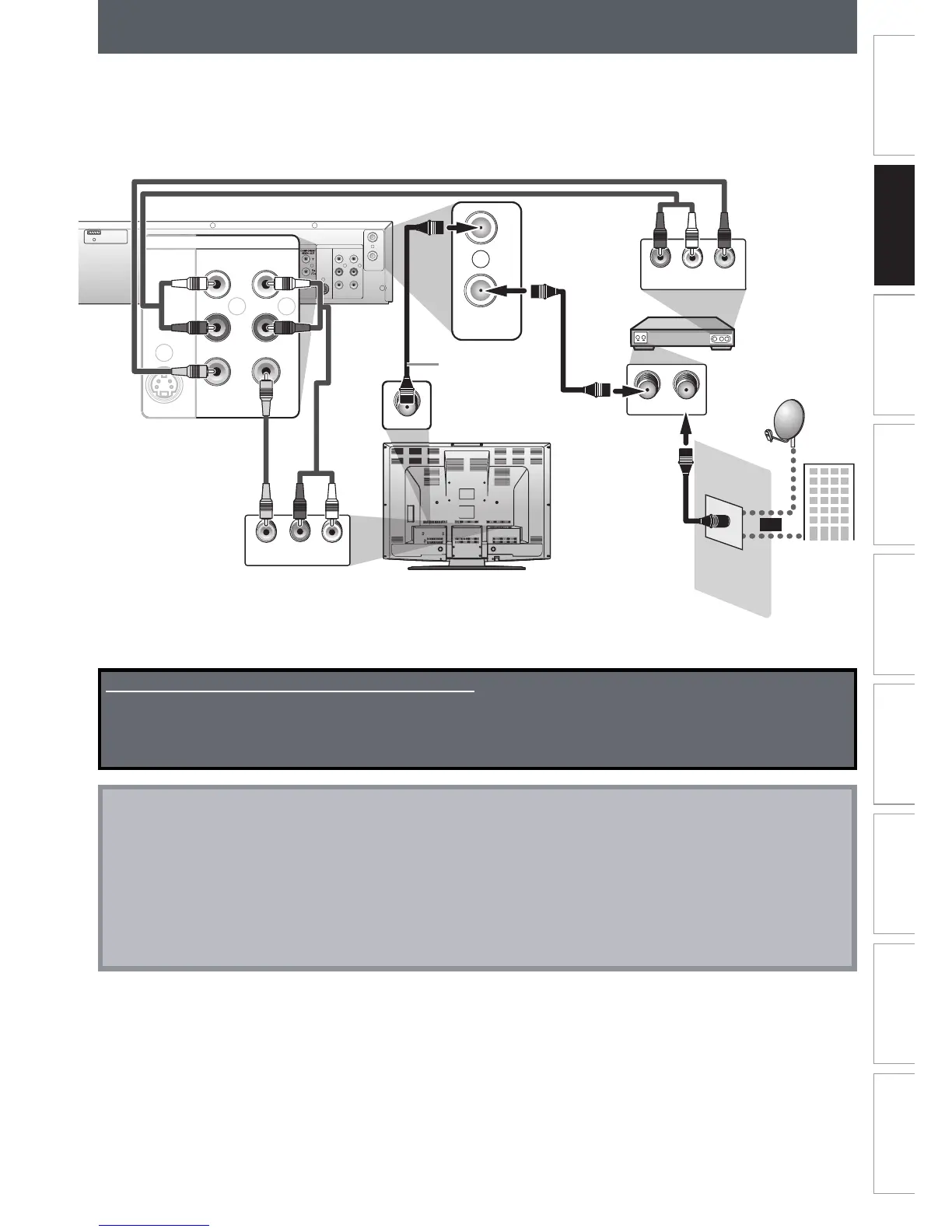
CONNECTION TO A CABLE / SATELLITE BOX
1) Disconnect the power cords of the devices from the AC outlet.
2) Make the connection as illustrated below.
3) Plug in the power cords of the devices to the AC outlet.
Note
• Required cables and connecting methods differ depending on the cable/satellite box.
For more information, please contact your cable/satellite provider.
• Instead of using video out jack of this unit, you can also use S-VIDEO OUT jack, COMPONENT VIDEO OUT jack, or
HDMI OUT jack (DVD only)(no audio out jack connection required) for connecting to your TV.
With this setup:
• You can record any unscrambled channel by selecting the channel on the cable/satellite box. Be sure that the
cable/satellite box is turned on.
• You cannot record one channel while watching another channel.
Supplied cables used in this connection are as follows:
• RF coaxial cable x 1
• RCA audio cable (L/R) x 1
• RCA video cable x 1
Please purchase the rest of the necessary cables at your local store.














 To Next Page