ErgoLine D330/D340
Customer Engineer Manual
Page 2-41
Installing Optional Line Interface
The ErgoLine terminal can be fitted with either a 2-wire or a 4-wire line interface.
To change the line interface, proceed as follows:
WARNING
: Do not open the ErgoLine terminal when line or external power is
connected.
1. Turn the terminal upside down.
2. Remove the line cord (if connected).
3. Remove the DSS cover, as described previously.
4. Remove the external power supply if fitted.
5. Remove the handset plug and any auxiliary equipment fitted.
6. Remove the base of the terminal. The base is fastened to the terminal with
screws, one of which is located under the DSS cover.
7. Remove the existing interface.
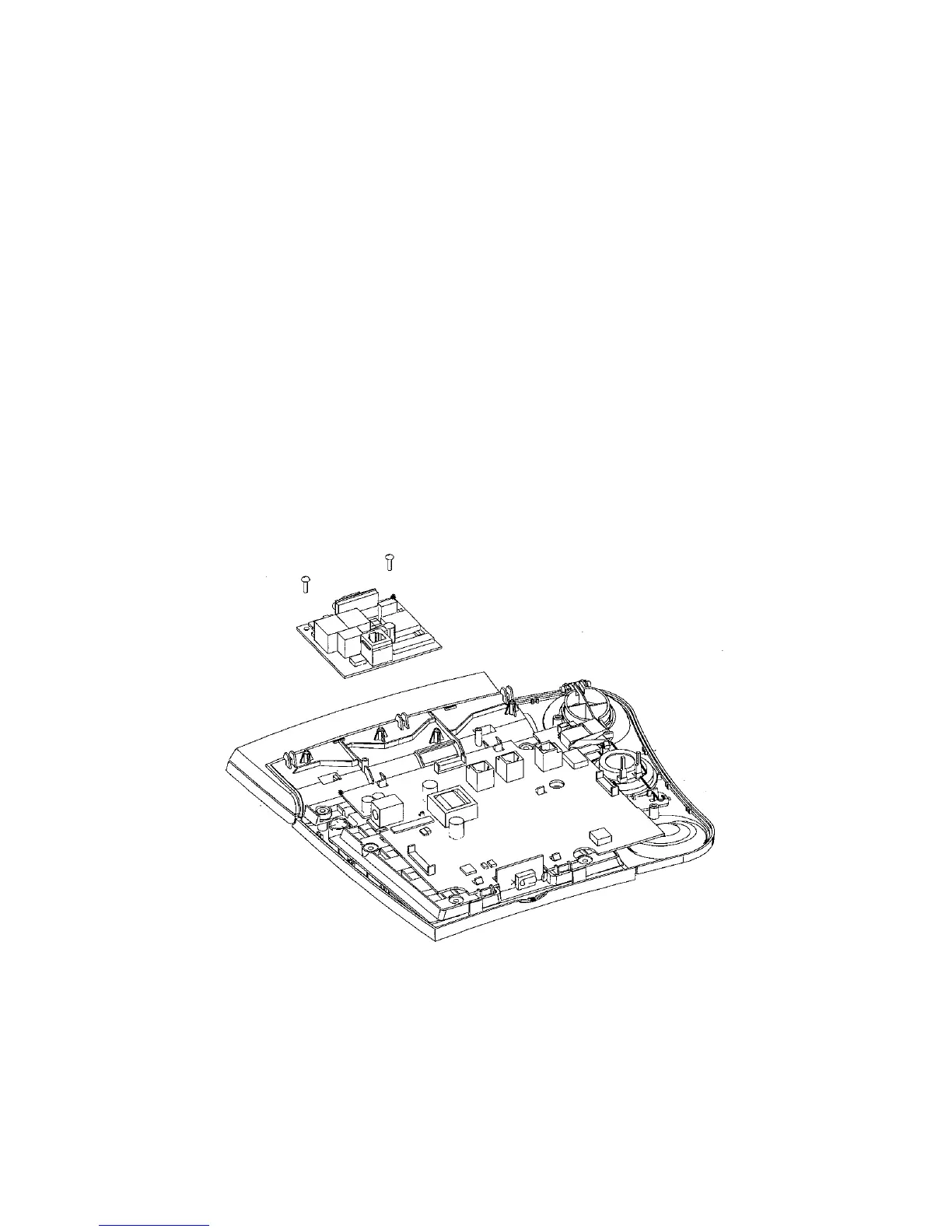
8. Install the optional line interface as shown. Make sure that the board is secured
using the screws provided.
F
IGURE
2-9. I
NSTALLING THE
O
PTIONAL
L
INE
I
NTERFACE
9. Replace the base cover of the terminal and secure it with the screws.
10. Replace any auxiliary equipment and handset plug.
11. Replace the line cord.



 To Next Page