Option 1" Connect to the HDMI jack Option 2: Connect to the component
video jack
1
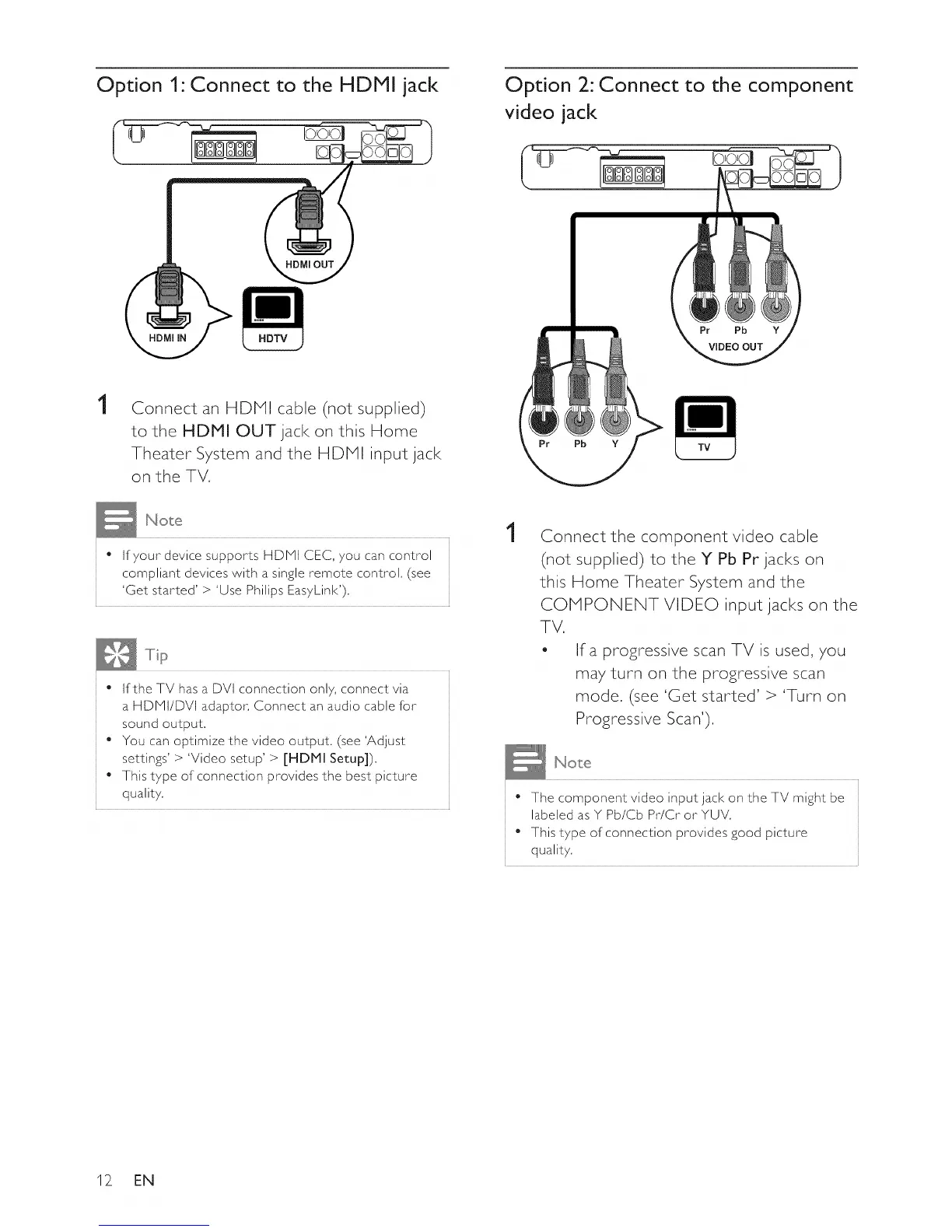
Connect an HDMI cable (not supplied)
to the HDMI OUT jack on this Home
Theater System and the HDMI input jack
on the TV,
• If your device supports HDMI CEC, you can control
compliant devices with a single remote control, (see
'Get started' > 'Use Philips Eas7Link' ),
• If the TV has a DVI connection onl 7,connect via
a HDMI/DVI adaptor, Connect an audio cable for
sound output,
• You can optimize the video output, (see 'Adjust
settings' > 'Video setup' > [HDMI Setup]),
• This t7pe of connection provides the best picture
qualit 7,
1
Connect the component video cable
(not supplied) to the Y Pb Pr jacks on
this Home Theater System and the
COMPONENT VIDEO input jacks on the
TV.
- Ira progressive scan TV is used, you
may turn on the progressive scan
mode. (see 'Get started' > 'Turn on
Progressive Scan').
• The component video input jack on the TV might be
labeled as Y Pb/Cb Pr/Cr or YUV,
• This type of connection provides good picture
quality,
12_ EN















 To Next Page