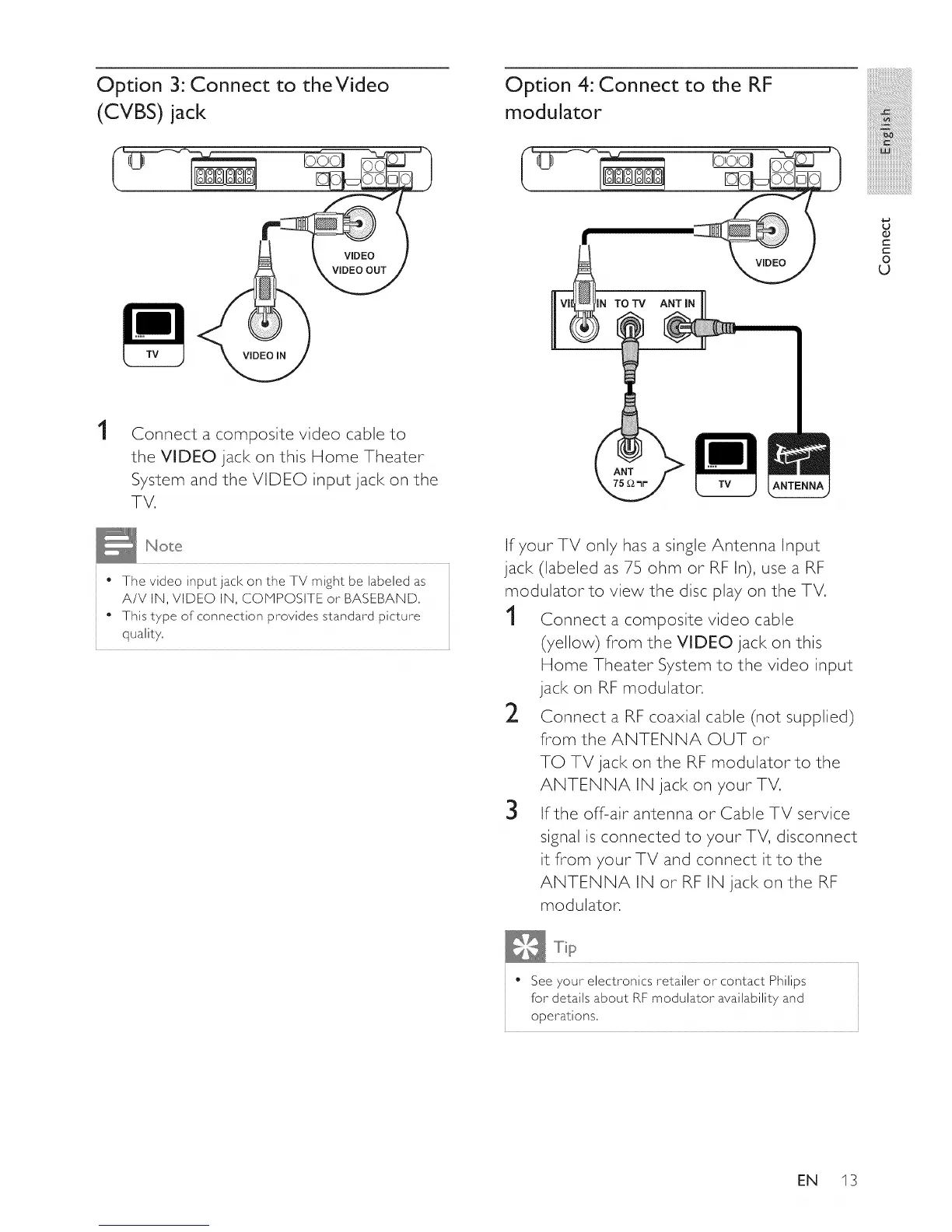
Option 3: Connect to theVideo
(CVBS) jack
VIDEO
VIDEO OUT
VIDEO IN
Option 4: Connect to the RF
modulator
N TOTV A_ •
:iiiiiiiiiiiii
iii_!iiiiiiiiiiiiiiii_iiiiiiiiiiiiiiiiiii!
iiiiiiiiiiii_ii_!i!i!i!i!i!i!i!
mmmmmmmmmm_
mmmmmmmmmm_
iiiiiiiiiiiiiiiiiiiiiiiiiiiiiiiiiil......
iiiiiiiiiiiiiiiiiiiiiiiiiiiiiiiiiiiii_
.$..,
,j
O
C
t-
O
U
1
Connect a composite video cable to
the VIDEO jack on this Home Theater
System and the VIDEO input jack on the
TV.
• The video input jack on the TV might be labeled as
A/V IN, VIDEO IN, COMPOSITE or BASEBAND.
• This type of connection provides standard picture
quality.
If your TV only has a single Antenna Input
jack (labeled as 75 ohm or RF In), use a RF
modulator to view the disc play on the TV.
1 Connect a composite video cable
(7ellow) from the VIDEO jack on this
Home Theater System to the video input
jack on RF modulator.
2 Connect a RF coaxial cable (not supplied)
from the ANTENNA OUT or
TO TV jack on the RF modulator to the
ANTENNA IN jack on your TV.
3 ffthe off-air antenna or Cable TV service
signal is connected to your TV, disconnect
it flrom 7ourTV and connect it to the
ANTENNA IN or RF IN jack on the RF
modulator.
• See 7our electronics retailer or contact Philips
for details about RF modulator availabilit 7 and
operations.
EN 13















 To Next Page