30 5756B
7. Data consistency:
To provide consistent data of more than one word
(16 bits), use the "Asynchronous With Synchronization
Pulse" operating mode. This can be set in IBS CMD (see
Figure 26) or in the driver blocks.
If you set "Asynchronous With Synchronization Pulse"
operating mode in the "Controller Board Settings... Bus
Operation" dialog box, you must also call the "Bus
Operation...Options" dialog box.
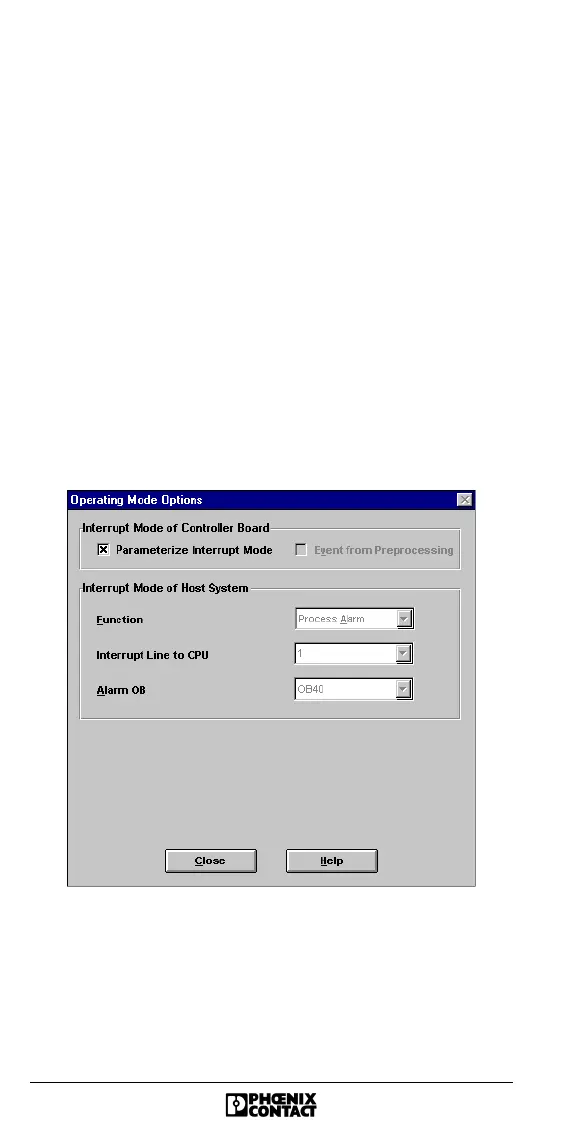
Figure 26 "Bus Operation Operating Mode Options" dialog
box
In this dialog box, check the "Parameterize Interrupt
Mode" box. This is required to provide the program with
additional data on the INTERBUS operating mode set
Offset (Byte) Enter the start address of the data to be
transmitted in the selected destination/source
area of the PLC.
Length (Byte) Enter the length of the data to be transmitted.
Destination/
Source
These fields indicate the corresponding
destination or source pointer for activated
data records. Activate a data record by
selecting the checkbox next to the display.




 To Next Page