5756B 59
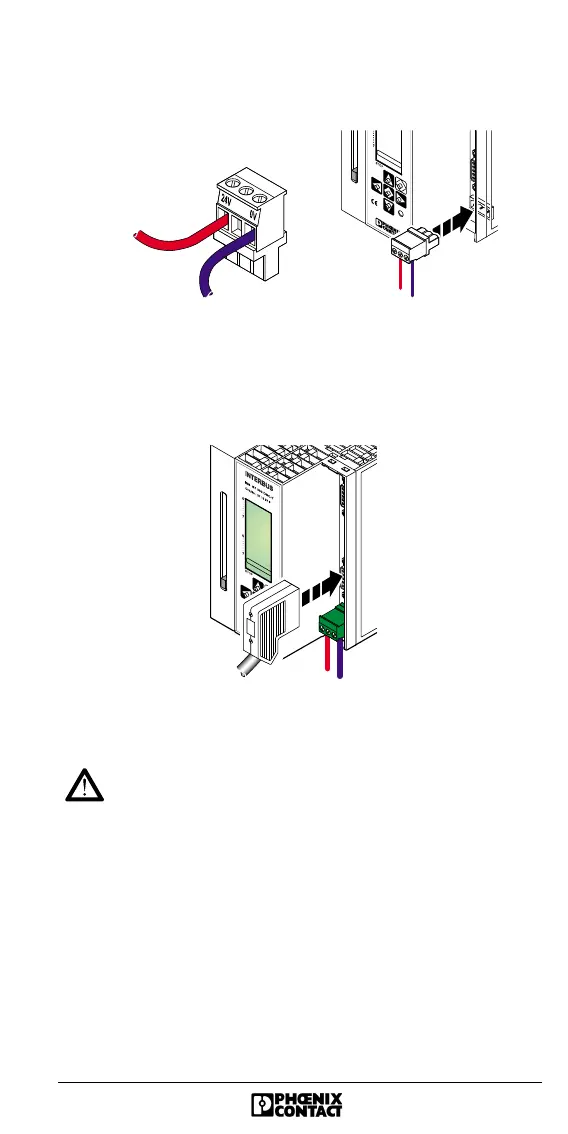
9. Plug the COMBICON connector used to connect the
external power supply into the controller board.
Figure 40 Connecting the COMBICON connector
10. Plug in and lock the remote bus connector.
Figure 41 Connecting the controller board to the remote bus
11. Plug in the RS-232 cable (if applicable) and lock it.
Observe the operating instructions for your system
before switching the PLC on.
12. Switch on the power supply of the PLC.
5756A037
0 V
24 V
5756A038




 To Next Page