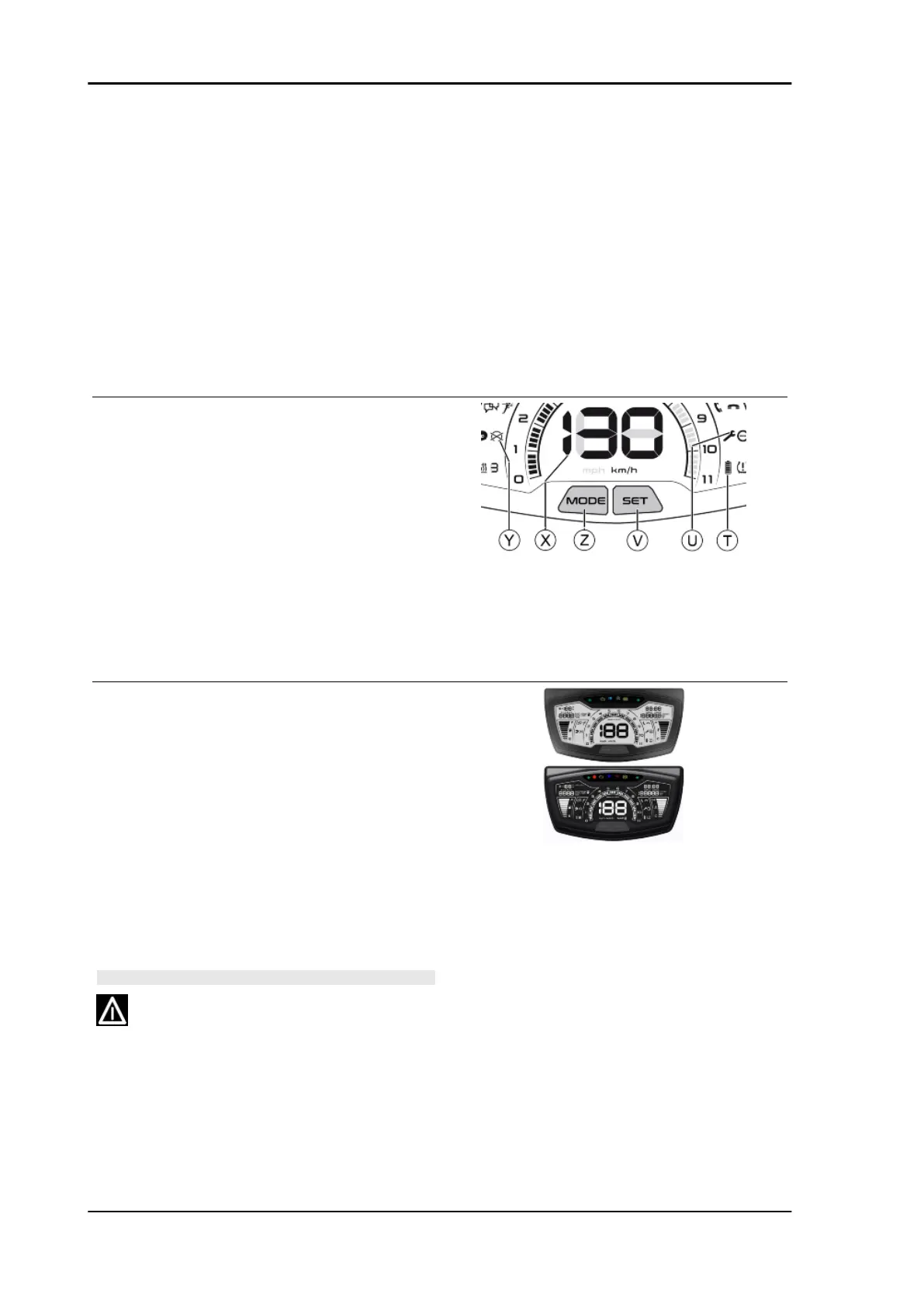
R = Icon for the connection between the smart-
phone PIAGGIO app and the PMP3 control unit on
the vehicle:
•
if it is steady, the application commu-
nicates with the ECU;
•
if it flashes, the smartphone and PMP3
control unit pairing is being performed.
S = Tyre low pressure icon provision (currently un-
available on this version)
T = Smartphone battery level icon
U = Icon for the scheduled maintenance service to
be performed
V = SET button for adjustments (clock, display
backlight)
Z = MODE button for display on the multifunctional
panel and measurement unit conversion on the
digital display
X = Speedometer
Y = Engine start inhibited icon
DIGITAL DISPLAY BACK-LIGHT COLOUR
CHANGE
To change the digital display back-light colour,
with the engine started and the ignition switch to
"ON" position, proceed as follows:
•
keep the SET button on the instrument
panel pressed and at the same time
press two consecutive times on the
MODE button; the back-light will switch
to another colour.
WARNING
FOR SAFETY REASONS, THE BACK-LIGHT COLOUR ON
THE DIGITAL DISPLAY CAN BE CHANGED ONLY WITH
THE VEHICLE AT A STANDSTILL.
Electrical system Beverly 400 E5
ELE SYS - 70


 To Next Page