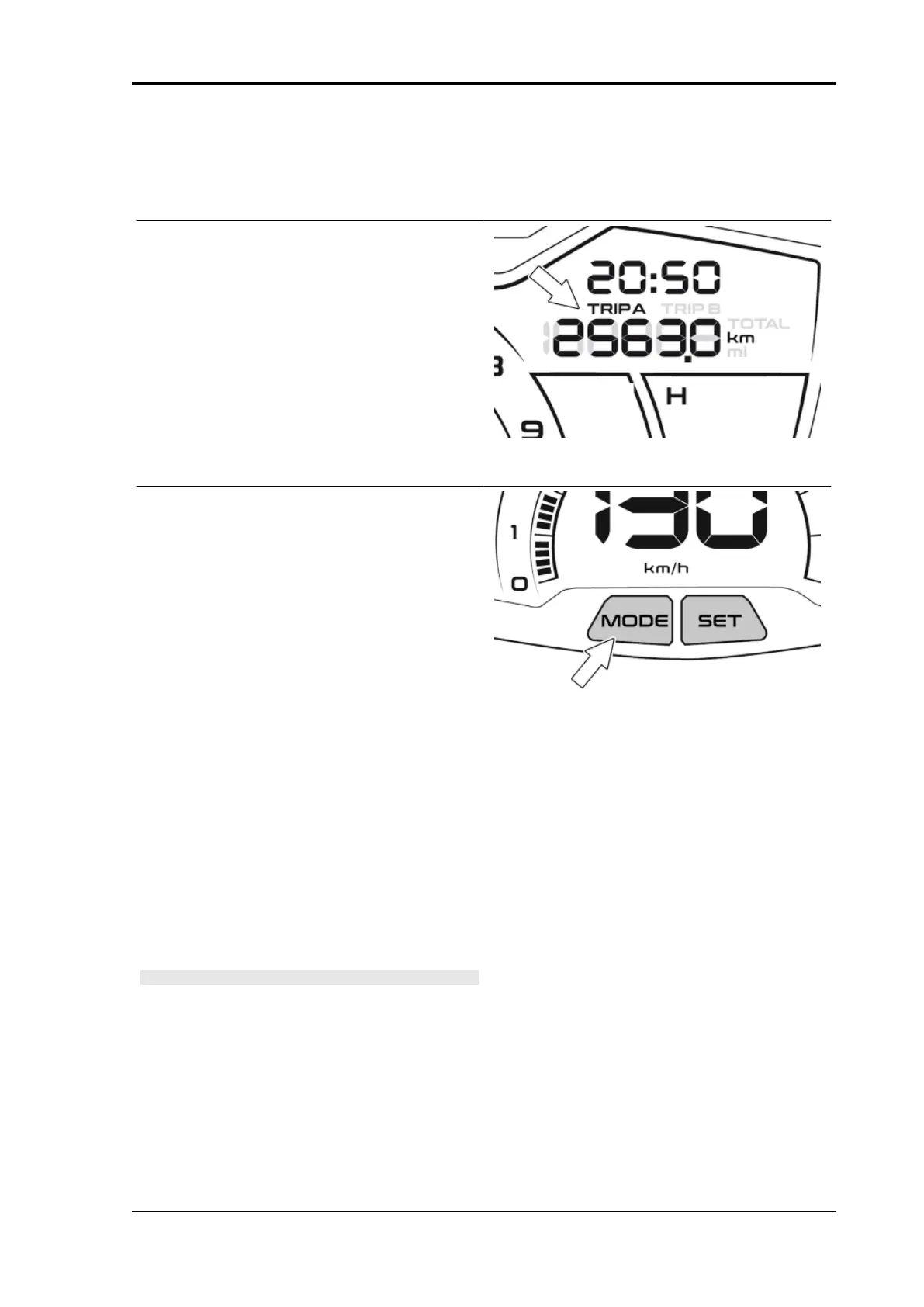
By keeping the MODE button pressed, upon its
release, the multifunctional panel will display the
current consumption.
By briefly pressing twice on the MODE button, the
following information can be viewed cyclically on
the digital display:
•
Trip A (partial odometer A)
•
Trip B (partial odometer B)
•
TOTAL (total odometer)
While viewing the selected function, to reset the
stored values, keep the MODE button pressed for
more than 5 seconds.
DIGITAL DISPLAY MEASUREMENT UNIT CON-
VERSION (Km-mi, l-gal, °C-°F)
•
With the ignition switch turned to
"OFF", press and hold the MODE but-
ton on the instrument cluster and si-
multaneously turn the ignition switch to
"ON";
•
release the button. The icons "mi",
"km", "°C", "°F" will flash;
•
briefly press the MODE button, until the
desired icon is displayed (steady);
•
press and hold the MODE for at least 1
to 5 seconds to change the unit of
measurement;
•
the consumption measurement unit
will automatically change when "Km"
or "mi" is selected.
N.B.
THE MEASUREMENT UNIT CONVERSION CAN TAKE
PLACE ONLY WITH THE VEHICLE AT A STANDSTILL.
Beverly 400 E5 Electrical system
ELE SYS - 73



 To Next Page