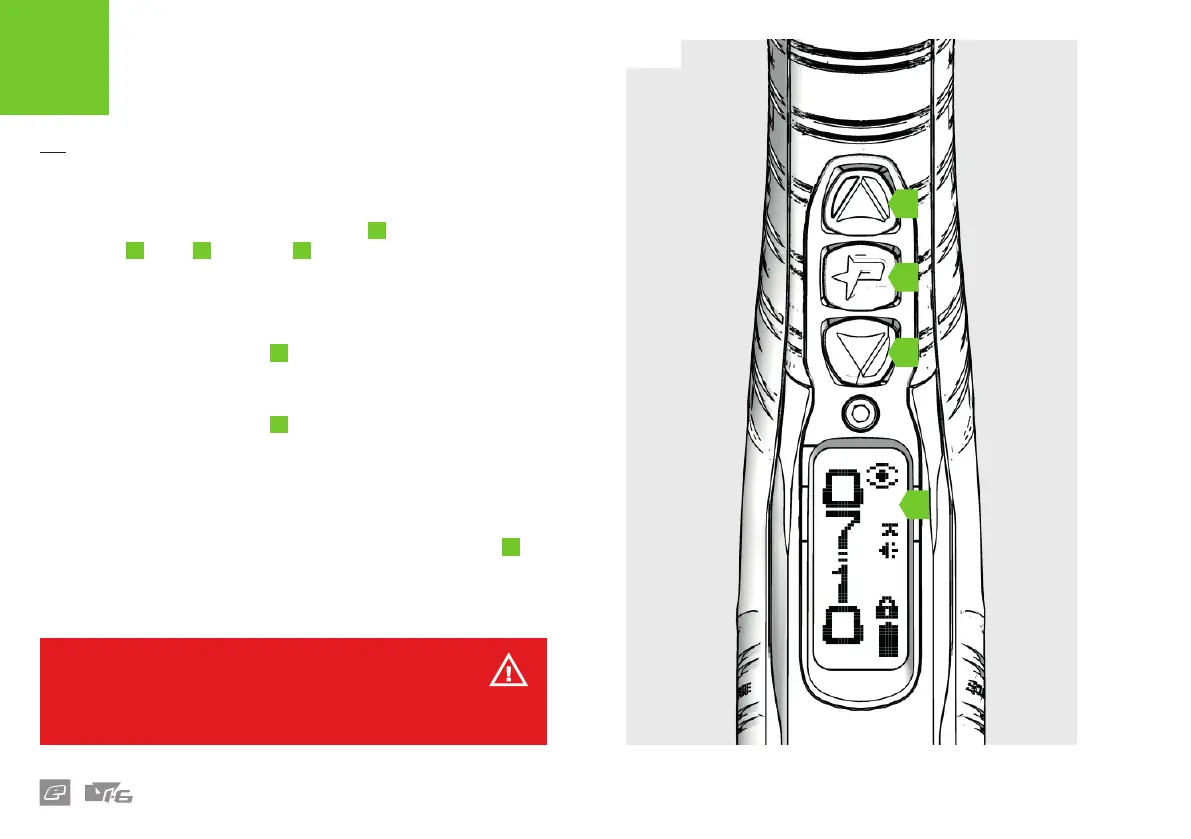
FIG-1
B
D
C
A
08
FIG-1
The navigation console houses the LCD screen
A
and the navigation
buttons: Up
B
Down
C
and Select
D
.
Use the navigation console to switch the LV1.6 On or O and change the
marker settings.
Switching ON
Press and hold the Select button
D
– or double-click it
1
– until the
Eclipse logo is displayed.
Switching OFF
Press and hold the Select button
D
– or double-click it
1
– until the TURN
OFF option is displayed. Press the Select button again to switch o.
Firing the marker
Pull the trigger to re the marker. The breech sensor (BS) will indicate
whether the marker is able to re.
To switch the breech sensor ON/OFF push and hold the Up button
B
for 0.5 seconds when the marker is switched on. See page 10 for BS
indicator details.
1 The double-click feature can be disabled in the HARDWARE menu (see page 35).
INTRODUCTION
SWITCHING ON/OFF
WARNING!
DO NOT dry re your marker as this may lead to damage over a sustained
period of dry ring.















 To Next Page