STERLINK mini User Manual
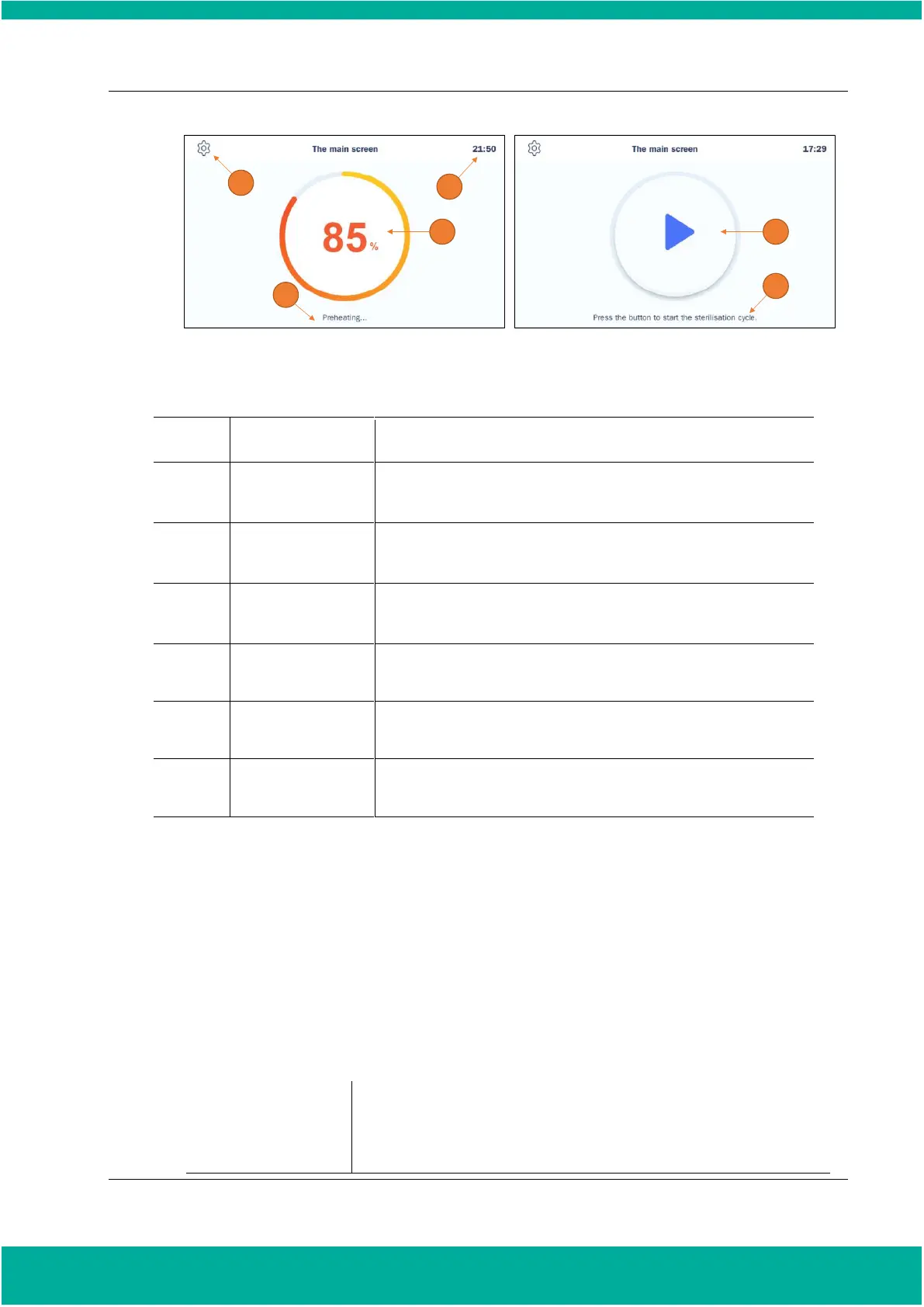
Fig. 5.1 Preheating and preparation processes displayed on the screen
Click the ‘Configuration’ icon to go to the Configuration settings of
the sterilizer.
The current status of the sterilizer is displayed.
The current time that can be set in the ‘Configuration’ is displayed.
Displays the progress status of the current preheating.
Click this icon to start the sterilization cycle.
This section shows the current status.
5.3. Preparations for Loading
Ensuring that sterilization conditions are met during the sterilization cycle is one of the most important
issues in sterilization. Using Biological Indicators (BI) is one way of ensuring that the sterilizer is
working properly.
Place a biological indicator in the chamber for chamber mode. It is recommended that this biological
test be performed once a day, or in accordance with your facility's policy. While the sterilizer is
preheated, you can prepare the loads.
Total mass of the items should be less than 1.54 lbs (0.7 kg).
(A maximum of five medical devices with lumen structure can be included.)


 To Next Page