STERLINK mini User Manual
5.5. Starting the Sterilization Cycle
1. After placing the STERLOAD™ in the loading block and the load in the chamber, confirm the door
is closed.
2. Press the ‘ ’ icon to start the sterilization cycle.
3. Then, the sterilizer automatically scans the barcode printed on the cassette to validate the loaded
cassette, and determines the operating mode.
4. The sterilizer automatically checks that the door is closed, and starts the sterilization cycle.
5. When the sterilization process starts, the door cannot be opened during the process because the
interior of the chamber is kept in a vacuum state.
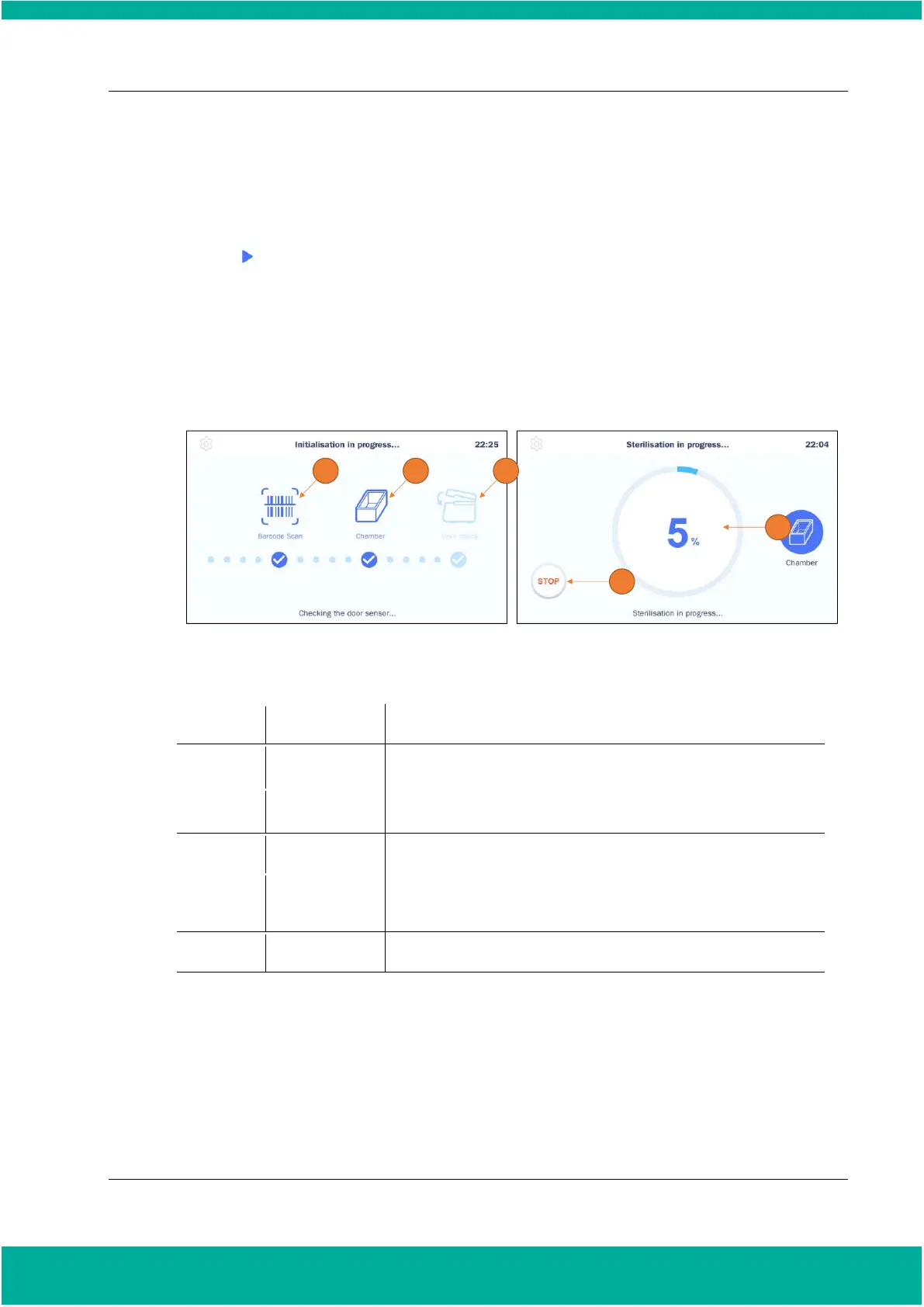
Fig. 5.3 Screen showing initialization and sterilization process
The result of the barcode scanning of the loaded cassette is displayed.
It indicates the sterilization mode determined by the barcode.
It indicates the status of the door.
Displays the progress status of the current sterilization.
This icon is used to cancel the sterilization cycle.
Notes.
▪ When a cassette is reused or expired, the cycle will be cancelled.
▪ If a cassette is mounted incorrectly, an error occurs in barcode recognition, and the cycle will be
canceled.
▪ If the chamber door is not tightly closed, the cycle will be cancelled.
▪ The cancellation of a cycle does not guarantee a Sterility Assurance Level, and a user may be


 To Next Page