Chapter 6. Access Levels and Administrator Tasks
6.1. Overview
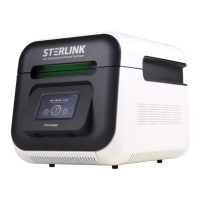
The STERLINK mini Sterilizer utilizes the embedded software for automated implementation of
STERLINK mini sterilization process. This chapter contains how to control the configuration of the
STERLINK mini Low Temperature Plasma Sterilizer.
A user with administrator-level access authorities (see below) are permitted to perform a set of
restricted sterilizer functions. These functions are not used in daily sterilizer operation and are
designed to control access, manage system records, and perform advanced diagnostic functions.
6.2. Access levels
The STERLINK mini sterilizer can be configured to require that the users enter a valid password in
order to control the system configuration. There are three levels of access available. Each is associated
with a different subset of permitted operations.
Operator-level access is designed to permit a user to perform the tasks associated with the daily
operation of the sterilizer. These authorities allow a user to:
▪ Start and cancel the cycle
▪ Print a cycle history report and view cycle history files
▪ Setup the display and sound
Administrative-level access include all authorities of Operator-level access and additionally
provides the ability to:
▪ Run diagnostic tests
▪ Perform calibration for the sensors
▪ Perform emergency action function
▪ Setup system time
Service-level access is only for use by the Plasmapp customer service representatives.
▪ Software update
▪ Modify the process parameters


 To Next Page