STERLINK mini User Manual
6.3. Additional Utilities Menu
The additional utilities menu of ‘Configuration’ is only available to administrators, or users with
service level access. The additional utility menus allow administrators to configure time settings,
sterilization system settings, and diagnostic tests.
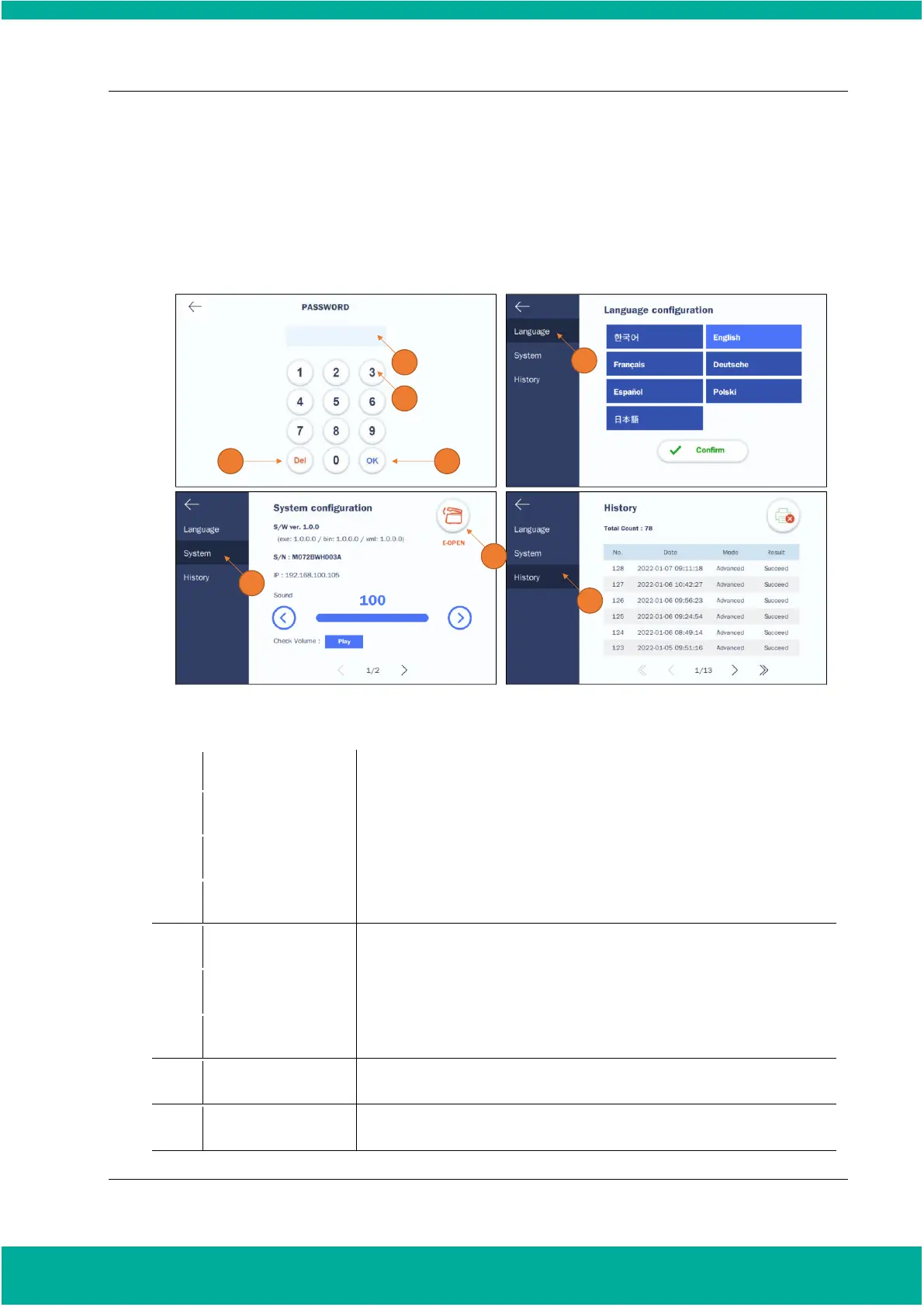
Fig. 6.1 Screens for system settings
A number key is provided for entering the password and system settings.
It deletes the entered number.
It displays the entered password. The password is set to “1111” by default.
It confirms the entered password.
The key is for changing the language. When the language changed, it will
automatically reboot and the selected language will be applied.
The key is for viewing information on the device or adjusting the volume.
If the chamber is not opened due to vacuum, the emergency vent button can
be used to forced vent.
It shows the usage history of the equipment. Up to 80 usage histories are
stored.


 To Next Page