STERLINK mini User Manual
Chapter 7. Reports and Data
7.1. Reports
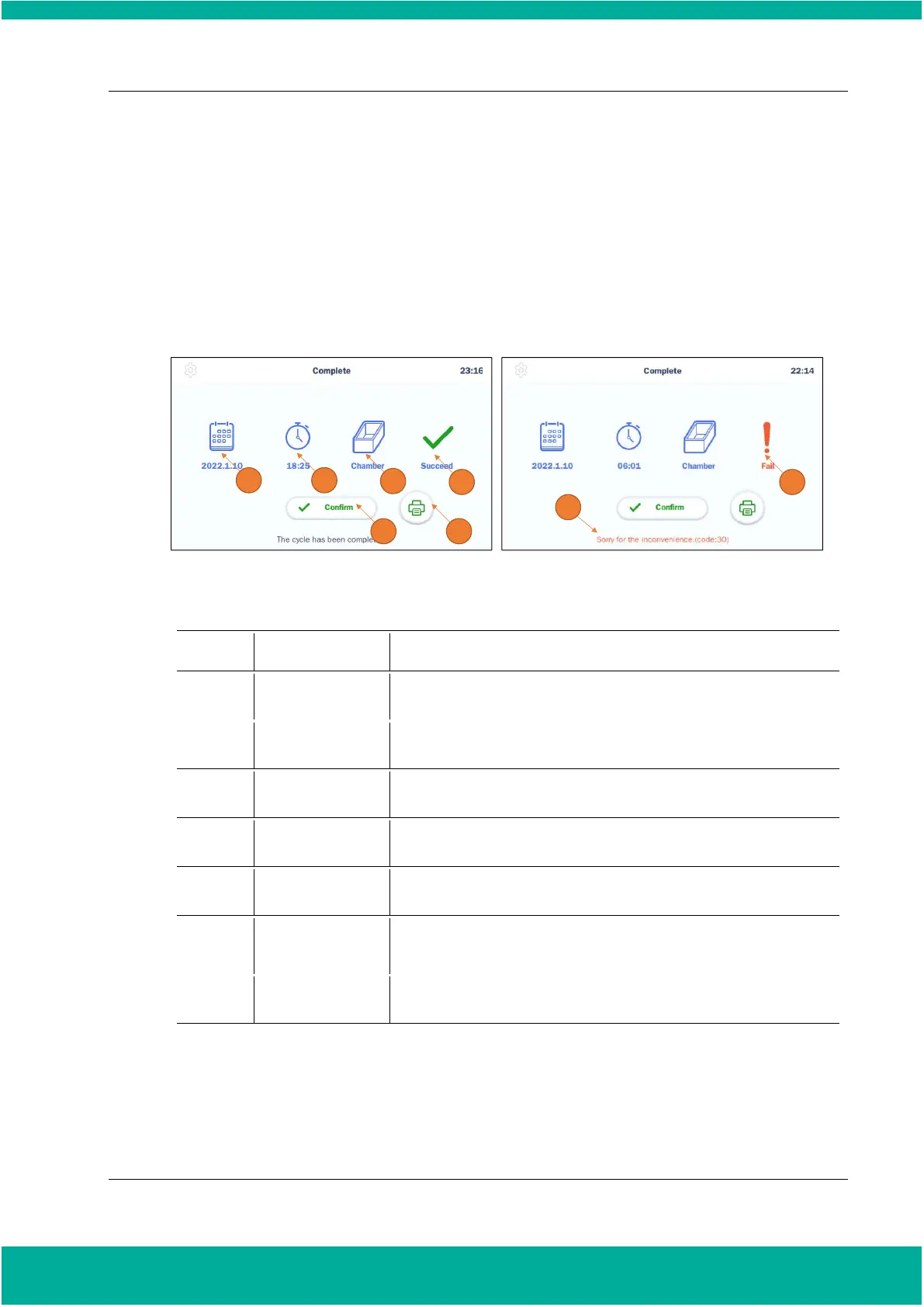
Upon completion of the sterilization cycle, the STERLINK mini Sterilization System automatically
creates a cycle report. The completed report summarizes the information of the cycle date, time,
process mode, and the result of the sterilization cycle.
Fig. 7.1 Screens for cycle report; succeed (left) and fail (right)
Displays the start date of the sterilization cycle.
Displays time for overall cycle time
Displays the mode of the finished sterilization cycle
Displays the result of the sterilization cycle
Clicks on “Confirm” button, the screen moves to ready state
Clicks on “Print” button, the label printer will print out the summary
of the sterilization cycle information
The current status of the sterilizer is displayed.
When a user selects the ‘Print’ button, the label printer will print a summary report that shows the
details on the device status, sterilization cycle, and cassette information. This summary report is useful
for record keeping, and the label printing allows for convenient tracking of information on sterilized
loads. The figure below shows an example of a summary report.


 To Next Page